
Troubleshoot Web Insight issues
In the Web Insight dashboard, you can visualize your application usage and monitor all applications that the NetScalers serve. Using Web Insight, the NetScalers send HTTP and SSL transaction data to the NetScaler ADM configured as an AppFlow collector. AppFlow is the flow export standard used to identify and collect application and transaction data in the network infrastructure.
This document helps you troubleshoot common Web Insight deployment issues.
Related information
Diagnostics for no data
If Web Insight does not show any data, ensure that Web Insight is enabled for the virtual server. For more information, see Manage licensing and enable analytics on virtual servers.
A notification with Diagnotics for no data is also visible if there is no data in Web Insight. You can click to view details for troubleshooting.

Issues related to Web Insight dashboard reports
If the NetScaler® ADM Web Insight dashboard (Applications> Web Insight) fails to display reports, the issue might be one of the following:
Configuration issue
Complete the following steps to troubleshoot this issue:
-
Ensure the AppFlow feature is enabled in the NetScaler instance. For details, see Enabling AppFlow.
-
Check the Web Insight configuration in the NetScaler:
-
Run the
show running | grep -i <appflow_policy>command to check the Web Insight configuration on policy. Ensure the bind type isREQUEST. For example:bind lb vserver afsanity -policy afp -priority 100 -type REQUEST -
Run the
show appflow actioncommand to check the Web Insight configuration on action. Ensure the-webinsightoption is enabled -
Check the
appflowlogparameter in LB/CS/CR virtual server, along with the bound services and servicegroups. Ensure this parameter is enabled in both virtual server, and bound services and servicegroups.
-
Connectivity issue between NetScaler and NetScaler ADM
Complete the following steps to troubleshoot this issue:
-
Check AppFlow collector status in NetScaler. For details, see How to check the status of connectivity between NetScaler and AppFlow Collector.
-
On the NetScaler GUI, check if the AppFlow policies are getting hits. Run the command
show appflow policy <policy_name>to check the AppFlow policy hits. You can also navigate to Settings > AppFlow > Policies in the GUI to check the AppFlow policy hits. -
Ensure that the firewall is not blocking the AppFlow data from NetScaler to NetScaler ADM.
AppFlow data not received from NetScaler
Complete the following steps to troubleshoot this issue:
-
Ensure that there are no AppFlow configuration and connectivity issues. For more information, see the solution sections in this topic for configuration issue and connectivity issue between NetScaler and NetScaler ADM.
-
On the NetScaler, on shell prompt, run the
nsconmsg -g appflow_tmpl -d currentcommand and check the following counters:-
appflow_tmpl_v4_l7_clt2ns_complete -
appflow_tmpl_v4_l7_srvr2ns_complete -
appflow_tmpl_v46_ulfd_client_eot -
appflow_tmpl_v46_ulfd_server_eot
If any of the counters are missing, take a trace on the NetScaler. Next, confirm the transaction is complete and the response is being served from the origin server. If the transaction is complete and some counters are missing, contact the support team. -
License issue
With this issue, the license for the particular virtual server for which you want to view the Web Insight report appears “No” under Settings > Licensing & Analytics Configuration > Configure License.
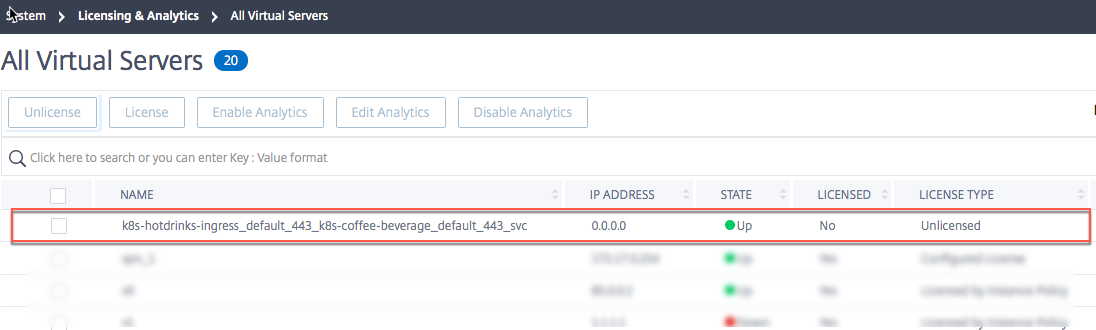
Complete the following steps to troubleshoot this issue:
-
In the NetScaler, ensure that the AppFlow policy hits are increasing and the instance is sending AppFlow records to ADM.
-
Check if the corresponding virtual server is licensed. If the virtual server is not licensed, NetScaler ADM drops the AppFlow records. As a result, Web Insight reports do not appear.
Observation point ID issue
This issue appears because the observation point ID is not unique.
Note
An observation point ID is the identifier for the NetScaler from which AppFlow records are being exported. By default, the NetScaler IP is the observation point ID.
Complete the following steps to troubleshoot this issue:
-
In the NetScaler, ensure that the AppFlow policy hits are increasing and the instance is sending AppFlow records to ADM.
-
Check if corresponding virtual server is licensed.
-
Ensure that the configuration is not copied from one NetScaler to another. When copied, the configuration might create an exporter ID issue that results NetScaler ADM to not process AppFlow records.
-
Log in to the NetScaler and run the
unset appflow param -observationpointIdcommand.
Missing AppFlow parameters issue
This issue appears because NetScaler ADM drops the AppFlow records due to missing data.
Complete the following steps to troubleshoot this issue:
-
Ensure in the NetScaler, the AppFlow policy hits are increasing and the instance is sending the AppFlow records to ADM.
-
Check if corresponding virtual server is licensed.
-
Ensure that the configuration is not copied from one NetScaler to another. When copied, the configuration might create an exporter ID issue that results NetScaler ADM to not process the AppFlow records.
-
Ensure the following AppFlow params are enabled on the NetScaler:
-
HTTP method logging -
HTTP domain name logging -
HTTP URL logging -
HTTP host logging -
HTTP Content-Type header logging
-
Troubleshoot using counters
Check the following AppFlow counters for any AppFlow or Web Insight related issues.
| Counter | Description |
|---|---|
appflow_tot_record_drop |
AppFlow records dropped due to an invalid collector. Usually happens when the collector configuration changes, and the existing connections use the old collector configuration. |
lstream_tot_trans_written |
This counter must increment for every transaction that is to be logged. |
lstream_sent |
This counter increments for every transaction log that is sent. |