Create a StyleBook to upload SSL certificate and certificate key files to NetScaler ADM
When creating a StyleBook configuration that uses the SSL protocol, you must upload the SSL certificate files and certificate key files as required by the StyleBook parameters. StyleBook allows you to directly upload the SSL files and key files from your local system by using the NetScaler ADM GUI. You can also use NetScaler ADM APIs to upload certificate files and key files that are already managed by NetScaler ADM.
Related information
StyleBook configuration
This document assists you to create your own StyleBook - Load Balancing Virtual Server (SSL) with components to upload SSL certificates and key files. The StyleBook provided here as an example creates a basic load balancing virtual server configuration on the selected NetScaler instance. The configuration uses the SSL protocol. To create a configuration using this StyleBook, you must provide the name and IP address of the virtual server, select the load balancing method parameters, and upload the certificate file and the certificate key file for the virtual server, or use a certificate file and certificate key file that are already present in the NetScaler ADM. These are specified in the "parameters" section, as shown below:
parameters:
  -
   name: name
   type: string
   required: true
  -
   name: ip
   type: ipaddress
   required: true
  -
   name: lb-alg
   type: string
   allowed-values:
     - ROUNDROBIN
     - LEASTCONNECTION
   default: ROUNDROBIN
  -
   name: certificate
   label: "SSL Certificate File"
   description: "The file name of the SSL certificate file"
   type: certfile
  -
   name: key
   label: "SSL Certificate Key File"
   description: "The file name of the server certificate's private key file"
   type: keyfile
Two components are then created in the components section of the StyleBook, as shown below. The "my-lbvserver-comp" component is of type ns::lbvserver, where:
-
"ns" is the prefix that refers to the built-in namespace netscaler.nitro.config and version 10.5 that you had specified in the import-stylebooks section.
-
"lbvserver" is a built-in StyleBook in this namespace. It corresponds to the NetScaler NITRO load balancing virtual server resource of the same name.
The second component "lbvserver-certificate-comp" is of type stlb::vserver-certs-binds. The prefix "stlb" refers to the namespace "com.citrix.adc.stylebooks" and version 1.0 that is specified in the import-stylebooks section of the StyleBook. If the "com.citrix.adc.stylebooks" namespace can be thought of as a folder, "vserver-certs-binds" is another StyleBook (or a file) in that folder. StyleBooks that are in the namespace "com.citrix.adc.stylebooks" are shipped as part of NetScaler ADM.
The "vserver-certs-binds" StyleBook used by user-defined StyleBooks allows you to easily configure the certificates by uploading the certificate and key files to the target NetScaler instance, and by configuring the binding of the certificate and key files to the appropriate virtual servers. The properties for this component are - the name of the lb virtual server and the names of the SSL certificates that you provide while creating the configuration pack.
components:
  -
   name: my-lbvserver-comp
   type: ns::lbvserver
   properties:
    name: $parameters.name
    servicetype: SSL
    ipv46: $parameters.ip
    port: 443
    lbmethod: $parameters.lb-alg
  -
   name: lbvserver-certificate-comp
   type: stlb::vserver-certs-binds
   description: Binds lbvserver with server certificate
   properties:
    vserver-name: $components.my-lbvserver-comp.properties.name
    certificates:
     -
      cert-name: $parameters.name + "-lb-cert"
      cert-file: $parameters.certificate
      ssl-inform: PEM
      key-name: $parameters.name + "-key"
      key-file: $parameters.key
When you use the API to create a configuration from such a StyleBook, use just the file names (not the full file path). These files are expected to be already available in the certificate and key file folders on NetScaler ADM. The uploaded SSL certificate file is stored on NetScaler ADM in the /var/mps/tenants/.../ns_ssl_certs directory, and the SSL certificate key file is stored in /var/mps/tenants/.../ns_ssl_keys directory in NetScaler ADM.
Creating configurations to upload SSL files
The following procedure creates a basic load balancing virtual server configuration on a selected NetScaler instance using the SSL protocol from the StyleBook specified above. You can use this procedure to upload the SSL certificate files and the certificate keys files in NetScaler ADM.
To create a configuration for uploading files
-
In NetScaler ADM, navigate to Applications > Configuration > StyleBooks. The StyleBooks page displays all the StyleBooks that are available in your NetScaler ADM.
-
Scroll down and select Load Balancing Virtual Server (SSL) or type Load Balancing Virtual Server (SSL) in the search field and press the Enter key.
-
Click Create Configuration link in the StyleBook panel.The StyleBook parameters appear as a user-interface page that allows you to enter the values for all the parameters defined in this StyleBook.
-
Enter the name of the load balancer and the virtual IP address in the basic load balancer settings section.
-
In SSL Certificates Settings section, select the respective files from your local storage folder. Alternatively, you can select the files present on the NetScaler ADM itself.
-
Select the target NetScaler instance on which the configuration needs to be created, and click Create.
Notes:
You can also click the refresh icon to add recently discovered NetScaler instances in NetScaler ADM to the available list of instances in this window.
In NetScaler ADM, the following default StyleBooks, which are shipped as part of NetScaler ADM, enable you to create SSL support by uploading the SSL certificates and keys.
-
HTTP/SSL LoadBalancing StyleBook (lb)
-
HTTP/SSL LoadBalancing (with Monitors) StyleBook (lb-mon)
-
HTTP/SSL Content Switched Application with Monitors (cs-lb-mon)
-
Sample Application StyleBook using CS, LB and SSL features (sample-cs-app)
You can also create your own StyleBooks that make use of SSL certificates in the same way as described in the above StyleBook
Build your StyleBook
The full content of the file lb-vserver-ssl.yaml is shown below:
name: lb-vserver-ssl
 description: "This stylebook defines a load balancing virtual server configuration."
 display-name: "Load Balancing Virtual Server (SSL)"
 namespace: com.example.ssl.stylebooks
 schema-version: "1.0"
 version: "0.1"

 import-stylebooks:
  -
   namespace: netscaler.nitro.config
   prefix: ns
   version: "10.5"
  -
   namespace: com.citrix.adc.stylebooks
   prefix: stlb
   version: "1.0"

 parameters:
  -
   name: name
   type: string
   required: true
  -
   name: ip
   type: ipaddress
   required: true
  -
   name: lb-alg
   type: string
   allowed-values:
     - ROUNDROBIN
     - LEASTCONNECTION
   default: ROUNDROBIN
  -
   name: certificate
   label: "SSL Certificate File"
   description: "The file name of the SSL certificate file"
   type: certfile
  -
   name: key
   label: "SSL Certificate Key File"
   description: "The file name of the server certificate's private key file"
   type: keyfile

 components:
  -
   name: my-lbvserver-comp
   type: ns::lbvserver
   properties:
     name: $parameters.name
     servicetype: SSL
     ipv46: $parameters.ip
     port: 443
     lbmethod: $parameters.lb-alg
  -
   name: lbvserver-certificate-comp
   type: stlb::vserver-certs-binds
   description: Binds lbvserver with server certificate
   properties:
    vserver-name: $ components.my-lbvserver-comp.properties.name
    certificates:
     -
      cert-name: $parameters.name + "-lb-cert"
      cert-file: $parameters.certificate
      ssl-inform: PEM
      key-name: $parameters.name + "-key"
      key-file: $parameters.key
Using the NetScaler ADM API to create a configuration pack
You can also use the NetScaler ADM API to create a configuration pack that uploads Cert and Key files to the selected NetScaler instance. For more information on how to use APIs, see How to Use API to Create Configurations to Upload Cert and Key Files.
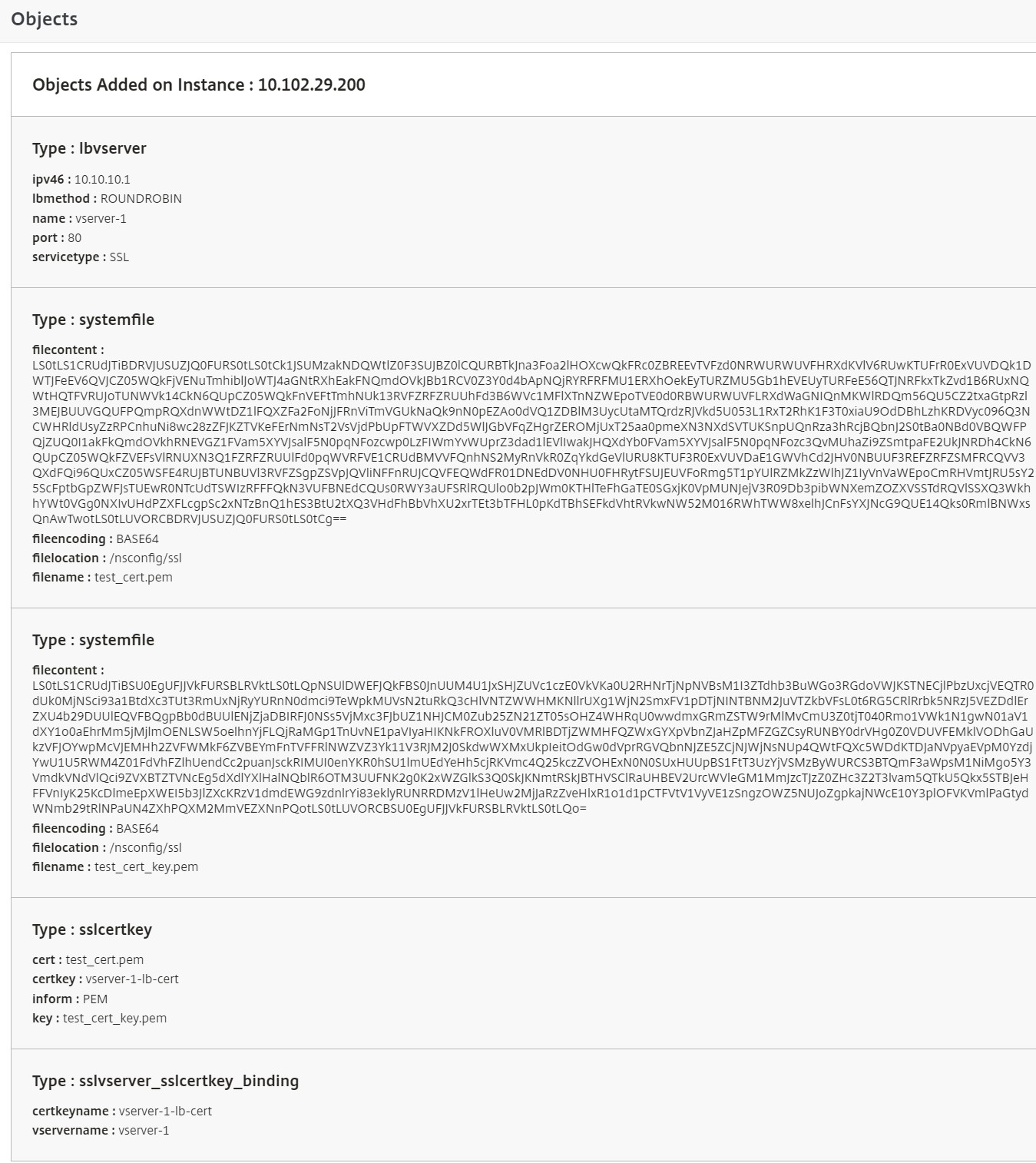
Viewing the objects defined on the NetScaler instance
After the StyleBook configuration pack is created on NetScaler ADM, click View objects created to display all the NetScaler objects created on the target NetScaler instance