
Migrate configuration pack of a StyleBook to another StyleBook
In NetScaler® Application Delivery Management (ADM), configuration packs are always bound to the StyleBook from which they are created. Any update to the configuration pack can be done only through the StyleBook that the configuration pack is bound to. NetScaler ADM now allows you to migrate an existing configuration pack to a new StyleBook. The new StyleBook can be a more original version of the current StyleBook that is bound to the configuration pack. Or, you can also migrate the configuration pack to an entirely different StyleBook.
For example, you created a StyleBook called example-lb. This StyleBook is used to deploy a basic load balancer configuration on a NetScaler instance. You created a configuration pack CP1 from this StyleBook on a NetScaler instance. Later, you realized that your StyleBook does not include a monitoring configuration. So, you now created a StyleBook called example-lb-mon. This StyleBook has the same load balancer configuration as example-lb StyleBook but adds the ability to configure monitors.
Now you want to update your existing configuration that was created in configuration pack CP1 to add some monitors. Previously, you had to delete the configuration pack CP1 and create a configuration pack CP2 from the new StyleBook to add monitors to your configuration. Deleting CP1 results in the removal of all the configuration created in configuration pack CP1 on one or more NetScaler instances. Earlier, you had to recreate a new configuration pack through the new StyleBook by typing values for all parameters.
Instead, you can now migrate the existing configuration pack CP1 to the new example-lb-mon StyleBook. Your new StyleBook can configure monitors monitor details. Only those monitor-related configuration objects are added to the NetScaler instances where the configuration pack was deployed. You have to provide just the monitor details now. The existing configuration deployed on the NetScaler instances that has not changed remains unaffected.
Related information
Migrate configuration pack
To migrate a configuration pack created using example-lb StyleBook to example-lb-mon StyleBook
-
In NetScaler ADM, navigate to Applications \> Configurations. The Configurations page displays all the configuration packs that are present in the system.
-
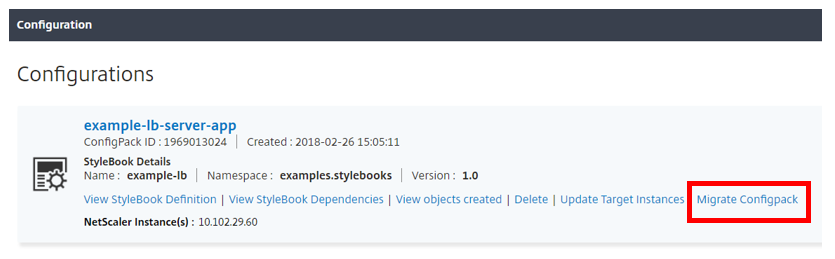
Scroll down to find the example-lb configuration pack that you would have created earlier, and click Migrate Configpack.
-
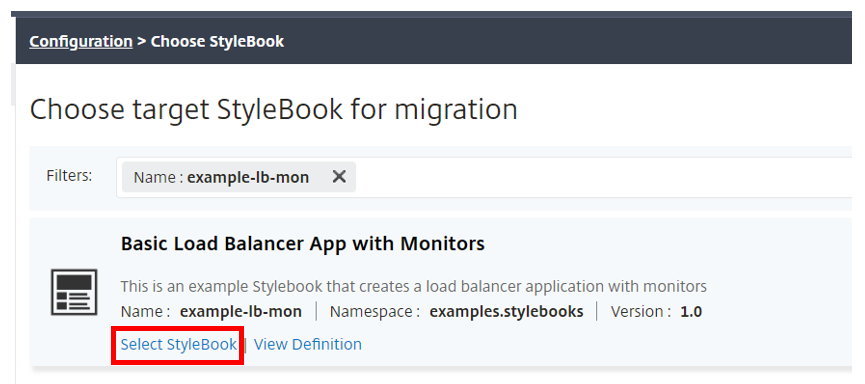
The Choose target StyleBook for migration page opens that lists all StyleBooks that available in NetScaler ADM. Scroll down to find the example-lb-mon StyleBook and click Select StyleBook. You can also search for the StyleBook by typing example-lb-mon.
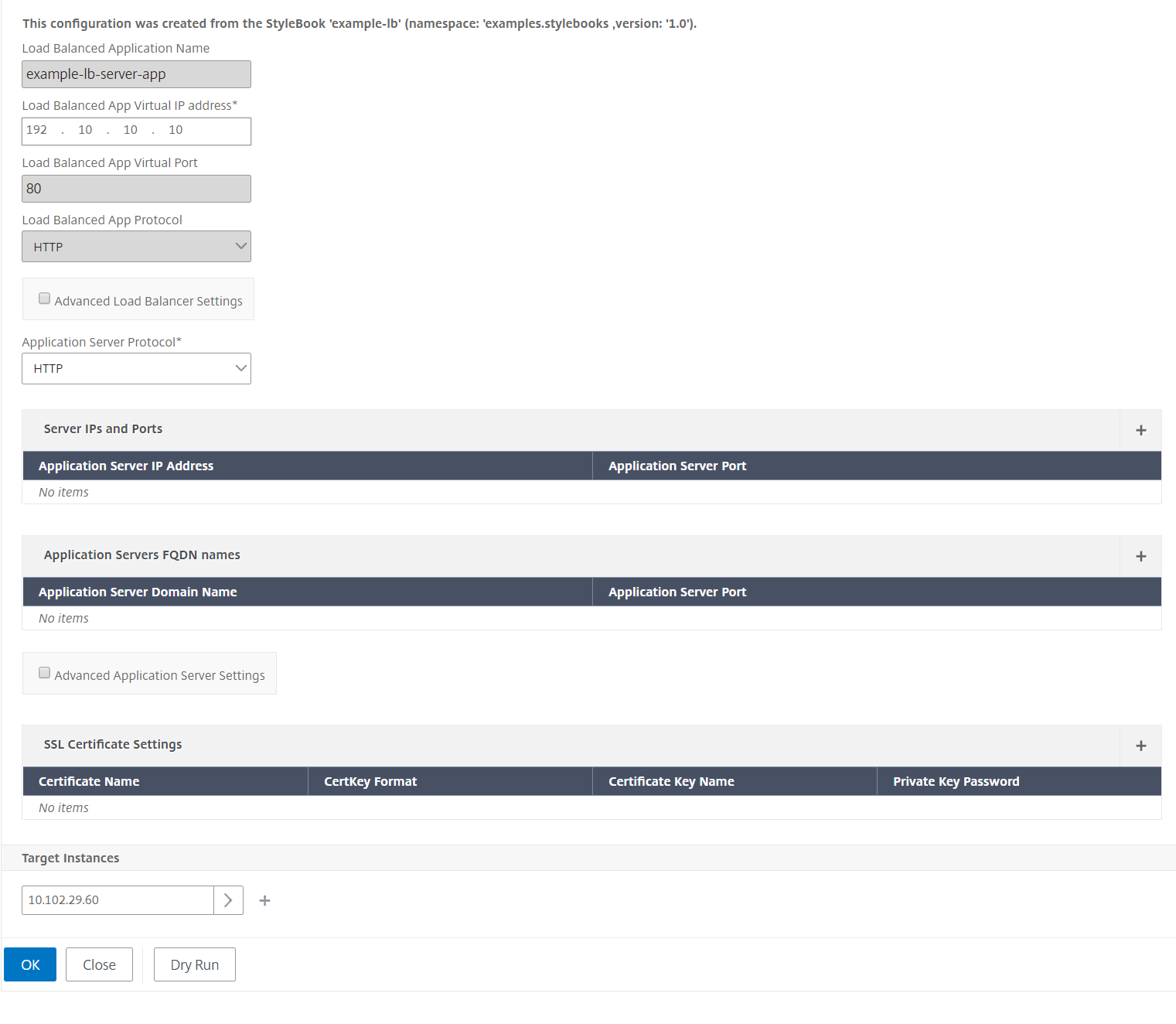
 If you migrate from one StyleBook to another, all parameters in the two StyleBooks might not have the same structure. If the parameter structure is similar, the previous values are automatically retained in the parameter fields. A few of the parameters in the new StyleBook may be new, or there might be a change in their structure. In such a case, you must manually fill in in the values for the StyleBook parameters. For example, the following image shows the parameters of the example-lb StyleBook.
 The following image shows the parameters after migrating the configuration pack to example-lb-mon StyleBook.
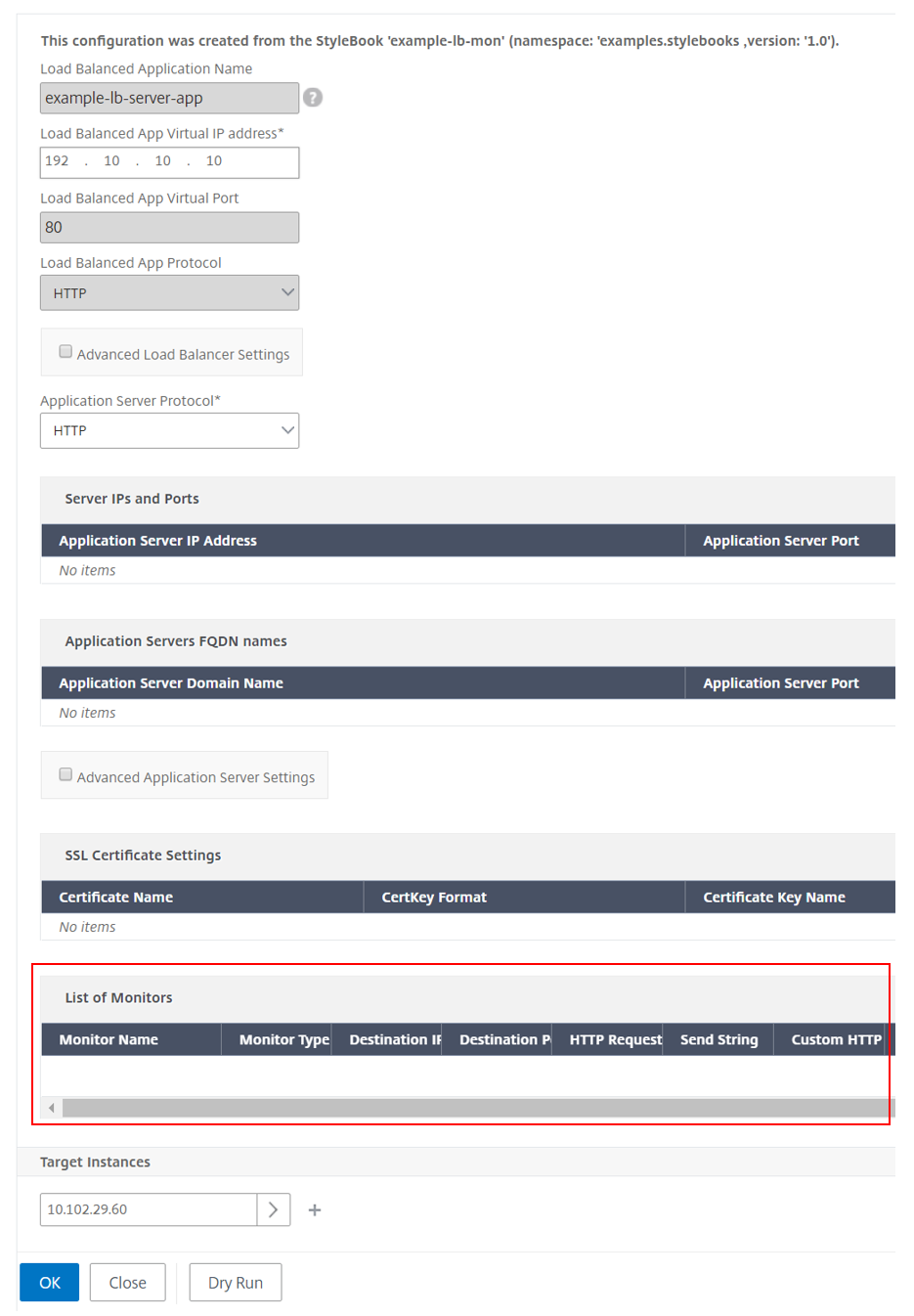 In this case, you can see that the StyleBooks retain the older values for the basic load balancer configuration. But, you must manually type the values for the monitor parameters.
 -
Type in values for the new parameters used for creating monitors on the instance.
-
Under Target Instances, click and select the IP address of the NetScaler instance where you want to run the configuration. Note that you can deploy the configuration on more than one NetScaler, by specifying as many target instances as needed.
-
Click Dry Run. The Objects page displays the objects that would be newly created, modified, or removed from the NetScaler instance(s).
-
Click Create to create or update the configuration of the selected instances. The configuration pack is created if the target instances are new. Else, the existing configurations deployed on the instances are updated.NoteYou can also click the refresh icon to add recently discovered NetScaler instances. So these instances are instantly available in the list of instances in this window. The refresh icon is currently available only on NetScaler ADM.
You can also migrate a configuration pack from one version of a StyleBook to the next version. Here also you might have to type the values of any new required parameters present in the new version. You can also migrate the configuration pack to an older version of the StyleBook. In this case, the extra parameters that are not present in the older StyleBook are removed. The Objects page displays any of the objects that are removed from the configuration.
After a successful migration, the ConfigPack is bound to the new StyleBook.
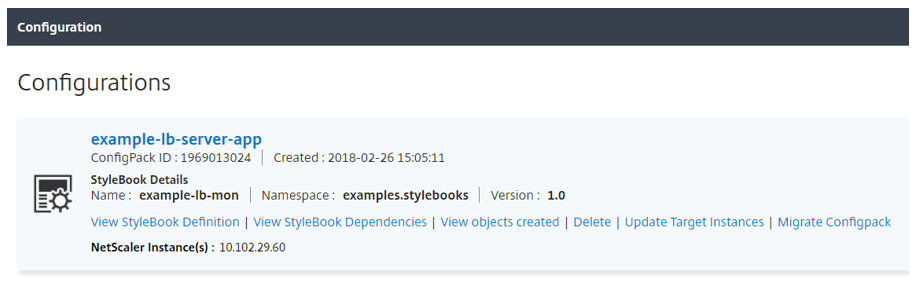
You can see that the name of the configuration pack and the configuration pack ID are same as earlier. But NetScaler ADM updates the StyleBook name to example-lb-mon from example-lb.
Build your StyleBooks
The full content of example-lb StyleBook is provided below for your reference:
name: example-lb
 namespace: examples.stylebooks
 version: "1.0"
 display-name: Basic Load Balancer App
 description: This is an example StyleBook that creates a load balancer application
 schema-version: "1.0"
 import-stylebooks:
   -
     namespace: com.citrix.adc.stylebooks
     prefix: stlb
     version: "1.0"
 parameters-default-sources:
   - stlb::lb
 components:
   -
     name: lb-comp
     type: stlb::lb
     description: Uses the default lb StyleBook to build the typical lb configuration objects
     properties-default-sources:
       - $parameters
The full content of example-lb-mon StyleBook is provided below for your reference:
name: example-lb-mon
 namespace: examples.stylebooks
 version: "1.0"
 description: This is an example StyleBook that creates a load balancer application with monitors
 display-name: Basic Load Balancer App with Monitors
 schema-version: "1.0"
 import-stylebooks:
   -
     namespace: netscaler.nitro.config
     prefix: ns
     version: "10.5"
   -
     namespace: com.citrix.adc.stylebooks
     prefix: stlb
     version: "1.0"
   -
     namespace: com.citrix.adc.commontypes
     prefix: cmtypes
     version: "1.0"
 parameters-default-sources:
   - stlb::lb
 parameters:
   -
     name: monitors
     label: "List of Monitors"
     description: "List of Monitors to monitor Application Servers"
     type: cmtypes::monitor[]
 substitutions:
   mon-name(appname, monname): $appname + "-mon-" + $monname
 components:
   -
     name: lb-comp
     type: stlb::lb
     description: Uses the default lb StyleBook to build the typical lb configuration objects
     properties-default-sources:
       - $parameters
   -
     name: monitors-comp
     type: cmtypes::monitor
     condition: $parameters.monitors
     repeat: $parameters.monitors
     repeat-item: mon
     repeat-index: ndx
     description: Builds a list of NetScaler monitor objects and binds them to the servicegroup of this LB config
     properties-default-sources:
       - $mon
     properties:
         monitorname: $substitutions.mon-name($parameters.lb-appname, $mon.monitorname)
     components:
       -
         name: monitor-svcg-binding-comp
         condition:  $parameters.svc-servers
         type: ns::servicegroup_lbmonitor_binding
         properties:
           servicegroupname: $components.lb-comp.outputs.servicegroup.properties.servicegroupname
           monitor_name: $parent.properties.monitorname