Create SNMP managers and users for NetScaler agent
You can query the SNMP agent for system-specific information from a remote device called an SNMP manager. The agent then searches the management information base (MIB) for requested data and sends the data to the SNMP manager.
You can add an SNMP manager to query a NetScaler agent. The manager complies with SNMP V2 and V3. If you specify one or more SNMP managers, the NetScaler agent does not accept SNMP queries from any hosts except the specified SNMP managers.
Related information
Add an SNMP v2 manager
To add an SNMP v2 manager for the NetScaler agent:
-
Navigate to Infrastructure > Agents, select a NetScaler agent, and click Select Action> Manage SNMP.
-
In the SNMP> SNMP Manager tab, click Add.
-
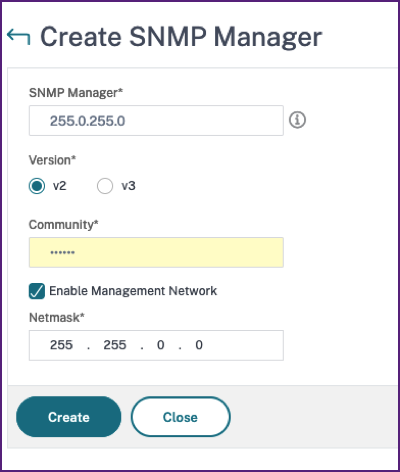
In the Create SNMP Manager page, specify the following details:
-
SNMP Manager. Enter the name or IP address of the SNMP Manager.
-
Version. Select v2.
-
Community. Enter a community name. An SNMP community configuration authenticates SNMP queries from SNMP managers.
-
Enable Management Network: Select this check box to specify the netmask of the SNMP manager network.
-
Netmask: Enter the subnet mask associated with an IP address.
-
-
Click Create.
Add an SNMP v3 manager
To add an SNMP v3 Manager for the NetScaler agent:
-
Navigate to Infrastructure > Agents, select a NetScaler agent, and click Select Action> Manage SNMP.
-
In the SNMP> SNMP Manager tab, click Add.
-
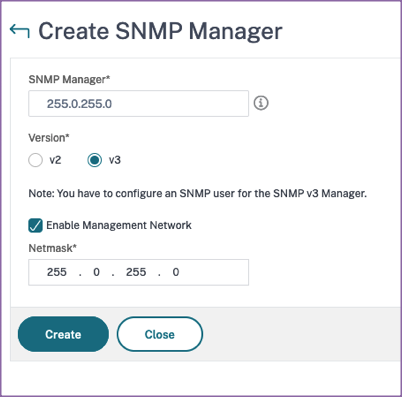
In the Create SNMP Manager page, specify the following details:
-
SNMP Manager. Enter the name or IP address of the SNMP Manager.
-
Version. Select v3.
-
Enable Management Network: Select this check box to specify the netmask of the SNMP manager network.
-
Netmask: Enter the subnet mask associated with an IP address.
-
-
Click Create.
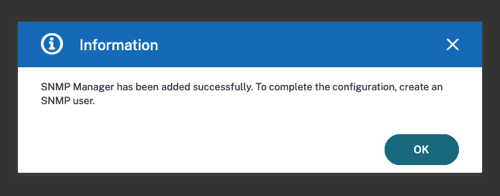
A dialog box appears confirming that an SNMP manager is created and prompting you to configure an SNMP user.
Note
You must configure an SNMP user for an SNMP v3 manager. To configure the SNMP user, go to SNMP > SNMP User.
Add an SNMP user
Add an SNMP user to respond to the SNMP v3 queries from an SNMP manager.
To add an SNMP user for the NetScaler agent:
-
Navigate to Infrastructure > Agents, select a NetScaler agent, and click Select Action> Manage SNMP.
-
In the SNMP> SNMP User tab, click Add.
-
In the Create SNMP User page, add the following details:
-
Name. Enter the user name.
-
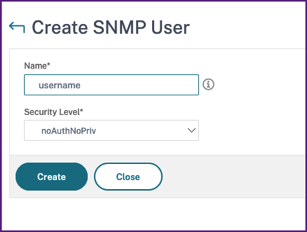
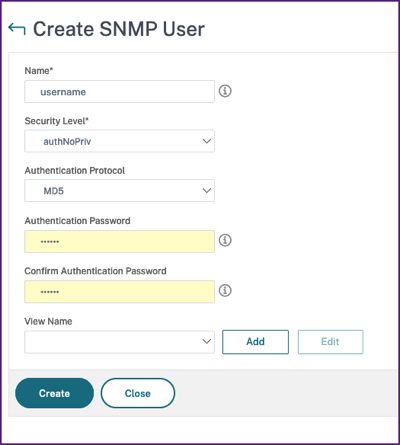
Security Level. Security level required for communication between the NetScaler agent and the SNMP manager.Select one of the following security levels:
-
noAuthNoPriv. Require neither authentication nor encryption.
-
authNoPriv. Require authentication but no encryption.
-
authPriv. Require authentication and encryption.
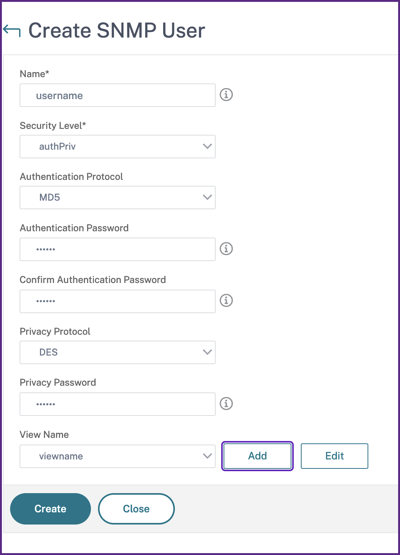 Based on the security level you’ve assigned to the user, provide extra authentication protocols, such as authentication protocols, privacy passwords, and assign SNMP views.
 -
Managing SNMP views
SNMP views are used to implement access control for an SNMP user. The SNMP views restrict the user access to specific portions of MIB.
To allow or restrict an SNMP OID for the NetScaler agent:
-
Navigate to Infrastructure > Agents > Manage SNMP and in the SNMP View tab, click Add.
-
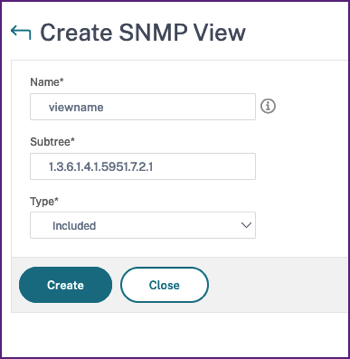
In the Create SNMP View, enter the following details:
-
View Name: A name for the SNMP view. An instance can have many SNMP views with the same name, differentiated by the subtree parameter settings.
-
Subtree: A particular branch (subtree) of the MIB tree that you want to associate with this SNMP view. You must specify the subtree as an SNMP OID.
-
Type: This field allows you to include or exclude subtrees from a view.
-
-
Click Create.