
Desktop View Reports and Metrics
The reports and metrics in this view are focused on the Citrix Virtual Desktops.
To navigate to the Desktop view:
-
Navigate to Gateway > HDX™ Insight > Desktop.
Related information
Summary view
The summary view displays the reports for all the Citrix Virtual Desktops that are logged in during the selected timeline.
All the metrics/reports, unless explicitly mentioned will have the values corresponding to them for the select time period.
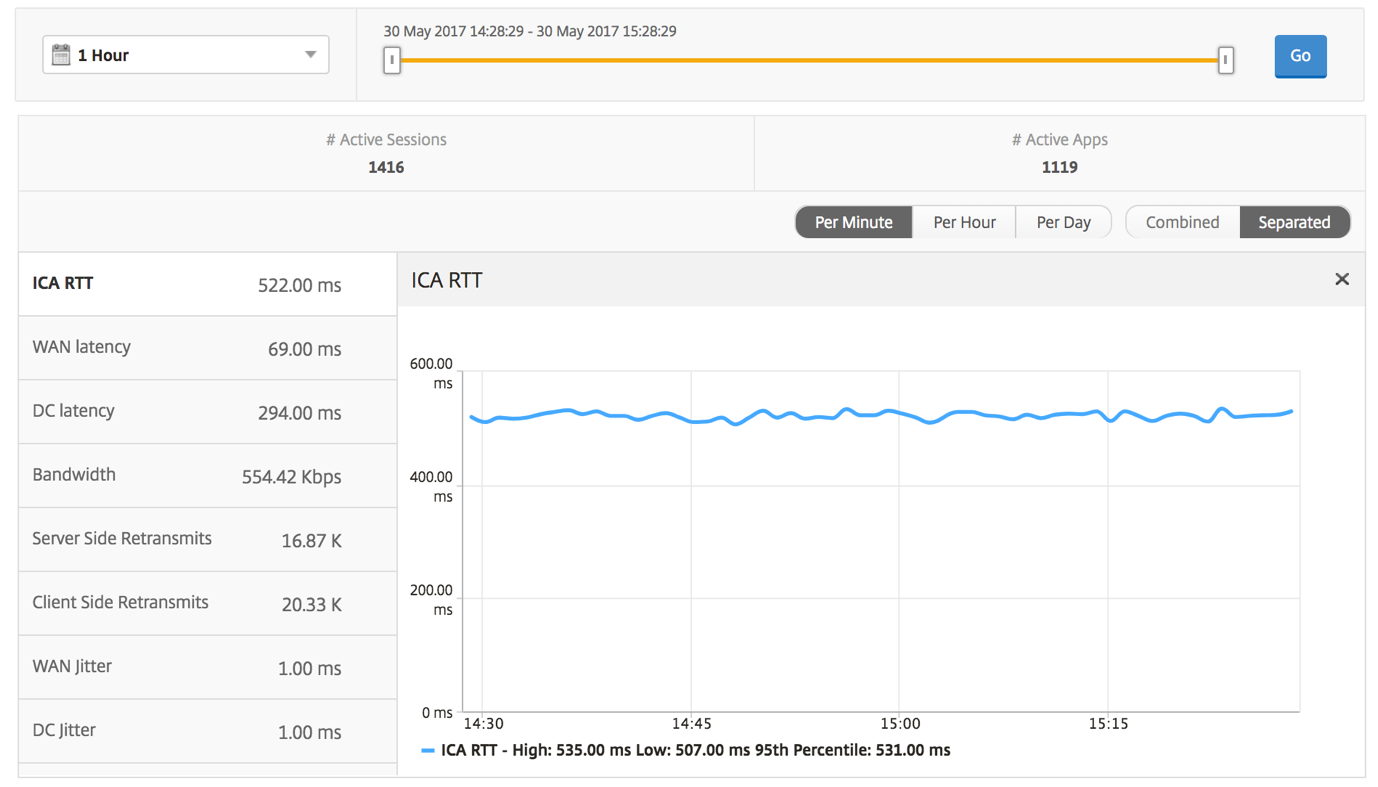
Line chart
| Metrics | Description |
|---|---|
| # Active Sessions | This number indicates the count of active Citrix Virtual Apps and Desktops sessions. |
| # Active Apps | This number indicates the count of active Citrix Virtual App sessions. |
| ICA RTT | ICA RTT is the screen lag that the user experiences while interacting with an application or desktop hosted on Citrix Virtual Apps and Desktops respectively. |
| WAN latency | Latency caused by the client side of the network. That is, from NetScaler to end user. |
| DC latency | Latency caused by the server side of the network. That is, from NetScaler to back end servers. |
| Bandwidth | Total bytes per second taken for end to end communication during the selected time interval. |
| Server Side Retransmits | The number of packets retransmitted on the connection between NetScaler and back end server. |
| Client Side Retransmits | The number of packets retransmitted on the connection between NetScaler and the end user. A high value of this metric does not mean that the user experience will not be seamless but indicates high bandwidth utilization due to retransmits. |
| Client side fast RTO | Number of times the retransmission timeout occurred the connection between NetScaler and the end user. |
| Server side fast RTO | Number of times the retransmission timeout occurred on the connection between NetScaler and back end server. |
| Client side Zero Window size event | This counter indicates the number of times the client advertised a zero TCP window. |
| Server side Zero Window size event | This counter indicates the number of times the server advertised a zero TCP window. |
Desktop summary report
| Metrics | Description |
|---|---|
| Active Sessions | Total number of active Citrix Virtual Desktop sessions during a given time interval. |
| Active Desktops | Total number of active Citrix Virtual Desktops during a given time interval. |
| ICA RTT | ICA RTT is the screen lag that the user experiences while interacting with an application or desktop hosted on Citrix Virtual Apps and Desktops respectively. |
| WAN latency | Latency caused by the client side of the network. That is, from NetScaler to end user. |
| DC latency | Latency caused by the server side of the network. That is, from NetScaler to back end servers. |
| Bandwidth | Total bytes per second taken for end to end communication during the selected time interval. |
| Total Bytes | Total Bytes consumed by the user during the selected time period. |

Threshold report
The threshold report represents the count of thresholds breached where the entity is selected as Desktop in the selected period. For more information, see how to create thresholds and alerts.
Per desktop view
Per desktop view provides detailed end user experience reporting for a selected Citrix Virtual Desktop.
To navigate to the particular Desktop view:
-
Navigate to Analytics \> HDX Insight \> Desktop.
-
Select a particular Desktop from the Desktop Summary Report.
Line chart
| Metrics | Description |
|---|---|
| # Active Sessions | This number indicates the count of active Citrix Virtual Apps and Desktops sessions. |
| # Active Apps | This number indicates the count of active Citrix Virtual App sessions. |
| ICA RTT | ICA RTT is the screen lag that the user experiences while interacting with an application or desktop hosted on Citrix Virtual Apps and Desktops respectively. |
| WAN latency | Latency caused by the client side of the network. That is, from NetScaler to end user. |
| DC latency | Latency caused by the server side of the network. That is, from NetScaler to back end servers. |
| Bandwidth | Total bytes per second taken for end to end communication during the selected time interval. |
| Server Side Retransmits | The number of packets retransmitted on the connection between NetScaler and back end server. |
| Client Side Retransmits | The number of packets retransmitted on the connection between NetScaler and the end user. A high value of this metric does not mean that the user experience will not be seamless but indicates high bandwidth utilization due to retransmits. |
| Client side fast RTO | Number of times the retransmission timeout occurred the connection between NetScaler and the end user. |
| Server side fast RTO | Number of times the retransmission timeout occurred on the connection between NetScaler and back end server. |
| Client side Zero Window size event | This counter indicates the number of times the client advertised a zero TCP window. |
| Server side Zero Window size event | This counter indicates the number of times the server advertised a zero TCP window. |
Desktop users report
This table gives the insight into the Citrix Virtual Desktop sessions for a particular user. These metrics can be sorted by Desktop Launch Count and Bandwidth.
| Metrics | Description |
|---|---|
| Name | Name of the Citrix Virtual Desktop. |
| Desktop Launch Count | Number of times the desktop has launched. |
| Bandwidth | Total bytes per second taken for end to end communication during the selected time interval. |
| DC latency | Latency caused by the server side of the network. That is, from NetScaler to back end servers. |
| WAN latency | Latency caused by the client side of the network. That is, from NetScaler to end user. |
| ICA RTT | ICA RTT is the screen lag that the user experiences while interacting with an application or desktop hosted on Citrix Virtual Apps and Desktops respectively. |

User desktops active/inactive report
These following metrics can be sorted by Bandwidth per interval, session reconnects, and ACR counts.
| Metrics | Description |
|---|---|
| Session ID | A unique identity for an ICA session. |
| Session Type | Application/Desktop. |
| State | Green/Red for active/Inactive sessions. |
| Host Delay | Average delay in ICA traffic that passes through the NetScaler ADCs caused by server network. |
| Bandwidth per Interval | The bandwidth consumed by the session during that particular interval of time. |
| Session Bandwidth | The bandwidth consumed by the session irrespective of the interval of time. |
| Bytes per Interval | Number of bytes consumed by the session during that particular interval of time. |
| Start Time | Session start time. |
| Up Time | Session duration. |
| Client IP Address | End user IP. |
| Server IP Address | Backend/ Citrix Virtual App server IP. |
| NetScaler IP Address | NetScaler Management IP (NSIP). |
| Client Type | Workspace type- Citrix Windows Client and so on |
| Client Version | Workspace version. |
| MSI | Boolean (Yes/No). Indicates if the session is multi-stream ICA. |
| Session Reconnects | Number of times the session reconnected. |
| ACR Counts | Total number of times a client automatically reconnects users to disconnected sessions. |
| User Access Type | Displays the mode of access of the ICA session. For example, NetScaler Gateway user/transparent mode. |
| Country | Country from which the session was established. |
| Region | Region from which the session was established. |
| City | City from which the session was established. |
| USB Status | Active/Inactive -Green/Red. |
| Number of USB Instances Accepted | The count of USB instances accepted. |
| Number of USB Instances Rejected | The count of USB instances rejected. |
| Number of USB Instances Stopped | The count of USB instances stopped. |
| Client Host Name | The host name of the client. |
| HA Failover Count | Number of times HA failover occurred. |
| Reason for termination | Displays the reason for a session termination. For example, ICA Session Timeout, Session terminated by the user. |
| ICA RTT | ICA RTT is the screen lag that the user experiences while interacting with an application or desktop hosted on Citrix Virtual Apps or Desktops respectively. |
| WAN latency | Latency caused by the client side of the network. That is, from NetScaler to end user. |
| DC latency | Latency caused by the server side of the network. That is, from NetScaler to back end servers. |
| Total Bytes | Total Bytes consumed by the user during the selected time period. |
| Server Side Retransmits | The number of packets retransmitted on the connection between NetScaler and back end server. |
| Client Side Retransmits | The number of packets retransmitted on the connection between NetScaler and the end user. A high value of this metric does not mean that the user experience will not be seamless but indicates high bandwidth utilization due to retransmits. |
| Client side Zero Window size event | This counter indicates the number of times the client advertised a zero TCP window. |
| Client side fast RTO | Number of times the retransmission timeout occurred the connection between NetScaler and the end user. |
| Server side Zero Window size event | This counter indicates the number of times the server advertised a zero TCP window. |
| Server side fast RTO | Number of times the retransmission timeout occurred on the connection between NetScaler and back end server. |
| VDI Image Name | Name of the Citrix Virtual Desktop to which the user is connected |
| Diagram |

Per desktop session view
Per desktop session view provides reporting for a particular selected Citrix Virtual Desktop session.
To navigate to the Desktop session view:
-
Navigate to Gateway > HDX Insight > Desktop.
-
Select a particular desktop from the Desktop Summary Report.
-
Select a session from current sessions report.
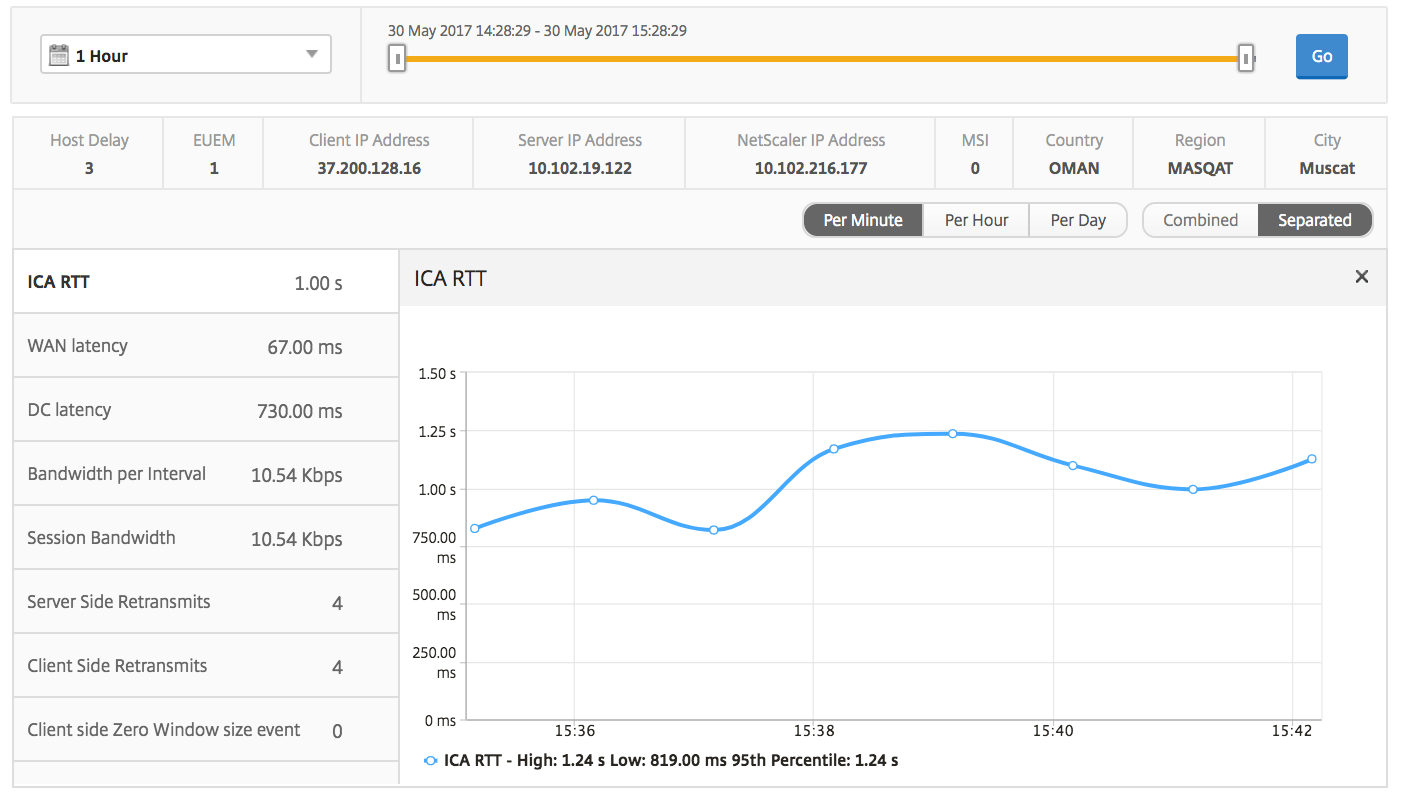
Timeline chart
The per user session view provides reporting for a particular selected user’s session.
To view the metrics for a selected user’s session:
-
Navigate to Gateway > HDX Insight > Users.
-
Select a particular user from the User Summary Report section.
-
Select a session from Current Sessions or Terminated Sessions column.
| Metrics | Description |
|---|---|
| Session Reconnects | This number indicates the count of active Citrix Virtual App and Desktop sessions. |
| ACR Counts | This number indicates the count of active Citrix Virtual App sessions. |
| ICA RTT | ICA RTT is the screen lag that the user experiences while interacting with an application or desktop hosted on Citrix Virtual App and Desktop respectively. |
| WAN latency | Latency caused by the client side of the network. That is, from NetScaler to end user. |
| DC latency | Latency caused by the server side of the network. That is, from NetScaler to back end servers. |
| Session Bandwidth | The bandwidth consumed by the session irrespective of the interval of time. |
| Server Side Retransmits | The number of packets retransmitted on the connection between NetScaler and back end server. |
| Client Side Retransmits | The number of packets retransmitted on the connection between NetScaler and the end user. A high value of this metric does not mean that the user experience will not be seamless but indicates high bandwidth utilization due to retransmits. |
| Client side fast RTO | Number of times the retransmission timeout occurred the connection between NetScaler and the end user. |
| Server side fast RTO | Number of times the retransmission timeout occurred on the connection between NetScaler and back end server. |
| Bandwidth per Interval | The bandwidth consumed by the session during that particular interval of time. |
| Server side Zero Window size event | This counter indicates the number of times the server advertised a zero TCP window. |
| Client side Zero Window size event | This counter indicates the number of times the client advertised a zero TCP window. |
Related desktop sessions report
These following metrics can be sorted by Bandwidth per interval, session reconnects, and ACR counts.
| Metrics | Description |
|---|---|
| Session ID | A unique identity for an ICA session. |
| Session Type | Application/Desktop. |
| State | Green/Red for active/Inactive sessions. |
| Host Delay | Average delay in ICA traffic that passes through the NetScalers caused by server network. |
| Bandwidth per Interval | The bandwidth consumed by the session during that particular interval of time. |
| Session Bandwidth | The bandwidth consumed by the session irrespective of the interval of time. |
| Bytes per Interval | Number of bytes consumed by the session during that particular interval of time. |
| Start Time | Session start time. |
| Up Time | Session duration. |
| Client IP Address | End user IP. |
| Server IP Address | Backend/ Citrix Virtual App server IP. |
| NetScaler IP Address | NetScaler Management IP (NSIP). |
| Client Type | Receiver type- Citrix Windows Client and so on |
| Client Version | Receiver version. |
| MSI | Boolean (Yes/No). Indicates if the session is multi-stream ICA. |
| Session Reconnects | Number of times the session reconnected. |
| ACR Counts | Total number of times a client automatically reconnects users to disconnected sessions. |
| User Access Type | Displays the mode of access of the ICA session. For example, NetScaler Gateway user/transparent mode. |
| Country | Country from which the session was established. |
| Region | Region from which the session was established. |
| City | City from which the session was established. |
| USB Status | Active/Inactive -Green/Red. |
| Number of USB Instances Accepted | The count of USB instances accepted. |
| Number of USB Instances Rejected | The count of USB instances rejected. |
| Number of USB Instances Stopped | The count of USB instances stopped. |
| Client Host Name | The host name of the client. |
| HA Failover Count | Number of times HA failover occurred. |
| Reason for termination | Displays the reason for a session termination. For example, ICA Session Timeout, Session terminated by the user. |
| ICA RTT | ICA RTT is the screen lag that the user experiences while interacting with an application or desktop hosted on Citrix Virtual App or Desktop respectively. |
| WAN latency | Latency caused by the client side of the network. That is, from NetScaler to end user. |
| DC latency | Latency caused by the server side of the network. That is, from NetScaler to back end servers. |
| Total Bytes | Total Bytes consumed by the user during the selected time period. |
| Server Side Retransmits | The number of packets retransmitted on the connection between NetScaler and back end server. |
| Client Side Retransmits | The number of packets retransmitted on the connection between NetScaler and the end user. A high value of this metric does not mean that the user experience will not be seamless but indicates high bandwidth utilization due to retransmits. |
| Client side Zero Window size event | This counter indicates the number of times the client advertised a zero TCP window. |
| Client side fast RTO | Number of times the retransmission timeout occurred the connection between NetScaler and the end user. |
| Server side Zero Window size event | This counter indicates the number of times the server advertised a zero TCP window. |
| Server side fast RTO | Number of times the retransmission timeout occurred on the connection between NetScaler and back end server. |
| VDI Image Name | Name of the Citrix Virtual Desktop to which the user is connected |