SSL Insight
SSL Insight provides visibility into secure web transactions (HTTPS) and allows IT administrators to monitor all the secure web applications being served by the NetScaler by providing integrated and real-time and historic monitoring of secure web transactions. With this visibility the administrator can assess following:
-
Determine configuration change impact on customer usage: The administrator can understand the impact on clients for making a configuration change like turning off SSLv3 or removing a cipher like RC4-MD5. This can be done by assessing the historic transaction data on this protocol and cipher.
-
Quantify client performance: Administrator can understand the impact on Application Response Time based on the SSL ciphers/protocol used or the certificates negotiated.
-
Application security: Assess if any of the applications has transactions running on low security protocols, ciphers, or weak key strength.
When SSL Analytics is enabled on a NetScaler instance, SSL statistics are recorded and logged for every SSL transaction. The statistics show the details of the SSL flow. Also, every successful connection is logged and displayed by NetScaler Application Delivery Management (ADM) Analytics.
SSL Insight provides the following critical information, which is displayed by NetScaler® ADM Analytics:
-
SSL Protocol version negotiated
-
Cipher negotiated, and the cipher strength
-
Signature Hash algorithm of the certificate used
-
Certificate Type & Size
-
SSL Front-end and Back-end errors
Note
For successful SSL connections, SSL AppFlow® logging happens at the end of every transaction.
Related information
Prerequisites
-
The NetScaler instance on which you intend to configure SSL Insight must be running NetScaler software release 11.1 51.21 and higher. Run the following commands on the ADC instance running 11.1 51.21 to enable Logstream as a transport type for SSL Insight.
-
enable ns mode ulfd -
add ulfd server <IP Address of the ADM>For ADC instances running version 12.0 and above, select Logstream as the transport type while enabling AppFlow from ADM.
-
The NetScaler ADM version and build must be equal to or higher than the NetScaler version and build. For example, if you have installed NetScaler ADM 11.1 build 61.7, then ensure you have installed NetScaler 11.1 build 60.14 or earlier.
Configure SSL Insight
SSL Insight Metrics are included in Web Insight reports if you enable the following elements:
-
Enable AppFlow for Web Insight on each NetScaler instance.
-
Enable ULFD mode on each NetScaler instance.
-
Enable required AppFlow parameters on each NetScaler instance.
Enable the AppFlow feature
Note
You can enable the AppFlow feature either from NetScaler ADM or from each NetScaler instance.
To enable the AppFlow feature from NetScaler ADM:
If your NetScaler ADM is 13.0 Build 41.x or later:
-
Navigate to Infrastructure > Instances > NetScaler, and select the instance type. For example, VPX.
-
Select the instance and from Select Action list, click Configure Analytics.
-
On the Configure Analytics on Virtual Server(s) page, select the virtual server, and click Enable Analytics.
-
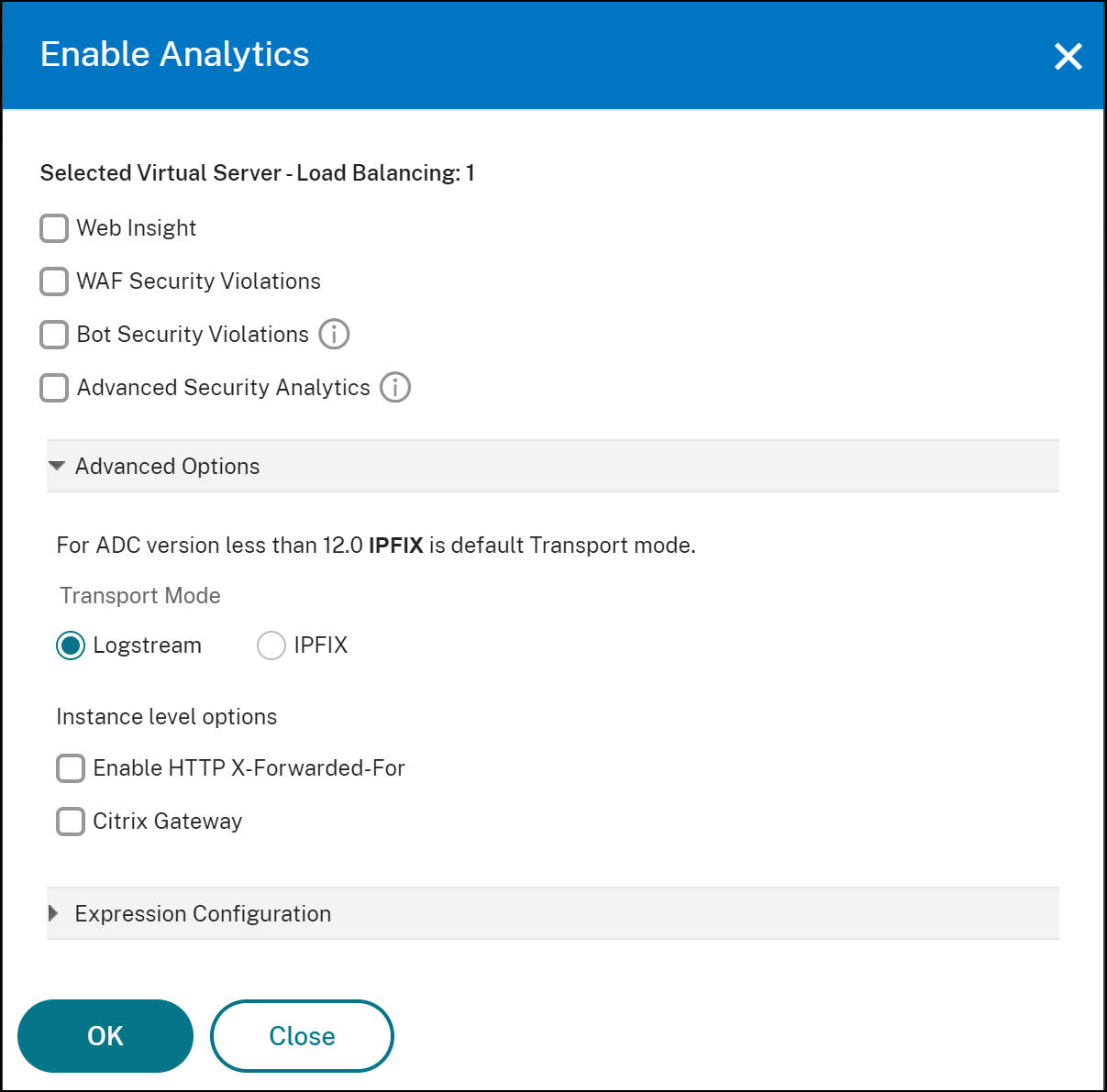
On the Enable Analytics window:
-
Select Web Insight
-
Select Logstream as Transport ModeNoteFor NetScaler 12.0 or earlier, IPFIX is the default option for Transport Mode. For NetScaler 12.0 or later, you can either select Logstream or IPFIX as Transport Mode.For more information about IPFIX and Logstream, see Logstream overview.
-
The Expression is true by default
-
Click OK
 Note
Note-
If you select virtual servers that are not licensed, then NetScaler ADM first licenses those virtual servers and then enables analytics
-
For admin partitions, only Web Insight is supported
-
For virtual servers such as Cache Redirection, Authentication, and GSLB, you cannot enable analytics. An error message is displayed.
-
-
After you click OK, NetScaler ADM processes to enable analytics on the selected virtual servers.
If your NetScaler ADM is 13.0 Build 36.27 or earlier:
-
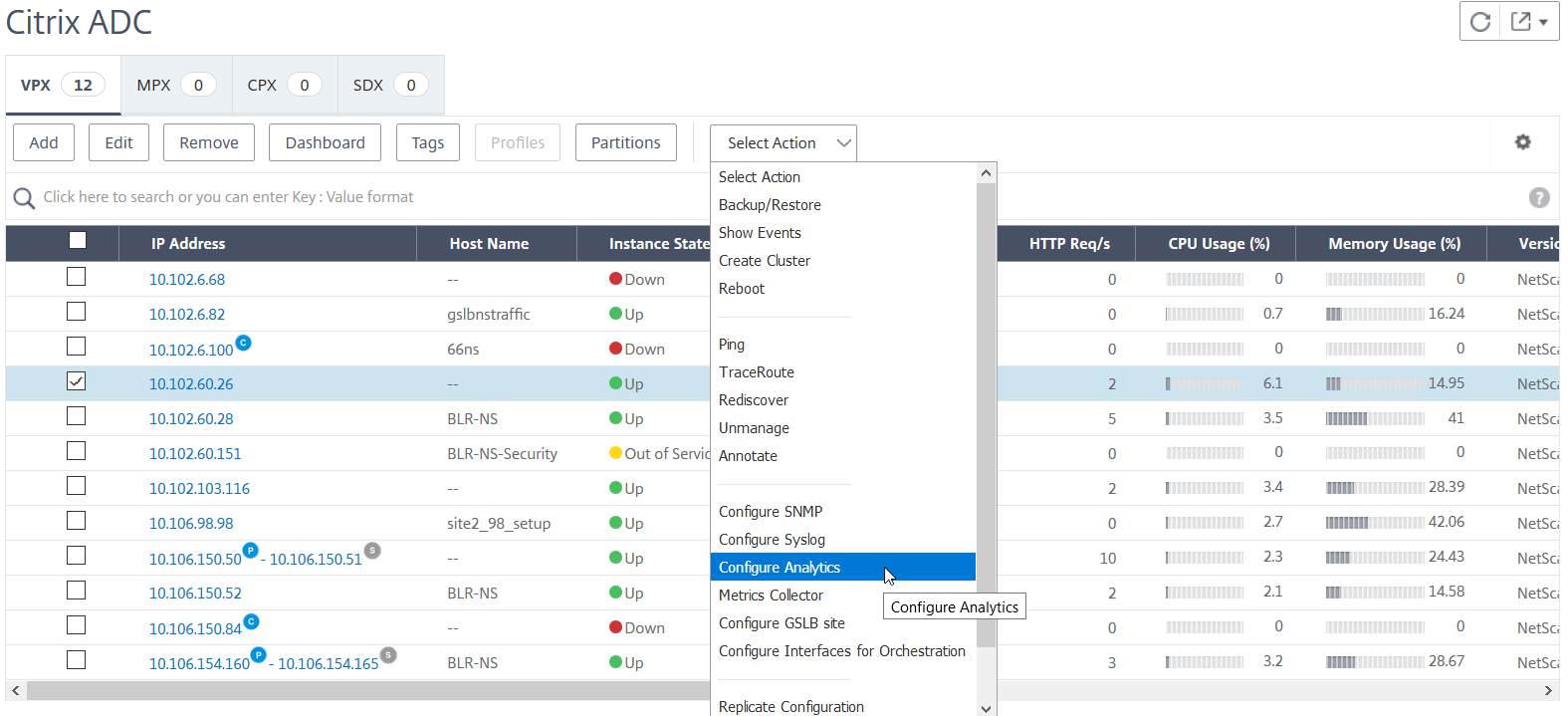
Navigate to Infrastructure > Instances > NetScaler, and select the NetScaler instance on which you want to enable analytics.
-
From the Select Action list, select Configure Analytics.
-
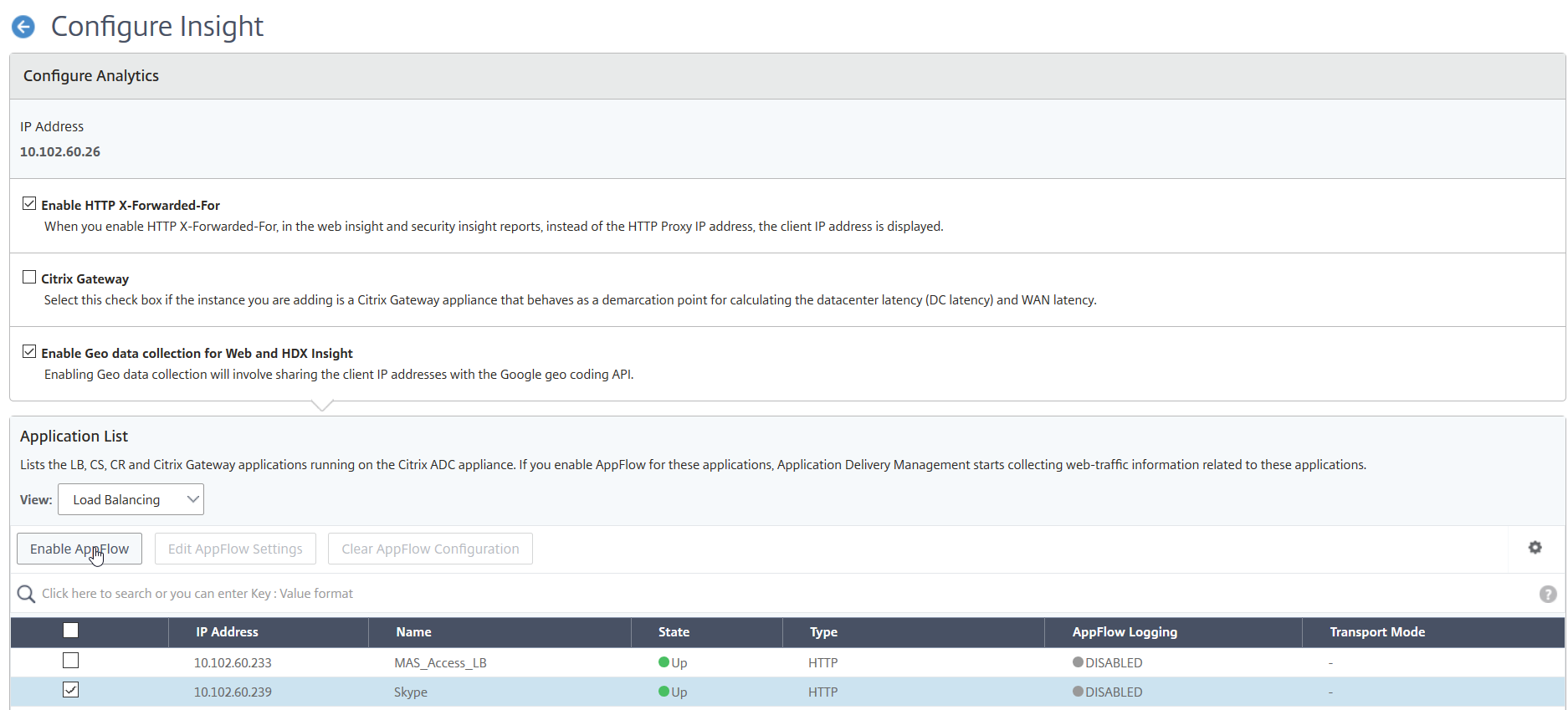
On the Configure Insight page:
-
Select the Application List for either Load Balancing or Content Switching.

-
Select the virtual server and click Enable AppFlow.
-
-
In the Enable AppFlow dialog box:
-
Enter true in the text box
-
Select Logstream as the transport modeNote Citrix recommends you to select Logstream as the transport mode
-
Select Web Insight and click OK.
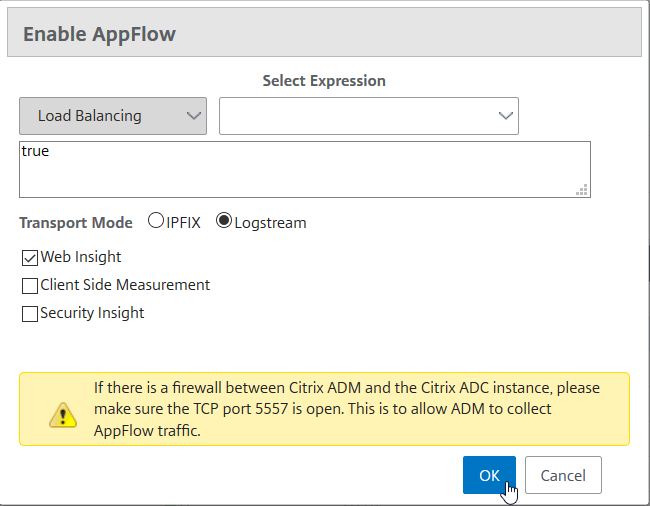
-
To enable the AppFlow feature by using the NetScaler GUI:
In a NetScaler instance's GUI, navigate to Configuration \> System \> Settings, click Configure Advanced Features, and select AppFlow.
Enable SSL Insight parameters
On each NetScaler instance, you have to enable some HTTP parameters to display SSL Insight records in NetScaler ADM.
To enable SSL Insight parameters from the NetScaler configuration utility:
-
Navigate to Configuration \> System \> AppFlow, and click Change AppFlowSettings.
-
Select the following check boxes: HTTP Domain, HTTP Host, HTTP Method, HTTP URL, HTTP User-Agent, HTTP Content-Type.
-
Click OK.
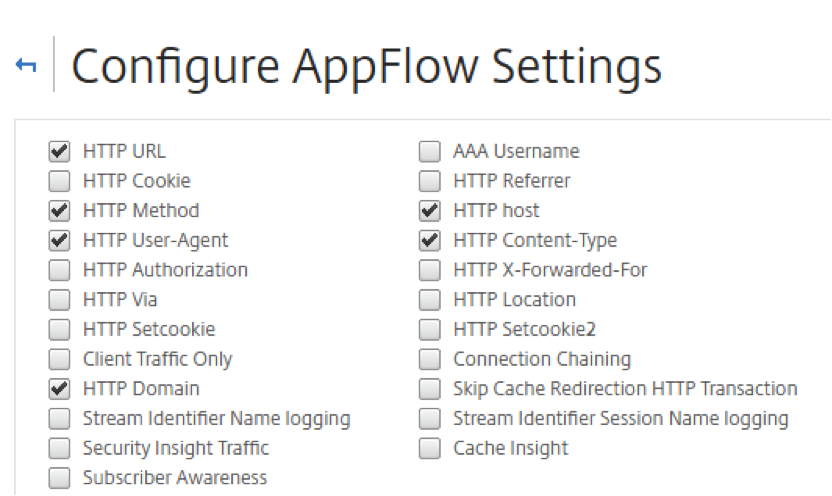
View the SSL Insight metrics
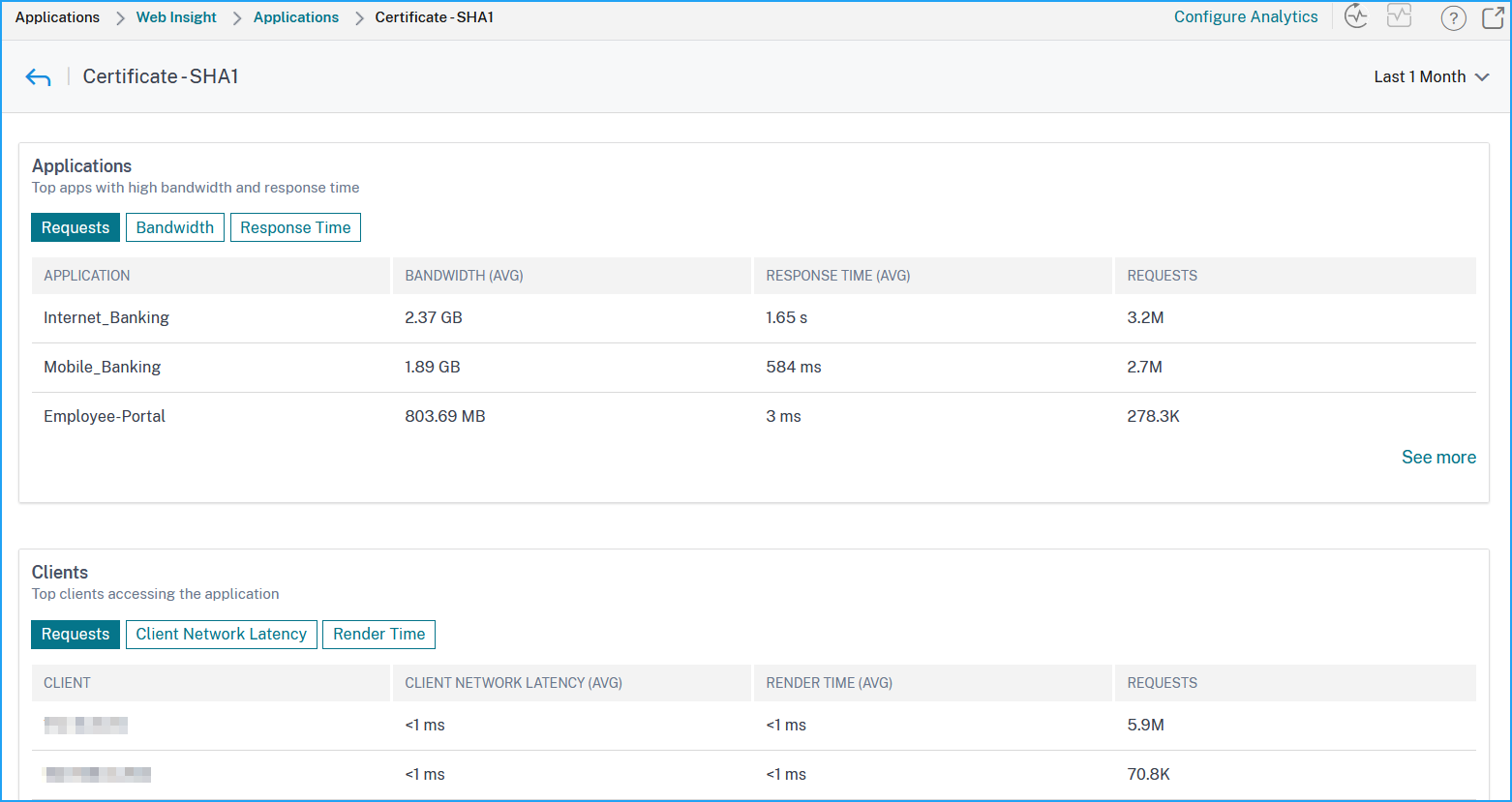
SSL Insight metrics in NetScaler ADM provide a detailed view of the performance of the SSL transactions served by the NetScaler instances. You can view the SSL Insight metrics at the client, server, or application level, and the SSL success and failure transactions’ metrics. With the help of these metrics, you can analyze and optimize your NetScaler HTTPS settings and SSL-certificate settings, and track performance issues.
Note
When you create a group, you can assign roles to the group, provide application-level access to the group, and assign users to the group. NetScaler ADM analytics now supports virtual IP address based authorization. Your users can now see reports for all Insights for only the applications (virtual servers) that they are authorized to. For more information on groups and assigning users to the group, see Configure Groups.
To monitor SSL Insight Metrics in NetScaler ADM:
You can view SSL metrics for:
-
An application. Navigate to Applications > Dashboard, click an application, and select Web Insight tab to view the detailed metrics. For more information, see Application Usage Analytics.
-
All applications. Navigate to Applications > Web Insight and click Applications and Clients tabs to view the SSL metrics.
Use case: Obtain an overview of the SSL transactions
The following use case describes how you can use SSL Insight to assess the usage of various SSL Parameters and improve security measures.
Consider that you have a set of applications that are using SSL transactions (HTTPS) for communication, and you have configured NetScaler ADM to monitor the SSL components. You might need to frequently review the applications so that you can focus first on the applications that need the most attention. The Web Insight dashboard for an application or all applications provides a summary of following SSL parameters under SSL Errors and SSL Usage:
-
SSL Certificates
-
SSL Protocols
-
SSL Cipher
-
SSL Key Strength
-
SSL Failure – Front end
-
SSL Failure – Back end
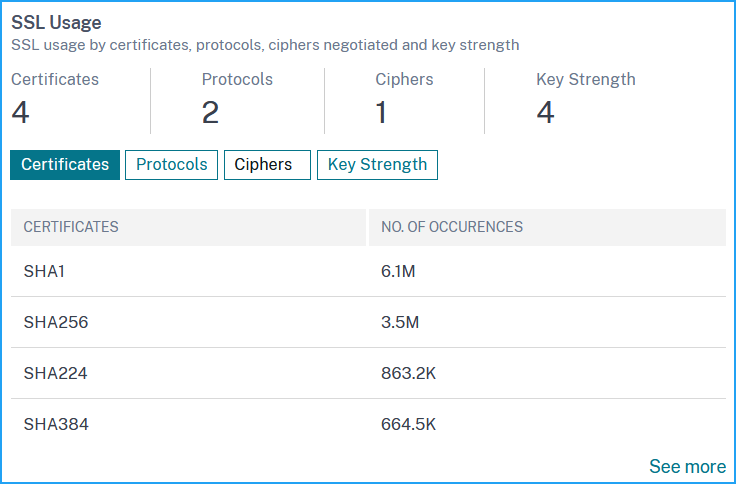
You can click each tab to view details.
Use case: SSL metrics for clients
You can see list of clients (identified by their IP addresses) and the total occurences per client. Navigate to Applications > Web Insight and select the Clients tab to view the details under SSL Usage.
Click a metric to view details and under Clients, click any client IP address to view the SSL metrics for the selected client.