
HTTP 厳密な転送セキュリティ (HSTS) のサポートを構成する
HTTP ストリクトトランスポートセキュリティ (HSTS) は、SSL ストリッピング、Cookie ハイジャック、プロトコルダウングレードなどのさまざまな攻撃から Web サイトを保護するのに役立ちます。HSTS を使用すると、サーバーはクライアントとのすべての通信に HTTPS 接続の使用を強制できます。つまり、HTTPS を使用しないとサイトにアクセスできません。
Citrix ADCアプライアンスは、SSLプロファイルおよびSSL仮想サーバーの組み込みオプションとしてHSTSをサポートします。SSL Labs からの A+ 認証には HSTS のサポートが必要です。
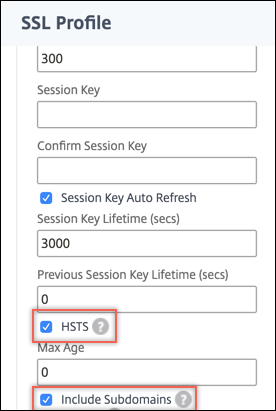
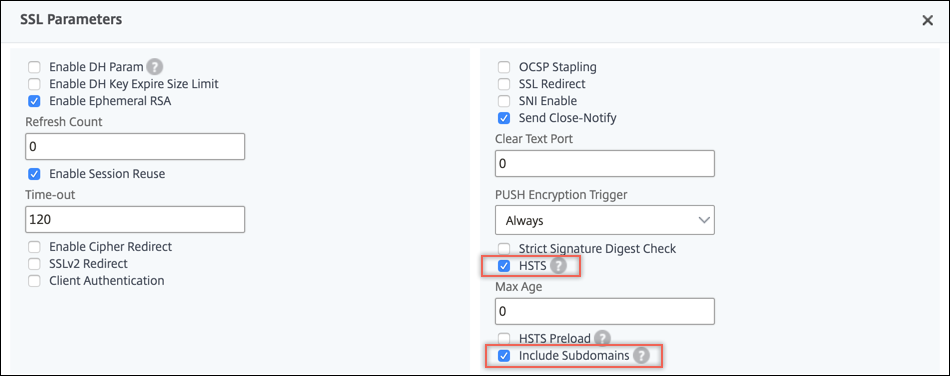
SSL フロントエンドプロファイルまたは SSL 仮想サーバーで HSTS を有効にします。SSL プロファイルを有効にする場合は、SSL 仮想サーバーで有効にする代わりに、SSL プロファイルで HSTS を有効にする必要があります。
ブラウザが暗号化されていない接続を受け入れない時間 (秒単位) を指定します。
maxageパラメータを使用して、そのクライアントに対して HSTS がその期間有効であることを指定します。デフォルトでは、HSTS ヘッダーはルートドメインにのみ適用されます。サブドメインを含める必要があるかどうかを指定できます。たとえば、IncludeSubdomainsパラメータを YES に設定すると、www.abc.example.com や www.xyx.example.com などの www.example.com のサブドメインに HTTPS を使用してのみアクセスできるように指定できます。サブドメインは HTTPS をサポートしている必要があります。ただし、それぞれの HSTS を有効にする必要はありません。
HSTS をサポートする Web サイトにアクセスすると、サーバーからの応答ヘッダーに次のようなエントリが含まれます。
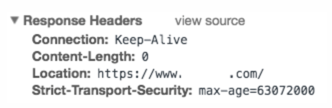
クライアントは、この情報を max-age パラメータで指定された時間だけ保存します。その Web サイトへの後続のリクエストでは、クライアントはメモリに HSTS エントリがないかチェックします。エントリが見つかった場合、HTTPS を使用してのみその Web サイトにアクセスします。たとえば、
maxageパラメータを 31536000 に設定すると、ブラウザは HTTPS のみを使用してドメインにアクセスすることを 1 年間記憶します。
HSTS は、SSL プロファイルまたは SSL 仮想サーバーの作成時に add コマンドを使用して設定できます。また、set コマンドを使用して変更することにより、既存の SSL プロファイルまたは SSL 仮想サーバーで HSTS を構成することもできます。
Related information
CLI を使用して HSTS を構成する
コマンドプロンプトで入力します。
add ssl vserver <vServerName> -maxage <positive_integer> -IncludeSubdomains ( YES | NO)
 set ssl vserver <vServerName> -HSTS ( ENABLED | DISABLED )
または
add ssl profile <name> -maxage <positive_integer> -IncludeSubdomains ( YES | NO )
 set ssl profile <name> -HSTS ( ENABLED | DISABLED )

 Arguments

 HSTS

          State of HTTP Strict Transport Security (HSTS) on an SSL virtual server or SSL profile. Using HSTS, a server can enforce the use of an HTTPS connection for all communication with a client.

           Possible values: ENABLED, DISABLED

           Default: DISABLED

 maxage

           Set the maximum time, in seconds, in the strict transport security (STS) header during which the client must send only HTTPS requests to the server.

           Default: 0

           Minimum: 0

           Maximum: 4294967294

 IncludeSubdomains

          Enable HSTS for subdomains. If set to Yes, a client must send only HTTPS requests for subdomains.

           Possible values: YES, NO

           Default: NO
次の例では、クライアントは HTTPS を使用してのみ 157,680,000 秒間 Web サイトとそのサブドメインにアクセスする必要があります。
add ssl vserver VS-SSL –maxage 157680000 –IncludeSubdomain YES
 set ssl vserver VS-SSL –HSTS ENABLED
add sslProfile hstsprofile –maxage 157680000 –IncludeSubdomain YES
set sslProfile hstsprofile –HSTS ENABLED
GUI を使用して HSTS を構成する
HSTS プリロードのサポート
HSTS ヘッダーは、ブラウザがドメインに暗号化されていない接続を行わないようにすることで、Web アプリケーションを保護します。ただし、ユーザーが初めてウェブサイトにアクセスする場合、ブラウザにはまだ HSTS ヘッダーが表示されていません。Web サーバーがブラウザに HTTPS を使用するように指示する前に、攻撃者が接続を乗っ取る可能性があります。
この問題に対処するために、Citrix ADCアプライアンスはHTTP応答ヘッダーにHSTSプリロードを追加することをサポートしています。プリロードを含めるには、SSL 仮想サーバーまたは SSLプロファイルの
preloadパラメーターを YES に設定する必要があります。アプライアンスは、クライアントへの HTTP 応答ヘッダーにプリロードを含めます。この機能は、CLI と GUI の両方を使用して設定できます。HSTS プリロードの詳細については、「<https://hstspreload.org/>」を参照してください。
以下は、プリロード付きの有効な HSTS ヘッダーの例です。
Strict-Transport-Security: max-age=63072000; includeSubDomains; preloadStrict-Transport-Security: max-age=63072000; preload
CLI を使用して HSTS プリロードを構成する
コマンドプロンプトで入力します。
add ssl vserver <vServerName> -maxage <positive_integer> -preload ( YES | NO )
 set ssl vserver <vServerName> -HSTS ( ENABLED | DISABLED )
または
add ssl profile <name> -maxage <positive_integer> -IncludeSubdomains ( YES | NO ) -preload ( YES | NO )
 set ssl profile <name> -HSTS ( ENABLED | DISABLED )
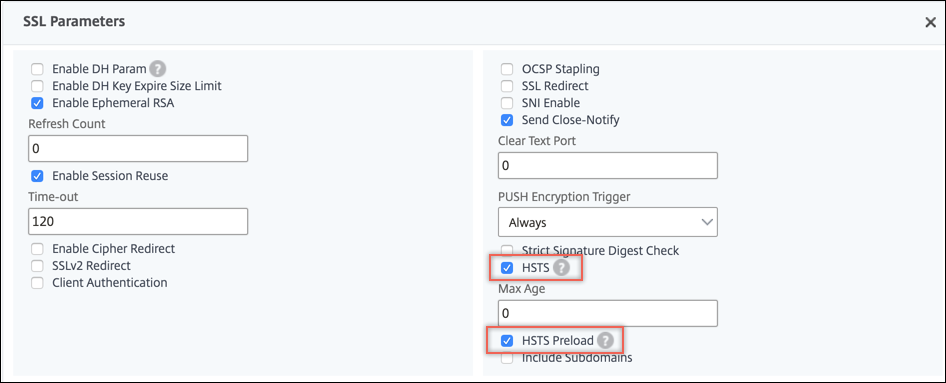
GUI を使用して HSTS プリロードを構成する
アプライアンスでデフォルトの SSL プロファイルが有効になっている場合は、次の手順を実行します。
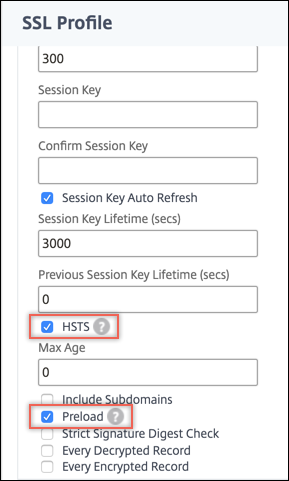
アプライアンスでデフォルトの SSL プロファイルが有効になっていない場合は、次の手順を実行します。
-
Traffic Management > Load Balancing > Virtual Serversに移動します。
-
HSTS****とプリロードを選択します。
使用例
ユーザー1は、Webブラウザを使用して一部のWebサイトに安全にアクセスしたいと考えています。exemple.comというサイトは、クライアントに安全なブラウジング体験を提供します。
ユーザー1はexemple.comのアカウントを持っており、このウェブサイトを使用して定期的に取引を行っています。ユーザー1は友人に送金する必要があり、ウェブブラウザにwww.exemple.comと入力してexemple.comにアクセスします。 ブラウザはURLを
<http://www.exemple.com>に変換します。ブラウザは exemple.com という名前を検出し、DNS サーバーと通信してホストサーバーの IP アドレスを取得します。 ブラウザはポート 80 を使用して IP アドレスにアクセスします。銀行のウェブサイトはリクエストを<https://www.exemple.com>にリダイレクトします。SSL ハンドシェイクが実行され、SSL 接続が確立されます。 URL の南京錠が緑色に変わり、ロックされていると表示されます。 これで、ユーザー 1 は認証情報を入力して取引を行うことができます。
問題シナリオ
Web サイトで HTTPS が有効になっている場合でも、クライアントは HTTP 経由で接続を試みることがあります。Web サイトはリクエストを HTTPS にリダイレクトできますが、攻撃者がユーザー情報を取得したり、ユーザーを偽の Web サイトにリダイレクトしたりする可能性があるため、このリダイレクトは安全ではありません。たとえば、 中間者がexemple.comの解決リクエストを傍受し、ユーザー1に独自のサーバーIPアドレスを送信できます。この IP アドレスにポート 80 でリクエストが送信されると、中間者は User1 をポート 443 にある同様の名前の Web サイト(例:)にリダイレクトできます
<https://www.example.com> (スペルが少し変わっていることに注意してください)。ユーザー 1 はこの不一致に気付かず (exemple.com ではなく example.com)、認証情報を入力する可能性があります。
解決策
Citrix ADCアプライアンスで次の手順を実行して、Webサイトを攻撃から保護します。CLI プロンプトで、次のように入力します。
add ssl profile sample-profile -maxage 63072000 -IncludeSubdomains YES -preload YES
 set ssl profile sample-profile -HSTS ENABLED
HSTS が有効になっているため、アプライアンスはクライアントへの HTTP 応答にプリロードを含めます。また、HSTS は指定された期間有効で、サブドメインも含まれます。その結果、クライアントからはHTTPS接続のみが受け入れられます。