
Configure system notification settings
You can send notifications to select groups of users for various system-related functions. These system functions are organized into event categories such as SystemReboot, StatusPoll, and SystemState. You can configure NetScaler® Application Delivery Management (ADM) to send you notifications either through email or SMS. You have to configure an email server or Short Message Service (SMS) gateway server or both to send email and text notifications to users. This ensures that you are notified of any system-level activities such as user logon or system restart.
For example, you might want to send an email notification to two users when someone attempts to log on to NetScaler ADM by using the CLI and the logon attempt fails. You have to configure system notification by selecting the UserLogin category and either create an email notification server or choose an existing email distribution list to send the notification to.
To configure system notification settings on NetScaler ADM:
-
Navigate to System \> Notifications. Under Settings, click Change Notification Settings.
-
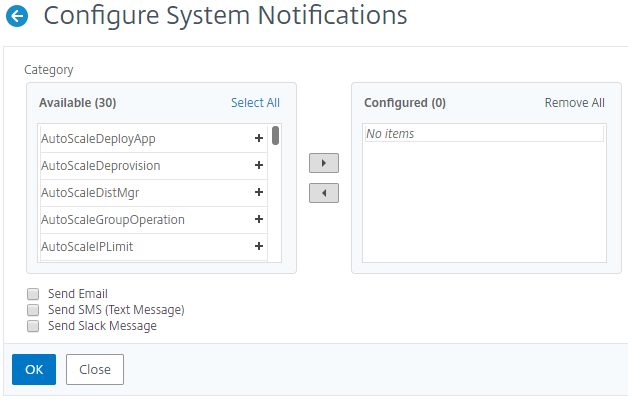
On the Configure System Notification Settings page, under Category, select a category such as UserLogin.
-
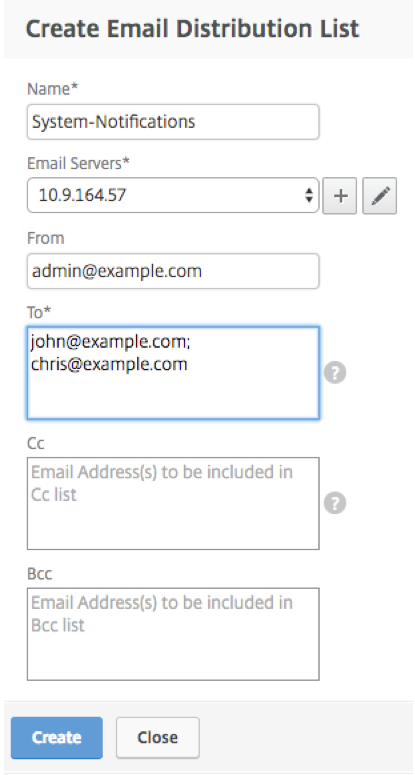
Select Send Email, and either select an email distribution from the drop-down list or click the "+" icon to create a new email distribution list as shown in the following figure. If you want to send text notifications, select Send SMS (Text Message) and create an SMS distribution list by clicking the “+” icon and specifying SMS server details.
 After the notifications are set for certain event categories, whenever an event pertaining to that category occurs, a notification is sent to the recipients either by using email or SMS. In this example, you can see email notifications when a user fails to log on to NetScaler ADM by using the CLI.
System notifications are sent for the following events:
| Category | Cause |
|---|---|
| BackupFailure | The system backup fails |
| DataStorageExceeded | The database storage crosses the limit specified in the license |
| DeviceBackupFailure | The instance backup fails |
HAMonitoring |
The system HA failover occurs, no heartbeats from a peer node, and database sync failure occurs |
| HealthMontoring | The CPU, RAM, or Disk utilization crosses threshold value |
| LicensePool | The license pool crosses the threshold value |
| Licenses | License fails when applied |
| PasswordRecovery | Password recovery fails or succeeds |
| PerfCounterThresholdHigh | The performance counter value exceeds the limit |
| PerfCounterThresholdNormal | The value of the performance counter is normal |
| PolicyFailed | Any of the system policies fails |
| RemoteDeviceBackupFailure | The remote instance backup fails |
| RemoteSystemBackupFailure | The remote system backup fails |
| RemoteSystemBackupNormal | The remote system backup succeeds |
| SSLCertThreshold | The threshold for a certificate is breached |
| StatusPoll | Any change in the state of an instance |
| SubSystemState | Any change in the subsystem state |
| SystemReboot | The system is rebooted |
| SystemState | Any change in the state of the system |
| TrapConfigFailure | Failure occurs when adding SNMP trap on an instance |
| UserLogin | User authentication fails |
Related information