HTTP 厳密な転送セキュリティ (HSTS) のサポートを構成する
Citrix ADCアプライアンスは、SSLプロファイルとSSL仮想サーバーの組み込みオプションとしてHTTP厳密なトランスポートセキュリティ(HSTS)をサポートします。HSTS を使用すると、サーバーはクライアントとのすべての通信に HTTPS 接続の使用を強制できます。つまり、HTTPS を使用しないとサイトにアクセスできません。SSL Labs からの A+ 認証には HSTS のサポートが必要です。
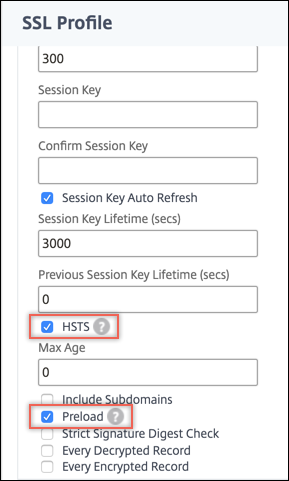
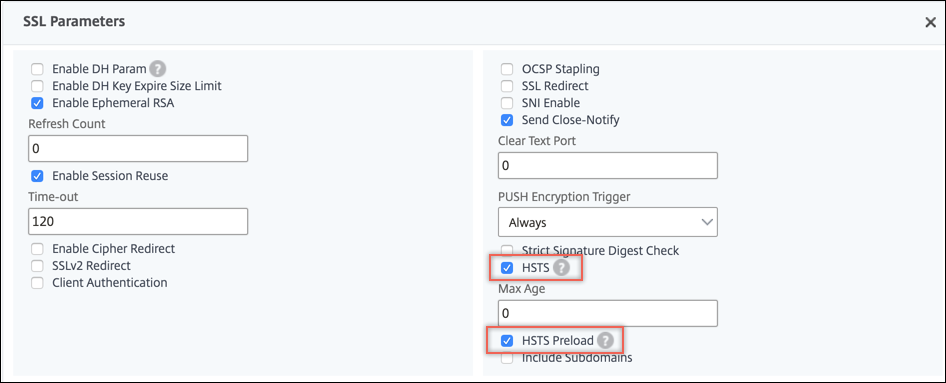
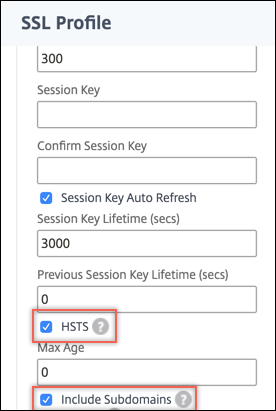
SSL フロントエンドプロファイルまたは SSL 仮想サーバーで HSTS を有効にします。SSL プロファイルを有効にする場合は、SSL 仮想サーバーで有効にする代わりに、SSL プロファイルで HSTS を有効にする必要があります。最大経過時間ヘッダーを設定することにより、そのクライアントに対してその期間中 HSTS が有効であることを指定します。サブドメインを含める必要があるかどうかも指定できます。たとえば、www.abc.example.com や www.xyx.example.com など、www.example.com のサブドメインに HTTPS を使用してのみアクセスできるように指定するには、
IncludeSubdomains パラメータを YES に設定します。
HSTS をサポートする Web サイトにアクセスすると、サーバーからの応答ヘッダーに次のようなエントリが含まれます。
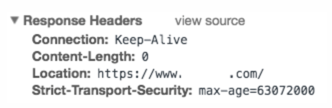
クライアントは、この情報を max-age パラメータで指定された時間だけ保存します。その Web サイトへの後続のリクエストでは、クライアントはメモリに HSTS エントリがないかチェックします。エントリが見つかった場合、HTTPS を使用してのみその Web サイトにアクセスします。
HSTS は、SSL プロファイルまたは SSL 仮想サーバーの作成時に add コマンドを使用して設定できます。また、set コマンドを使用して変更することにより、既存の SSL プロファイルまたは SSL 仮想サーバーで HSTS を構成することもできます。
Related information
CLI を使用して HSTS を構成する
コマンドプロンプトで入力します。
add ssl vserver <vServerName> -maxage <positive_integer> -IncludeSubdomains ( YES | NO)
 set ssl vserver <vServerName> -HSTS ( ENABLED | DISABLED )
または
add ssl profile <name> -maxage <positive_integer> -IncludeSubdomains ( YES | NO )
 set ssl profile <name> -HSTS ( ENABLED | DISABLED )

 Arguments

 HSTS

          State of HTTP Strict Transport Security (HSTS) on an SSL virtual server or SSL profile. Using HSTS, a server can enforce the use of an HTTPS connection for all communication with a client.

           Possible values: ENABLED, DISABLED

           Default: DISABLED

 maxage

           Set the maximum time, in seconds, in the strict transport security (STS) header during which the client must send only HTTPS requests to the server.

           Default: 0

           Minimum: 0

           Maximum: 4294967294

 IncludeSubdomains

          Enable HSTS for subdomains. If set to Yes, a client must send only HTTPS requests for subdomains.

           Possible values: YES, NO

           Default: NO
次の例では、クライアントは HTTPS を使用してのみ 157,680,000 秒間 Web サイトとそのサブドメインにアクセスする必要があります。
add ssl vserver VS-SSL –maxage 157680000 –IncludeSubdomain YES
 set ssl vserver VS-SSL –HSTS ENABLED
add sslProfile hstsprofile –HSTS ENABLED –maxage 157680000 –IncludeSubdomain YES
set sslProfile hstsprofile –HSTS ENABLED
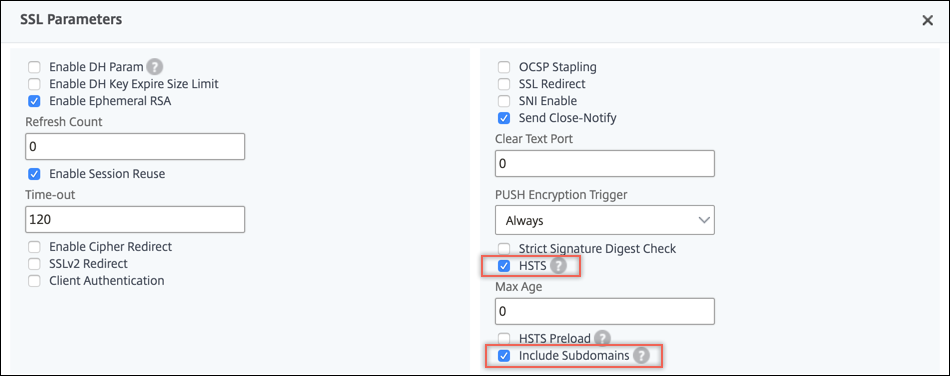
GUI を使用して HSTS を構成する
HSTS プリロードのサポート
Citrix ADCアプライアンスは、HTTP応答ヘッダーにHSTSプリロードを追加することをサポートしています。プリロードを含めるには、SSL 仮想サーバーまたは SSLプロファイルの
preloadパラメーターを YES に設定する必要があります。アプライアンスは、クライアントへの HTTP 応答ヘッダーにプリロードを含めます。この機能は、CLI と GUI の両方を使用して設定できます。HSTS プリロードの詳細については、「<https://hstspreload.org/>」を参照してください。
以下は、プリロード付きの有効な HSTS ヘッダーの例です。
Strict-Transport-Security: max-age=63072000; includeSubDomains; preloadStrict-Transport-Security: max-age=63072000; preload
CLI を使用して HSTS プリロードを構成する
コマンドプロンプトで入力します。
add ssl vserver <vServerName> -maxage <positive_integer> -preload ( YES | NO )
 set ssl vserver <vServerName> -HSTS ( ENABLED | DISABLED )
または
add ssl profile <name> -maxage <positive_integer> -IncludeSubdomains ( YES | NO ) -preload ( YES | NO )
 set ssl profile <name> -HSTS ( ENABLED | DISABLED )