文字列マップ
文字列マップを使用すると、デフォルトのポリシー構文を使用するすべてのCitrix ADC機能でパターンマッチングを実行できます。文字列マップは、キーと値のペアで構成されるCitrix ADCエンティティです。キーと値は、ASCII 形式または UTF-8 形式の文字列です。文字列比較では、2 つの新しい関数、
MAP_STRING(<string_map_name>) およびIS_STRINGMAP_KEY(<string_map_name>)を使用します。
文字列マップを使用するポリシー設定は、ポリシー式を使用して文字列マッチングを実行するポリシーよりもパフォーマンスが向上し、多数のキーと値のペアで文字列マッチングを実行するために必要なポリシーが少なくなります。文字列マップも直感的で、設定が簡単で、構成が小さくなります。
Related information
文字列マップの仕組み
文字列マップは、パターンセットと構造が似ています(パターンセットはインデックス値の文字列へのマッピングを定義し、文字列マップは文字列へのマッピングを定義します)。文字列マップの設定コマンド(add、bind、unbind、remove、show などのコマンド)は、構文的に構成と似ています。コマンドを実行します。また、パターンセット内のインデックス値と同様に、文字列マップ内の各キーはマップ全体で一意である必要があります。次の表は、url_string_map という文字列マップを示しています。このマップには、キーと値として URL が含まれています。
| キー | 値 |
|---|---|
| /url_1.html | http://www.redirect_url_1.com/url_1.html |
| /url_2.html | http://www.redirect_url_2.com/url_2.html |
| /url_3.html | http://www.redirect_url_1.com/url_1.html |
表1. 文字列マップ「url_文字列マップ」
次の表では、文字列マップ内のキーとの文字列マッチングを有効にするために導入された 2 つの関数について説明します。文字列のマッチングは、常にキーで実行されます。さらに、次の関数は、文字列マップ内のキーと、式プレフィックスによって返される完全な文字列を比較します。説明の例は、前の例を示しています。
文字列マップ内のキーとの文字列マッチングを有効にするために導入された 2 つの関数の詳細については、 文字列マップ関数表 pdf を参照してください。
文字列マップの設定
最初に文字列マップを作成し、次にキーと値のペアをバインドします。文字列マップは、コマンドラインインターフェイス(CLI)または設定ユーティリティから作成できます。
コマンドラインインターフェイスを使用して文字列マップを設定するには
コマンドプロンプトで、次の操作を行います。
-
文字列マップを作成します。
add policy stringmap <name> -comment <string>
-
キーと値のペアを文字列マップにバインドします。
bind policy stringmap <name> <key> <value> [-comment <string>]
例:
bind policy stringmap url_string_map1 "/url_1.html" "http://www.redirect_url_1.com/url_1.html"
Citrix ADC GUIを使用して文字列マップを構成するには
\[AppExpert\] > \[文字列マップ\] に移動し、\[追加\] をクリックして、関連する詳細を指定します。
例:リダイレクトアクションを含むレスポンダーポリシー
次のユースケースは、リダイレクトアクションを含むレスポンダーポリシーです。以下の例では、最初の 4 つのコマンドで文字列マップ url_string_map を作成し、前の例で使用した 3 つのキーと値のペアをバインドします。マップを作成し、キーと値のペアをバインドしたら、応答側アクション (act_url_redirects) を作成します。応答側アクション (act_url_redirects) は、文字列マップの対応する URL または www.default.com にクライアントをリダイレクトします。また、リクエストされた URL が url_string_map のいずれかのキーと一致しているかどうかをチェックし、設定されたアクションを実行するレスポンダポリシー(pol_url_redirects)も設定します。最後に、レスポンダーポリシーを、評価するクライアント要求を受信するコンテンツスイッチ仮想サーバーにバインドします。
add stringmap url_string_map
bind stringmap url_string_map /url_1.html http://www.redirect_url_1.com/url_1.html
bind stringmap url_string_map /url_2.html http://www.redirect_url_2.com/url_2.html
bind stringmap url_string_map /url_3.html http://www.redirect_url_1.com/url_1.html
add responder action act_url_redirects redirect 'HTTP.REQ.URL.MAP_STRING("url_string_map") ALT "www.default.com"' -bypassSafetyCheck yes
add responder policy pol_url_redirects TRUE act_url_redirects
bind cs vserver csw_redirect -policyname pol_url_redirects -priority 1 -type request
Citrix ADC GUIを使用して文字列マップを構成するには
文字列マップを設定するには、以下の手順に従ってください。
-
ナビゲーションウィンドウで、\[AppExpert\] を展開し、\[文字列マップ\] をクリックします。
-
詳細ウィンドウで、\[追加\] をクリックします。
-
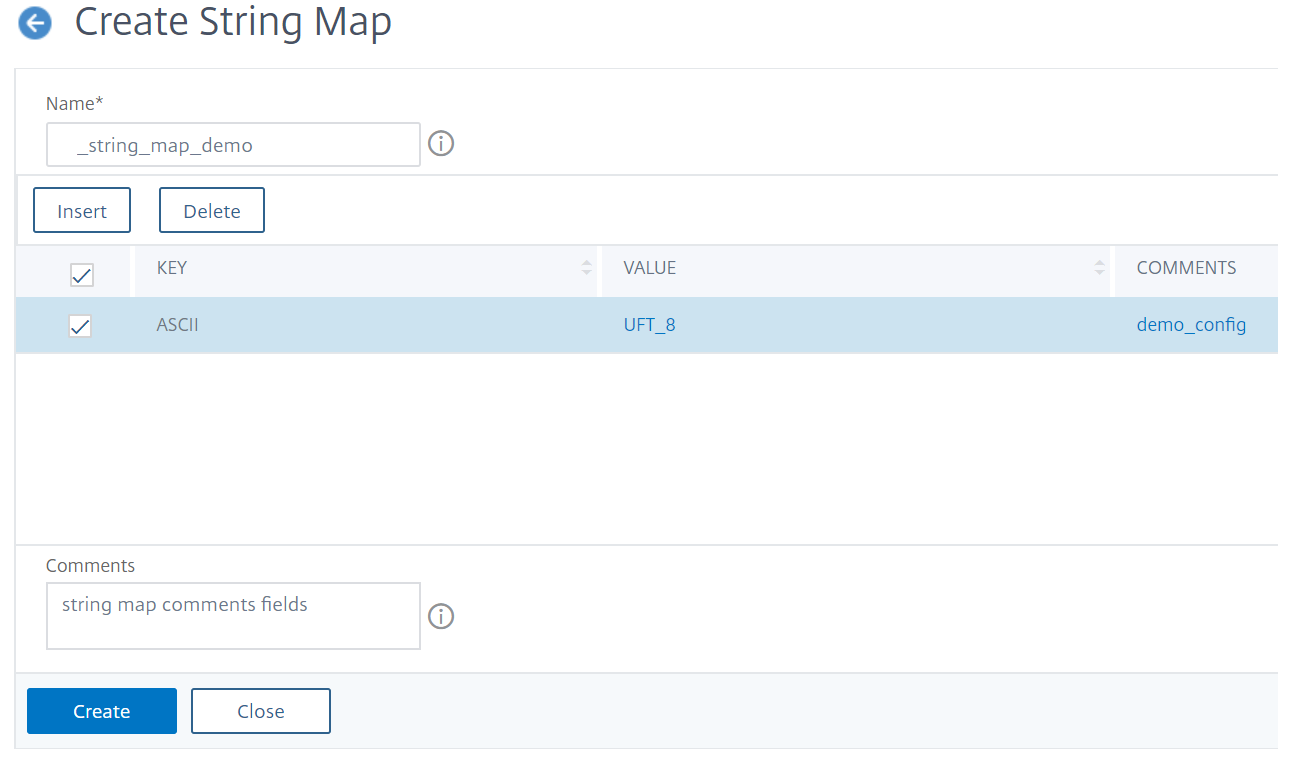
\[文字列マップの作成\] ページで、次のパラメータを設定します。
-
Name:文字列マップの名前。
-
キー値を設定します。文字列マップにバインドされたASCIIベースのキー値エントリ
-
コメント。文字列マップにバインドされたキー値に関する簡単な説明。
-
-
\[作成\]して\[閉じる\] をクリックします。