
システムユーザーと外部ユーザーの二要素認証
二要素認証は、NetScaler ADCアプライアンスがシステムユーザーを2つの認証レベルで認証するセキュリティメカニズムです。アプライアンスは、両方の認証レベルによるパスワードの検証が成功した後にのみ、ユーザーへのアクセスを許可します。ユーザーがローカルで認証される場合、ユーザープロファイルはNetScaler ADC データベースに作成する必要があります。ユーザーが外部で認証される場合、ユーザー名とパスワードは、外部認証サーバーに登録されているユーザーIDと一致する必要があります。
注:
二要素認証機能は、NetScaler 12.1 ビルド 51.16 以降でのみ機能します。
Related information
2 段階認証の仕組み
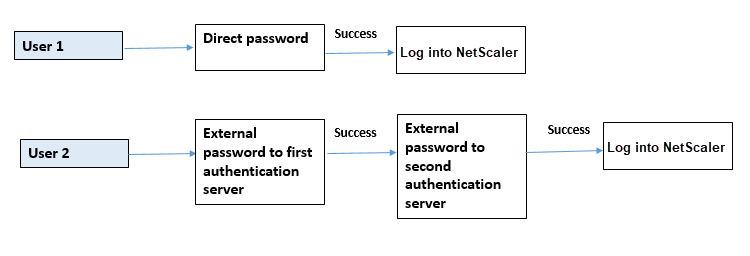
ユーザーがNetScaler ADCアプライアンスにログオンしようとしているとします。要求されたアプリケーションサーバーは、ユーザー名とパスワードを最初の外部認証サーバー (RADIUS、TACACS、LDAP、または AD) に送信します。ユーザー名とパスワードが検証されると、ユーザーは2段階目の認証を求められます。これで、ユーザーは 2 番目のパスワードを入力できます。両方のパスワードが正しい場合にのみ、ユーザーはNetScaler ADCアプライアンスにアクセスできます。次の図は、NetScaler ADCアプライアンスでの二要素認証の仕組みを示しています。
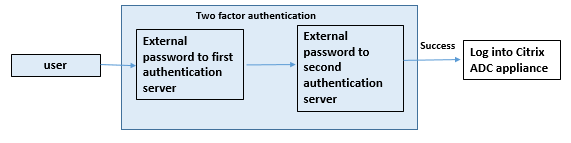
外部ユーザーとシステムユーザーの 2 要素認証を設定するさまざまなユースケースを以下に示します。
NetScaler ADCアプライアンスでは、さまざまな方法で二要素認証を構成できます。以下は、NetScaler ADCアプライアンスでの2要素認証のさまざまな構成シナリオです。
-
NetScaler、GUI、CLI、API、SSHにわたる二要素認証(2FA)。
-
システムユーザーの外部認証は有効で、ローカル認証は無効になっています。
-
システムユーザー向けのポリシーベースのローカル認証による外部認証が有効になっています。
-
ローカル認証が有効になっているシステムユーザーの外部認証は無効になっています。
-
システムユーザーの外部認証が有効で、ローカル認証が有効になっています。
-
特定の LDAP ユーザーに対して外部認証が有効になっています
ユースケース 1: Citrix のADC、GUI、CLI、API、SSHインターフェイスにわたる二要素認証 (2FA)
二要素認証は有効になっており、GUI、API、SSHのすべてのNetScaler ADC管理アクセスで使用できます。
ユースケース 2: LDAP、RADIUS、Active Directory、TACACS などの外部認証サーバーで 2 要素認証がサポートされています
次の外部認証サーバーで、第 1 レベルおよび第 2 レベルのユーザー認証用に 2 要素認証を設定できます。
-
RADIUS
-
LDAP
-
Active Directory
-
TACACS
ユースケース 3: システムユーザーの外部認証を有効にし、ローカル認証を無効にする
認証プロセスを開始するには、外部認証オプションを有効にし、システムユーザーのローカル認証を無効にします。
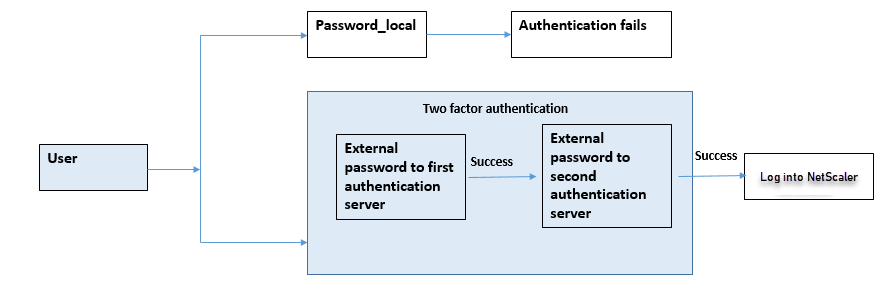
コマンドラインインターフェイスを使用して、次の手順を実行します。
-
LDAP ポリシーの認証アクションを追加
-
LDAP ポリシーの認証ポリシーを追加
-
RADIUS ポリシーの認証アクションを追加
-
RADIUS ポリシーの認証ポリシーを追加
-
認証ログインスキーマの追加
-
認証ポリシーラベルを RADIUS サーバに追加してバインドする
-
LDAP ポリシー用バインドシステムグローバル認証
-
システムパラメータのローカル認証を無効にする
LDAP サーバーの認証アクションを追加 (第 1 レベルの認証)
コマンドプロンプトで入力します:
add authentication ldapaction <ldap action name> -serverip <IP> -ldapbase <> -ldapbinddn <binddn name> -ldapbinddnpassword <password>-ldaploginname <loginname> -groupattrname <grp attribute name> -subAttributename <string>-ssoNameAttribute <string>
例:
add authentication ldapaction ldapact1 -serverip 1.1.1.1 -ldapbase base -ldapbindDn name -ldapbindDNpassword password -ldapLoginName name -groupAttrName name -subAttributeName name -ssoNameAttribute name
LDAP サーバーの認証ポリシーの追加 (第 1 レベルの認証)
コマンドプロンプトで入力します:
add authentication policy <ldap policy name> -rule true -action <ldap action name>
例:
add authentication policy pol1 -rule true -action ldapact1
RADIUS サーバの認証アクションの追加 (第 2 レベル認証)
コマンドプロンプトで入力します:
add authentication radiusaction <rad action name> -serverip <rad server ip> -radkey <key> -radVendorID <ID >-radattributetype <rad attribute type>
例:
add authentication radiusaction radact1 -serverip 1.1.1.1 -radkey 123 -radVendorID 1234 -radAttributeType 2
RADIUSサーバの認証ポリシーを追加 (第2レベル認証)
コマンドプロンプトで入力します:
add authentication policy <radius policy name> -rule true -action <rad action name>
例:
add authentication policy radpol11 -rule true -action radact1
認証ログインスキーマの追加
システムユーザーの「SingleAuth.xml」ログインスキーマを使用して、NetScaler ADCアプライアンスの2番目のパスワードを指定できます。コマンドプロンプトで入力します:
add authentication loginSchema <login schema name> -authenticationSchema LoginSchema/SingleAuth.xml
例:
add authentication loginSchema radschema -authenticationSchema LoginSchema/SingleAuth.xml
認証ポリシーラベルを RADIUS サーバに追加してバインドする
コマンドプロンプトで入力します:
add authentication policylabel <labelName> [-type ( AAATM_REQ | RBA_REQ )] [-comment <string>][-loginSchema <string>]
bind authentication policylabel <labelName> -policyName <string> -priority <positive_integer> [-gotoPriorityExpression <expression>][-nextFactor <string>]
例:
add authentication policylabel label1 -type RBA_REQ -loginSchema radschema
bind authentication policylabel label1 -policyName radpol11 -priority 1
LDAP ポリシー用バインド認証システムグローバル
コマンドプロンプトで入力します:
bind system global ldappolicy -priority <priority> -nextFactor <policy label name>
例:
bind system global pol11 -priority 1 -nextFactor label1
システムパラメータのローカル認証を無効にする
コマンドプロンプトで入力します:
set system parameter -localauth disabled
ユースケース 4: ローカル認証ポリシーがアタッチされたシステムユーザーの外部認証を有効にする
このシナリオでは、ユーザーは 2 段階目のユーザー識別レベルでのローカル認証ポリシー評価による二要素認証を使用してアプライアンスにログオンできます。
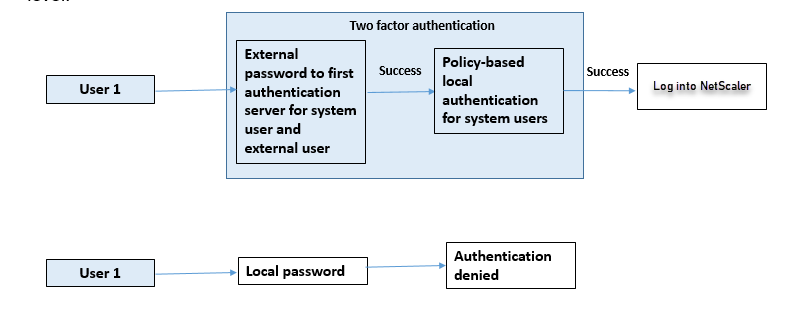
コマンドラインインターフェイスを使用して、次の手順を完了します。
-
LDAP サーバーの認証アクションを追加
-
LDAP ポリシーの認証ポリシーを追加
-
ローカル認証ポリシーを追加
-
認証ポリシーラベルを追加
-
LDAP ポリシーをシステムグローバルとしてバインドする
-
システムパラメータのローカル認証を無効にする
LDAP サーバーの認証アクションを追加 (第 1 レベルの認証)
コマンドプロンプトで入力します:
add authentication ldapaction <ldap action name> -serverip <IP> -ldapbase <> -ldapbinddn <binddn name> -ldapbinddnpassword <password>-ldaploginname <loginname> -groupattrname <grp attribute name> -subAttributename <string>-ssoNameAttribute <string>
例:
add authentication ldapaction ldapact1 -serverip 1.1.1.1 -ldapbase base -ldapbindDn name -ldapbindDNpassword password -ldapLoginName name -groupAttrName name -subAttributeName name -ssoNameAttribute name –ssoNameAttribute name
LDAP サーバーの認証ポリシーの追加 (第 1 レベルの認証)
コマンドプロンプトで入力します:
add authentication policy <ldap policy name> -rule true -action <ldap action name>
例:
add authentication ldapaction ldapact1 -serverip 1.1.1.1 -ldapbase base -ldapbindDn name -ldapbindDNpassword password -ldapLoginName name -groupAttrName name -subAttributeName name -ssoNameAttribute name
システムユーザー用のローカル認証ポリシーの追加 (第 2 レベル認証)
コマンドプロンプトで入力します:
add authentication policy <policy> -rule <rule> -action <action name>
例:
add authentication policy local_policy -rule true -action LOCAL
認証ポリシーラベルを追加してバインドする
コマンドプロンプトで入力します:
add authentication policylabel <labelName> [-type ( AAATM_REQ | RBA_REQ )] [-comment <string>][-loginSchema <string>] bind authentication policylabel <labelName> -policyName <string> -priority <positive_integer> [-gotoPriorityExpression <expression>][-nextFactor <string>]
注
管理アクセスの場合、ポリシータイプは RBA_REQ でなければなりません。
例:
add authentication policylabel label1 -type RBA_REQ -loginSchema radschema bind authentication policylabel label1 -policyName radpol11 -priority 1 -gotoPriorityExpression NEXT
システムパラメータのローカル認証を無効にする
コマンドプロンプトで入力します:
set system parameter -localauth disabled
ユースケース 5: システムユーザーの外部認証を無効にし、ローカル認証を有効にする
ユーザーの「ExternalAuth」が無効になっている場合は、そのユーザーが認証サーバーに存在しないことを示します。同じユーザー名のユーザーが外部認証サーバーに存在していても、ユーザーは外部認証サーバーで認証されません。ユーザーはローカルで認証されます。
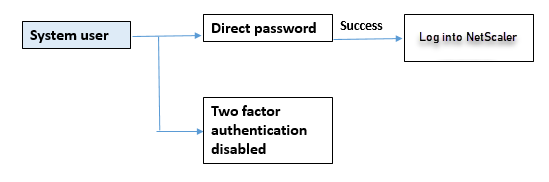
システムユーザーパスワードを有効にし、外部認証を無効にするには
コマンドプロンプトで、次のように入力します:
add system user <name> <password> -externalAuth DISABLED
例:
add system user user1 password1 –externalAuth DISABLED
ユースケース 6: システムユーザーの外部認証が有効で、ローカル認証が有効になっている
ローカルパスワードを使用してシステムユーザーを認証するようにアプライアンスを構成すること。この認証に失敗すると、ユーザーは外部認証サーバーの外部認証パスワードを使用して 2 つのレベルで認証されます。
CLI を使用して次の手順を設定します。
-
LDAP サーバーの認証アクションを追加
-
LDAP ポリシーの認証ポリシーを追加
-
RADIUS ポリシーの認証アクションを追加
-
RADIUS ポリシーの認証ポリシーを追加
-
認証ログインスキーマの追加
-
認証ポリシーラベルを追加
-
ログインスキーマのバインド認証ポリシーラベル
-
RADIUS ポリシー用グローバル認証システムをバインドする
-
LDAP ポリシー用バインド認証システムグローバル
LDAP サーバーの認証アクションを追加
コマンドプロンプトで入力します:
add authentication ldapaction <ldap action name> -serverip <IP> -ldapbase <> -ldapbinddn <binddn name> -ldapbinddnpassword <password>-ldaploginname <loginname> -groupattrname <grp attribute name> -subAttributename <>-ssoNameAttribute <>
例:
add authentication ldapaction ldapact1 -serverip 1.1.1.1 -ldapbase base -ldapbindDn name -ldapbindDNpassword password -ldapLoginName name -groupAttrName name -subAttributeName name -ssoNameAttribute name
LDAP ポリシーの認証ポリシーを追加
コマンドプロンプトで入力します:
add authentication policy <policy name> --rule true -action <ldap action name>
例:
add authentication policy pol1 -rule true -action ldapact1
RADIUS サーバの認証アクションを追加
コマンドプロンプトで入力します:
add authentication radiusaction <rad action name> -serverip <rad server ip> -radkey <key> -radVendorID <ID >-radattributetype <rad attribute type>
例:
add authentication radiusaction radact1 -serverip 1.1.1.1 -radkey 123 -radVendorID 1234 -radAttributeType 2
RADIUS サーバ用の高度な認証ポリシーの追加
コマンドプロンプトで入力します:
add authentication policy <policy name> -rule true -action <rad action name>
例:
add authentication policy radpol11 -rule true -action radact1
認証ログインスキーマの追加
SingleAuth.xml ログインスキーマを使用してログインページを表示し、第 2 レベルの認証でシステムユーザーを認証できます。
コマンドプロンプトで入力します:
add authentication loginSchema <name> -authenticationSchema <string>
例:
add authentication loginSchema radschema -authenticationSchema LoginSchema/SingleAuth.xml
認証ポリシーラベルをユーザーログイン用の RADIUS 認証ポリシーに追加してバインドする
コマンドプロンプトで入力します:
add authentication policylabel <labelName> [-type ( AAATM_REQ | RBA_REQ )] [-comment <string>][-loginSchema <string>]
例:
add authentication policylabel label1 -type RBA_REQ -loginSchema radschema bind authentication policylabel <labelName> -policyName <string> -priority <positive_integer> [-gotoPriorityExpression <expression>][-nextFactor <string>]
例:
bind authentication policylabel label1 -policyName rad pol11 -priority 1
バインド認証ポリシーグローバル
コマンドプロンプトで入力します:
bind system global [<policyName> [-priority <positive_integer>] [-nextFactor <string>] [-gotoPriorityExpression <expression>]]
例:
bind system global radpol11 -priority 1 -nextFactor label11
ユースケース 7: 特定の外部ユーザーに対してのみ外部認証を有効にする
LDAP アクションで設定した検索フィルターに従って選択的外部ユーザーを 2 要素認証で設定し、他のシステムユーザーは単一要素認証で認証します。
CLI を使用して次の手順を設定します。
-
LDAP サーバーの認証アクションを追加
-
LDAP ポリシーの認証ポリシーを追加
-
RADIUS ポリシーの認証アクションを追加
-
RADIUS ポリシーの認証ポリシーを追加
-
認証ログインスキーマの追加
-
認証ポリシーラベルを追加
-
ログインスキーマのバインド認証ポリシーラベル
-
RADIUS ポリシー用グローバル認証システムをバインドする
LDAP サーバーの認証アクションを追加
コマンドプロンプトで入力します:
add authentication ldapaction <ldap action name> -serverip <IP> -ldapbase <> -ldapbinddn <binddn name> -ldapbinddnpassword <password>-ldaploginname <loginname> -groupattrname <grp attribute name> -subAttributename <>-ssoNameAttribute <>
例:
add authentication ldapaction ldapact1 -serverip 1.1.1.1 -ldapbase base -ldapbindDn name -ldapbindDNpassword password -ldapLoginName name -groupAttrName name -subAttributeName name -ssoNameAttribute name
LDAP ポリシーの認証ポリシーを追加
コマンドプロンプトで入力します:
add authentication policy <policy name> --rule true -action <ldap action name>
例:
add authentication policy pol1 -rule true -action ldapact1
RADIUS サーバの認証アクションを追加
コマンドプロンプトで入力します:
add authentication radiusaction <rad action name> -serverip <rad server ip> -radkey <key> -radVendorID <ID >-radattributetype <rad attribute type>
例:
add authentication radiusaction radact1 -serverip 1.1.1.1 -radkey 123 -radVendorID 1234 -radAttributeType 2
RADIUS サーバ用の高度な認証ポリシーの追加
コマンドプロンプトで入力します:
add authentication policy <policy name> -rule true -action <rad action name>
例:
add authentication policy radpol11 -rule true -action radact1
認証ログインスキーマの追加
SingleAuth.xml ログインスキーマを使用して、アプライアンスがシステムユーザーを第 2 レベルの認証で認証するためのログインページを提供できます。
コマンドプロンプトで入力します:
add authentication loginSchema <name> -authenticationSchema <string>
例:
add authentication loginSchema radschema -authenticationSchema LoginSchema/SingleAuth.xml
認証ポリシーラベルをユーザーログイン用の RADIUS 認証ポリシーに追加してバインドする
コマンドプロンプトで入力します:
add authentication policylabel <labelName> [-type ( AAATM_REQ | RBA_REQ )] [-comment <string>][-loginSchema <string>]
例:
add authentication policylabel label1 -type RBA_REQ -loginSchema radschema bind authentication policylabel <labelName> -policyName <string> -priority <positive_integer> [-gotoPriorityExpression <expression>][-nextFactor <string>]
例:
bind authentication policylabel label1 -policyName radpol11 -priority
バインド認証ポリシーグローバル
コマンドプロンプトで入力します:
bind system global [<policyName> [-priority <positive_integer>] [-nextFactor <string>] [-gotoPriorityExpression <expression>]]
例:
bind system global radpol11 -priority 1 -nextFactor label11
検索フィルターを使用してグループユーザーに 2 要素認証なしで構成するには:
-
LDAP サーバーの認証アクションを追加
-
LDAP サーバーの認証ポリシーを追加
-
LDAP サーバー用グローバル認証システム
LDAP サーバーの認証アクションを追加
コマンドプロンプトで入力します:
add authentication ldapaction <ldap action name> -serverip <IP> -ldapbase <> -ldapbinddn <binddn name> -ldapbinddnpassword <password>-ldaploginname <loginname> -groupattrname <grp attribute name> -subAttributename <>-searchFilter<>
例:
add authentication ldapaction ldapact1 -serverip 1.1.1.1 -ldapbase base -ldapbindDn name -ldapbindDNpassword password -ldapLoginName name -groupAttrName name -subAttributeName name - searchFilter "memberOf=CN=grp4,CN=Users,DC=aaatm-test,DC=com"
LDAP サーバーの認証ポリシーを追加
コマンドプロンプトで入力します:
add authentication policy <policy name> --rule true -action <ldap action name>
例:
add authentication policy pol1 -rule true -action ldapact1
LDAP ポリシー用バインド認証システムグローバル
コマンドプロンプトで入力します:
bind system global ldappolicy -priority <priority> -nextFactor <policy label name>
例:
bind system global pol11 -priority 1 -nextFactor label11
2 要素認証用にカスタマイズされたプロンプトメッセージを表示
/flash/nsconfig/loginschema/LoginSchemaのSingleAuth.xml ファイルで 2 要素パスワードフィールドを設定する場合
以下は SingleAuth.xml ファイルの抜粋です。'SecondPassword: 'は 2 つ目のパスワードフィールド名で、ユーザーに 2 つ目のパスワードの入力を求められます。
<?xml version="1.0" encoding="UTF-8"?>
 <AuthenticateResponse xmlns="http://citrix.com/authentication/response/1">
 <Status>success</Status>
 <Result>more-info</Result>
 <StateContext/>
 <AuthenticationRequirements>
 <PostBack>/nf/auth/doAuthentication.do</PostBack>
 <CancelPostBack>/nf/auth/doLogoff.do</CancelPostBack>
 <CancelButtonText>Cancel</CancelButtonText>
 <Requirements>
 <Requirement><Credential><ID>login</ID><SaveID>ExplicitForms-Username</SaveID><Type>username</Type></Credential><Label><Text>singleauth_user_name</Text><Type>nsg-login-label</Type></Label><Input><AssistiveText>singleauth_please_supply_either_domain\username_or_user@fully.qualified.domain</AssistiveText><Text><Secret>false</Secret><ReadOnly>false</ReadOnly><InitialValue/><Constraint>.+</Constraint></Text></Input></Requirement>
 <Requirement><Credential><ID>passwd</ID><SaveID>ExplicitForms-Password</SaveID><Type>password</Type></Credential><Label><Text>SecondPassword:</Text><Type>nsg-login-label</Type></Label><Input><Text><Secret>true</Secret><ReadOnly>false</ReadOnly><InitialValue/><Constraint>.+</Constraint></Text></Input></Requirement>
 <Requirement><Credential><Type>none</Type></Credential><Label><Text>singleauth_first_factor</Text><Type>nsg_confirmation</Type></Label><Input/></Requirement>
 <Requirement><Credential><ID>saveCredentials</ID><Type>savecredentials</Type></Credential><Label><Text>singleauth_remember_my_password</Text><Type>nsg-login-label</Type></Label><Input><CheckBox><InitialValue>false</InitialValue></CheckBox></Input></Requirement>
 <Requirement><Credential><ID>loginBtn</ID><Type>none</Type></Credential><Label><Type>none</Type></Label><Input><Button>singleauth_log_on</Button></Input></Requirement>
 </Requirements>
 </AuthenticationRequirements>
 </AuthenticateResponse>
NetScaler GUI を使用した二要素認証の設定
-
NetScaler ADCアプライアンスにログオンします。
-
「 認証ポリシーの作成 」ページで、次のパラメータを設定します。
-
Name:ポリシーの名前
-
アクションタイプ。LDAP、Active Directory、RADIUS、TACACS などとしてアクションタイプを選択してください
-
操作。ポリシーに関連付ける認証アクション (プロファイル)。既存の認証アクションを選択するか、プラス記号をクリックして適切なタイプのアクションを作成できます。
-
式。詳細なポリシー表現を提供してください。
-
-
-
式。詳細なポリシー表現を提供してください。
-
-
[作成] をクリックします。
-
「 認証ポリシーの作成 」ページで、次のパラメータを設定します。
-
Name:ポリシーの名前
-
アクションタイプ。LDAP、Active Directory、RADIUS、TACACS などとしてアクションタイプを選択してください
-
操作。ポリシーに関連付ける認証アクション (プロファイル)。既存の認証アクションを選択するか、+ アイコンをクリックして適切なタイプのアクションを作成できます。
-
式。詳細なポリシー表現を提供
-
-
-
式。詳細なポリシー表現を提供してください。
-
-
[作成] をクリックします。
-
「 認証ポリシー 」ページで、「 グローバルバインディング」をクリックします。
-
「 グローバル認証ポリシーバインディングの作成 」ページで、第1レベルの認証ポリシーを選択し、「 バインドの追加」をクリックします。
-
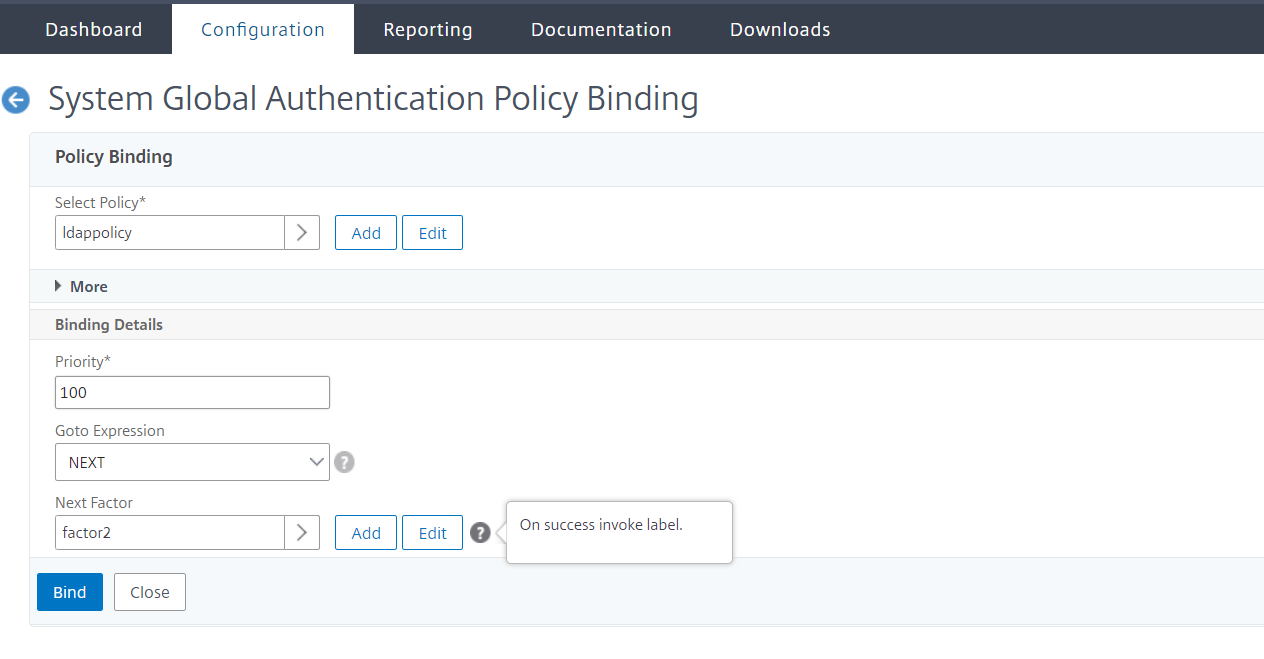
ポリシーバインディングページで 、認証ポリシーを選択し、次のポリシーバインディングパラメータを設定します。
-
次の要因。第 2 レベルの認証ポリシーラベルを選択します。
-
-
-
[完了] をクリックします。
-
NetScaler ADCアプライアンスにログオンして、第2レベルの認証を行います。これで、ユーザーは 2 番目のパスワードを入力できます。両方のパスワードが正しい場合にのみ、ユーザーはNetScaler ADCアプライアンスにアクセスできます。
(注
)2 要素認証用に設定された TACACS は、「TACACSaction」コマンドで有効にしても、認可とアカウンティングをサポートしません。2番目の要素は、認証目的でのみ使用されます。
また、 NetScaler nFactor認証のトピックの「二要素認証 」を参照してください。