
NetScaler VPX展開用Azureタグ
Azureクラウドポータルでは、リソースを名前:値のペア(例: Dept: Finance)でタグ付けして、リソースグループ間、およびポータル内でサブスクリプション間でリソースを分類および表示できます。タグ付けは、課金、管理、または自動化のためにリソースを整理する必要がある場合に役立ちます。
Related information
VPX展開におけるAzureタグの仕組み
Azure Cloudに展開されたNetScaler VPXスタンドアロンおよび高可用性インスタンスの場合、Azureタグに関連付けられた負荷分散サービスグループを作成できるようになりました。VPXインスタンスは、Azure仮想マシン(バックエンドサーバー)とネットワークインターフェイス(NIC)、またはその両方を、それぞれのタグで常に監視し、それに応じてサービスグループを更新します。
VPXインスタンスは、タグを使用してバックエンドサーバーの負荷分散を行うサービスグループを作成します。インスタンスは、特定のタグ名とタグ値でタグ付けされたすべてのリソースについてAzure APIをクエリします。割り当てられたポーリング期間(デフォルトでは60秒)に応じて、VPXインスタンスは定期的にAzure APIをポーリングし、VPX GUIで割り当てられたタグ名とタグ値を持つ利用可能なリソースを取得します。適切なタグを持つVMまたはNICが追加または削除されるたびに、ADCはそれぞれの変更を検出し、VMまたはNICのIPアドレスをサービスグループから自動的に追加または削除します。

始める前に
NetScaler負荷分散サービスグループを作成する前に、Azureのサーバーにタグを追加します。タグは、仮想マシンまたはNICのいずれかに割り当てることができます。

Azureタグの追加の詳細については、MicrosoftドキュメントのAzureリソースを整理するためのタグの使用を参照してください。
注:
Azureタグ設定を追加するためのADC CLIコマンドは、数字またはアルファベットで始まり、その他のキーボード文字で始まらないタグ名とタグ値をサポートします。
VPX GUIを使用してAzureタグ設定を追加する方法
VPX GUIを使用してAzureタグクラウドプロファイルをVPXインスタンスに追加すると、インスタンスは指定されたタグを使用してバックエンドサーバーの負荷分散を行うことができます。次の手順に従います。
-
VPX GUIで、Configuration > Azure > Cloud Profile に移動します。
-
「追加」をクリックしてクラウドプロファイルを作成します。クラウドプロファイルウィンドウが開きます。
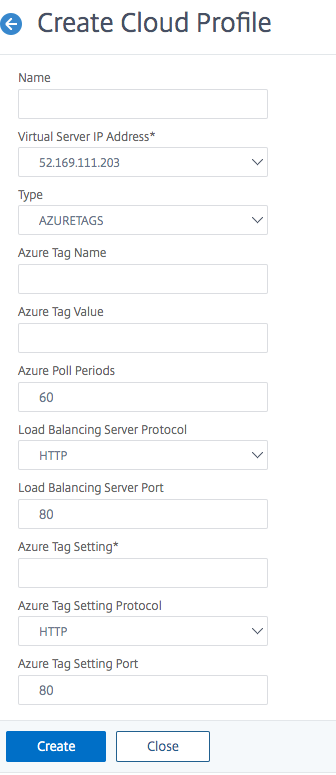
-
次のフィールドに値を入力します。
-
名前: プロファイルの名前を追加します
-
仮想サーバーIPアドレス: 仮想サーバーIPアドレスは、VPXインスタンスで利用可能な空きIPアドレスから自動入力されます。詳細については、Azureポータルを使用して仮想マシンに複数のIPアドレスを割り当てるを参照してください。
-
タイプ: メニューからAZURETAGSを選択します。
-
Azureタグ名: AzureポータルでVMまたはNICに割り当てた名前を入力します。
-
Azureタグ値: AzureポータルでVMまたはNICに割り当てた値を入力します。
-
Azureポーリング期間: デフォルトでは、ポーリング期間は60秒で、これが最小値です。要件に応じて変更できます。
-
ロードバランシングサーバープロトコル: ロードバランサーがリッスンするプロトコルを選択します。
-
ロードバランシングサーバーポート: ロードバランサーがリッスンするポートを選択します。
-
Azureタグ設定: このクラウドプロファイル用に作成されるサービスグループの名前。
-
Azureタグ設定プロトコル: バックエンドサーバーがリッスンするプロトコルを選択します。
-
Azureタグ設定ポート: バックエンドサーバーがリッスンするポートを選択します。
-
-
「作成」をクリックします。
ロードバランサー仮想サーバーとサービスグループは、タグ付けされたVMまたはNIC用に作成されます。ロードバランサー仮想サーバーを表示するには、VPX GUIからTraffic Management > Load Balancing > Virtual Serversに移動します。
VPX CLIを使用してAzureタグ設定を追加する方法
Azureタグのクラウドプロファイルを作成するには、NetScaler CLIで次のコマンドを入力します。
add cloud profile `<profile name>` -type azuretags -vServerName `< vserver name>` -serviceType HTTP -IPAddress `<vserver IP address>` -port 80 -serviceGroupName `<service group name>` -boundServiceGroupSvcType HTTP -vsvrbindsvcport 80 -azureTagName `<Azure tag specified on Azure portal>` -azureTagValue `<Azure value specified on the Azure portal>` -azurePollPeriod 60
重要:
すべての設定を保存する必要があります。そうしないと、インスタンスを再起動した後に設定が失われます。
save configと入力します。
例1: 「myTagName/myTagValue」ペアでタグ付けされたすべてのAzure VM/NICのHTTPトラフィック用のクラウドプロファイルのサンプルコマンドを次に示します。
add cloud profile MyTagCloudProfile -type azuretags -vServerName MyTagVServer -serviceType HTTP -IPAddress 40.115.116.57 -port 80 -serviceGroupName MyTagsServiceGroup -boundServiceGroupSvcType HTTP -vsvrbindsvcport 80 -azureTagName myTagName -azureTagValue myTagValue -azurePollPeriod 60
 Done
クラウドプロファイルを表示するには、
show cloudprofileと入力します。
例2: 次のCLIコマンドは、例1で新しく追加されたクラウドプロファイルに関する情報を表示します。
show cloudprofile
 1)    Name:  MyTagCloudProfile Type:  azuretags         VServerName:  MyTagVServer ServiceType:  HTTP       IPAddress:  52.178.209.133 Port:  80                ServiceGroupName:  MyTagsServiceGroup BoundServiceGroupSvcType:  HTTP
      Vsvrbindsvcport:  80     AzureTagName:  myTagName AzureTagValue:  myTagValue AzurePollPeriod:  60     GraceFul:  NO            Delay:  60
クラウドプロファイルを削除するには、「rm cloud profile
<cloud profile name>」と入力します。
例3: 次のコマンドは、例1で作成されたクラウドプロファイルを削除します。
> rm cloudprofile MyTagCloudProfile
   Done
トラブルシューティング
問題: ごくまれに、「rm cloud profile」CLIコマンドが、削除されたクラウドプロファイルに関連付けられているサービスグループとサーバーを削除できない場合があります。これは、削除されるクラウドプロファイルのポーリング期間が終了する数秒前にコマンドが発行された場合に発生します。
解決策: 残りのサービスグループごとに次のCLIコマンドを入力して、残りのサービスグループを手動で削除します。
#> rm servicegroup <serviceGroupName>
また、残りのサーバーごとに次のCLIコマンドを入力して、残りのサーバーをそれぞれ削除します。
#> rm server <name>
問題: CLIを使用してAzureタグ設定をVPXインスタンスに追加すると、ウォームリブート後もrain_tagsプロセスがHAペアノードで実行され続けます。
解決策:ウォームリブート後、セカンダリノードでプロセスを手動で終了します。セカンダリHAノードのCLIからシェルプロンプトに終了します。
#> shell
rain_tagsプロセスを強制終了するには、次のコマンドを使用します。
# PID=`ps -aux | grep rain_tags | awk '{print $2}'`; kill -9 $PID
問題:バックエンドサーバーが正常であるにもかかわらず、VPXインスタンスによって到達不能と報告され、DOWN状態になることがあります。 解決策:VPXインスタンスがバックエンドサーバーに対応するタグ付けされたIPアドレスに到達できることを確認してください。タグ付けされたNICの場合、これはNICのIPアドレスです。一方、タグ付けされたVMの場合、これはVMのプライマリIPアドレスです。VM/NICが別のAzure VNetにある場合は、VNetピアリングが有効になっていることを確認してください。