
Azure tags for NetScaler VPX deployment
In the Azure cloud portal, you can tag resources with a name: value pair (such as Dept: Finance) to categorize and view resources across resource groups and, within the portal, across subscriptions. Tagging is helpful when you need to organize resources for billing or management or automation.
How Azure tag works for VPX deployment
For NetScaler VPX standalone and high-availability instances deployed on Azure Cloud, now you can create load balancing service groups associated with an Azure tag. The VPX instance constantly monitors Azure virtual machines (back-end servers) and network interfaces (NICs), or both, with the respective tag and updates the service group accordingly.
The VPX instance creates the service group that load balances the back-end servers using tags. The instance queries the Azure API for all resources that are tagged with a particular tag name and tag value. Depending on the assigned poll period (by default 60 seconds), the VPX instance periodically polls the Azure API and retrieves the resources available with the tag name and tag values assigned in the VPX GUI. Whenever a VM or NIC with the appropriate tag is added or deleted, the ADC detects the respective change and adds or deletes the VM or NIC IP address from the service group automatically.

Before you begin
Before creating NetScaler load balancing service groups, add a tag to the servers in Azure. You can assign the tag to either the virtual machine or to NIC.

For more information about adding Azure tags, see Microsoft document Use tags to organize your Azure resources.
Note:
ADC CLI commands to add Azure tag settings support tag names and tag values that start only with numerals or alphabets and not other keyboard characters.
How to add Azure tag settings by using VPX GUI
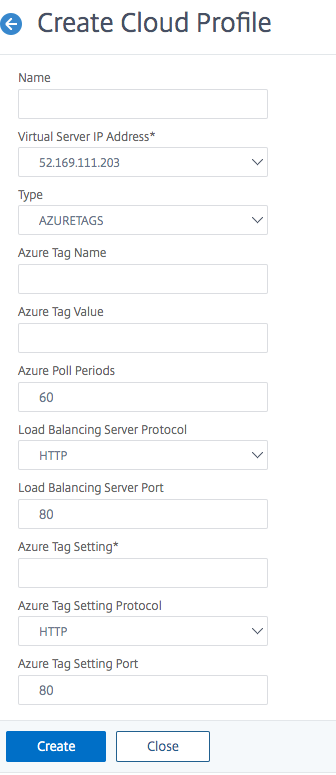
You can add the Azure tag cloud profile to a VPX instance by using the VPX GUI so that the instance can load balance the back-end servers using the specified tag. Follow these steps:
-
From the VPX GUI, go to Configuration > Azure > Cloud Profile.
-
Click Add to create a cloud profile. The cloud profile window opens.
-
Enter values for the following fields:
-
Name: Add a name for your profile
-
Virtual Server IP Address: The virtual server IP address is auto-populated from the free IP address available to the VPX instance. For more information, see Assign multiple IP addresses to virtual machines using the Azure portal.
-
Type: From the menu, select AZURETAGS.
-
Azure Tag Name: Enter the name that you have assigned to the VMs or NICs in the Azure portal.
-
Azure Tag Value: Enter the value that you have assigned to the VMs or NICs in Azure portal.
-
Azure Poll Periods: By default the poll period is 60 seconds, which is the minimum value. You can change it according to your requirement.
-
Load Balancing Server Protocol: Select the protocol that your load balancer listens on.
-
Load Balancing Server Port: Select the port that your load balancer listens on.
-
Azure tag setting: The name of the service group that will be created for this cloud profile.
-
Azure Tag Setting Protocol: Select the protocol that your back-end servers listen on.
-
Azure Tag Setting Port: Select the port that your back-end servers listen on.
-
-
Click Create.
A load-balancer virtual server and a service group are created for the tagged VMs or NICs. To see the load balancer virtual server, from the VPX GUI, navigate to Traffic Management > Load Balancing > Virtual Servers.
How to add Azure tag settings by using VPX CLI
Type the following command on NetScaler CLI to create a cloud profile for Azure tags.
add cloud profile `<profile name>` -type azuretags -vServerName `< vserver name>` -serviceType HTTP -IPAddress `<vserver IP address>` -port 80 -serviceGroupName `<service group name>` -boundServiceGroupSvcType HTTP -vsvrbindsvcport 80 -azureTagName `<Azure tag specified on Azure portal>` -azureTagValue `<Azure value specified on the Azure portal>` -azurePollPeriod 60
Important:
You must save all configurations; otherwise, the configurations are lost after you restart the instance. Type
save config.
Example 1: Here’s a sample command for a cloud profile for HTTP traffic of all Azure VMs/NICs tagged with the “myTagName/myTagValue” pair:
add cloud profile MyTagCloudProfile -type azuretags -vServerName MyTagVServer -serviceType HTTP -IPAddress 40.115.116.57 -port 80 -serviceGroupName MyTagsServiceGroup -boundServiceGroupSvcType HTTP -vsvrbindsvcport 80 -azureTagName myTagName -azureTagValue myTagValue -azurePollPeriod 60
 Done
To display the cloud profile, type
show cloudprofile.
Example 2: The following CLI command prints information about the newly added cloud profile in example 1.
show cloudprofile
 1)    Name:  MyTagCloudProfile Type:  azuretags         VServerName:  MyTagVServer ServiceType:  HTTP       IPAddress:  52.178.209.133 Port:  80                ServiceGroupName:  MyTagsServiceGroup BoundServiceGroupSvcType:  HTTP
      Vsvrbindsvcport:  80     AzureTagName:  myTagName AzureTagValue:  myTagValue AzurePollPeriod:  60     GraceFul:  NO            Delay:  60
To remove a cloud profile, type rm cloud profile
<cloud profile name>
Example 3: The following command removes the cloud profile created in example 1.
> rm cloudprofile MyTagCloudProfile
   Done
Troubleshooting
Issue: In very rare cases, the "rm cloud profile" CLI command might fail to remove service group and servers associated with the deleted cloud profile. This happens when the command is issued seconds before the poll period of the cloud profile being deleted elapses.
Solution: Manually delete the remaining service groups by entering the following CLI command for each of the remaining service groups:
#> rm servicegroup <serviceGroupName>
Also remove each of the remain servers by entering the following CLI command for each of the remaining servers:
#> rm server <name>
Issue: If you add an Azure tag setting to a VPX instance by using CLI, the rain_tags process continues to run on an HA pair node after a warm reboot.
Solution: Manually terminate the process on the secondary node after a warm reboot. From the CLI of the secondary HA node exit to the shell prompt:
#> shell
Use the following command to kill the rain_tags process:
# PID=`ps -aux | grep rain_tags | awk '{print $2}'`; kill -9 $PID
Issue: Back-end servers might not be reachable and reported as DOWN by the VPX instance, in spite of being healthy. Solution: Make sure that the VPX instance can reach the tagged IP address corresponding to the back-end server. For a tagged NIC, this is the NIC IP address; whereas for a tagged VM, this is the VM’s primary IP address. If the VM/NIC resides on a different Azure VNet, make sure that VNet peering is enabled.