
Configure a NetScaler VPX instance to use SR-IOV network interface
Note:
Support for SR-IOV interfaces in a high availability setup is available from NetScaler release 12.0 57.19 onwards.
After you have created a NetScaler VPX instance on AWS, you can configure the virtual appliance to use SR-IOV network interfaces, by using the AWS CLI.
In all NetScaler VPX models, except NetScaler VPX AWS Marketplace Editions of 3G and 5G, SR-IOV is not enabled in the default configuration of a network interface.
Before you start the configuration, read the following topics:
This section includes the following topics:
-
Change the Interface Type to SR-IOV
-
Configure SR-IOV on a High Availability Setup
Change the interface type to SR-IOV
You can run the show interface summary command to check the default configuration of a network interface.
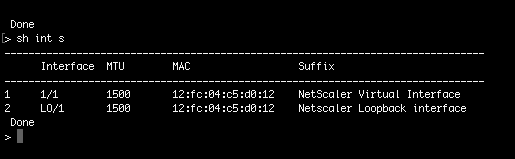
Example 1: The following CLI screen capture shows the configuration of a network interface where SR-IOV is enabled by default on NetScaler VPX AWS Marketplace Editions of 3G and 5G.

Example 2: The following CLI screen capture shows the default configuration of a network interface where SR-IOV is not enabled.
For more information about changing the interface type to SR-IOV, see
<http://docs.aws.amazon.com/AWSEC2/latest/UserGuide/sriov-networking.html>
To change the interface type to SR-IOV
-
Shut down the NetScaler VPX instance running on AWS.
-
To enable SR-IOV on the network interface, type the following command in the AWS CLI.
$ aws ec2 modify-instance-attribute --instance-id \<instance\_id\> --sriov-net-support simple -
To check if SR-IOV has been enabled, type the following command in the AWS CLI.
$ aws ec2 describe-instance-attribute --instance-id \<instance\_id\> --attribute sriovNetSupportExample 3: Network interface type changed to SR-IOV, by using the AWS CLI. If SR-IOV is not enabled, value for SriovNetSupport is absent.Example 4: In the following example, SR-IOV support is not enabled.
-
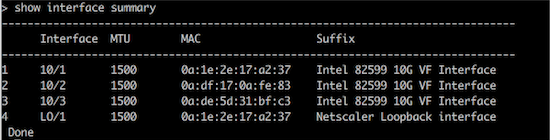
Power on the VPX instance. To see the changed status of the network interface, type "show interface summary" in the CLI.Example 5: The following screen capture shows the network interfaces with SR-IOV enabled. The interfaces 10/1, 10/2, 10/3 are SR-IOV enabled.
These steps complete the procedure to configure VPX instances to use SR-IOV network interfaces.
Configure SR-IOV on a high availability setup
High availability is supported with SR-IOV interfaces from NetScaler release 12.0 build 57.19 onwards.
If the high availability setup was deployed manually or by using the Citrix CloudFormation template for NetScaler version 12.0 56.20 and lower, the IAM role attached to the high availability setup must have the following privileges:
-
ec2:DescribeInstances
-
ec2:DescribeNetworkInterfaces
-
ec2:DetachNetworkInterface
-
ec2:AttachNetworkInterface
-
ec2:StartInstances
-
ec2:StopInstances
-
ec2:RebootInstances
-
autoscaling:*
-
sns:*
-
sqs:*
-
IAM:SimulatePrincipalPolicy
-
IAM:GetRole
By default, the Citrix CloudFormation template for NetScaler version 12.0 57.19 automatically adds the required privileges to the IAM role.
Note:
A high availability setup with SR-IOV Interfaces takes around 100 seconds of downtime.
Related resources:
For more information about IAM roles, see AWS documentation.