
Post authentication policies
Important:
Endpoint Analysis is intended to analyze the user device against pre-determined compliance criteria and does not enforce or validate the security of end-user devices. It is recommended to use endpoint security systems to protect devices from local admin attacks.
A post-authentication policy is a set of generic rules that the user device must meet to keep the session active. If the policy fails, the connection to NetScaler Gateway ends. When you configure the post-authentication policy, you can configure any setting for user connections that can be made conditional.
You use session policies to configure post-authentication policies. First, you create the users to which the policy applies. Then, you add the users to a group. Next, you bind session, traffic policies, and intranet applications to the group.
You can also specify groups to be authorization groups. This type of group allows you to assign users to groups based on a client device check expression within the session policy.
You can also configure a post-authentication policy to put users in a quarantine group if the user device does not meet the requirements of the policy. A simple policy includes a client device check expression and a message. When users are in the quarantine group, users can log on to NetScaler Gateway; however, they receive limited access to network resources.
You cannot create an authorization group and a quarantine group by using the same session profile and policy. The steps for creating the post-authentication policy are the same. When you create the session policy, you select either an authorization group or a quarantine group. You can create two session policies and bind each policy to the group.
Post-authentication policies are also used with SmartAccess. For more information about SmartAccess, see Configuring SmartAccess.
Note:
This functionality works only with the Citrix Secure Access client. If users log on with Citrix Workspace app, the Endpoint Analysis scan runs at logon only.
Configure a post-authentication policy
You use a session policy to configure a post-authentication policy. A simple policy includes a client device check expression and a message.
To configure a post-authentication policy by using the GUI
-
Expand NetScaler Gateway > Policies and then click Session.
-
In the details pane, on the Policies tab, click Add.
-
In Name, type a name for the policy.
-
Next to Request Profile, click New.
-
In Name, type a name for the profile.
-
On the Security tab, click Advanced Settings.
-
Under Client Security, click Override Global, and then click New.
-
Configure the client device check expression, and then click Create.
-
Under Client Security, in Quarantine Group, select a group.
-
In Error Message, type the message you want users to receive if the post-authentication scan fails.
-
Under Authorization Groups, click Override Global, select a group, click Add, click OK, and then click Create.
-
In the Create Session Policy dialog box, next to Named Expressions, select General, select True value, click Add Expression, click Create, and then click Close.
Configure the frequency of post-authentication scans
You can configure NetScaler Gateway to run the post-authentication policy at specified intervals. For example, you configured a client device check policy and want it to run on the user device every 10 minutes. You can configure this frequency by creating a custom expression within the policy.
Note:
The frequency check functionality for post-authentication policies works only with the Citrix Secure Access client. If users log on with Citrix Workspace app, the Endpoint Analysis scan runs at logon only.
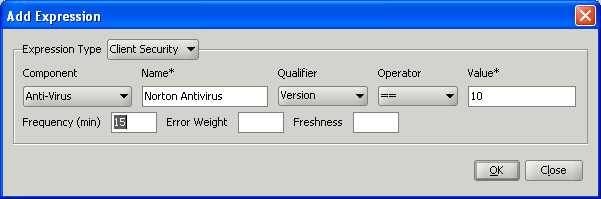
You can set the frequency (in minutes) when you configure the client device check policy. The following figure shows where you can enter a frequency value in the Add Expression dialog box.
Quarantine and authorization groups
When users log on to NetScaler Gateway, you assign them to a group that you configure either on NetScaler Gateway or on an authentication server in the secure network. If a user fails a post-authentication scan, you can assign the user to a restricted group, called a quarantine group, which restricts access to network resources.
You can also use authorization groups to restrict user access to network resources. For example, you might have a group of contract personnel having access only to your email server and a file share. When user devices pass the device check requirements that you defined on NetScaler Gateway, users can become members of groups dynamically.
You use either global settings or session policies to configure quarantine and authorization groups that are bound to a user, group, or virtual server. You can assign users to groups based on a client device check expression within the session policy. When the user is a member of a group, NetScaler Gateway applies the session policy based on group membership.
Configuring Quarantine Groups
When you configure a quarantine group, you configure the client device check expression using the Security Settings - Advanced Settings dialog box within a session profile.
To configure the client device check expression for a quarantine group
-
Navigate to NetScaler Gateway > Policies and then click Session.
-
In the details pane, on the Policies tab, click Add.
-
In Name, type a name for the policy.
-
Next to Request Profile, click New.
-
In Name, type a name for the profile.
-
On the Security tab, click Advanced Settings.
-
Under Client Security, click Override Global, and then click New.
-
In the Client Expression dialog box, configure the client device check expression and, then click Create.
-
In Quarantine Group, select the group.
-
In Error Message, type a message that describes the problem for users and then click Create.
-
In the Create Session Policy dialog box, next to Named Expressions, select General, select True value, click Add Expression.
-
Click Create, and then click Close.
After you create the session policy, bind it to a user, group, or virtual server.
Note:
If the Endpoint Analysis scan fails and the user is put in the quarantine group, the policies that are bound to the quarantine group are effective only if there are no policies bound directly to the user that have an equal or lower priority number than the policies bound to the quarantine group.
To configure a global quarantine group
-
Expand NetScaler Gateway and then click Global Settings.
-
In the details pane, under Settings, click Change global settings.
-
On the Security tab, click Advanced Settings.
-
In Client Security, configure the client device check expression.
-
In Quarantine Group, select the group.
-
In Error Message, type a message that describes the problem for users, and then click OK.