
Optimizing NetScaler Gateway VPN split tunnel for Office365
As organizations are adapting to the remote work options more rapidly than before, the remote access infrastructure must be optimized to facilitate seamless connectivity during increased traffic load conditions.
Important:
Microsoft recommends excluding traffic destined to key Office 365 services from the scope of VPN connection by configuring split tunneling using published IPv4 and IPv6 address ranges. For best performance and most efficient use of VPN capacity, traffic to the dedicated IP address ranges associated with the following applications must be routed directly, outside of the VPN tunnel:
-
Office 365 Exchange Online
-
SharePoint Online
-
Microsoft Teams (referred to as Optimize category in Microsoft documentation)
Refer to Microsoft guidance for more detailed information about this recommendation.
Microsoft’s recommendation in NetScaler Gateway is achieved by routing the Microsoft provided list of IP addresses directly to the internet for the O365 traffic by using the split tunnel reverse configuration.
The configuration involves the following that can be performed manually by using the GUI or the CLI:
-
Configure split tunnel for reverse configuration. For details, see Split tunneling options.
-
Configure intranet applications for user access to resources.
Configuration by using the GUI
To configure split tunneling by using the GUI
-
On the Configuration tab, Navigate to NetScaler Gateway > Global Settings.
-
In the details pane, under Settings, click Change Global Settings.
-
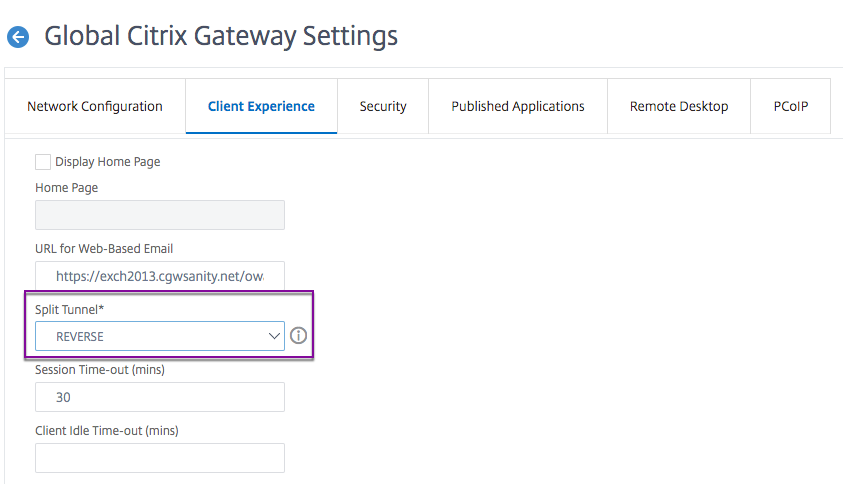
On the Client Experience tab, in Split Tunnel, select Reverse.
-
Click OK.
To create a VPN intranet application by using the GUI
-
On the Configuration tab, Navigate to Citrix Gateway > Global Settings.
-
In the details pane, under Intranet Applications, click the link.
-
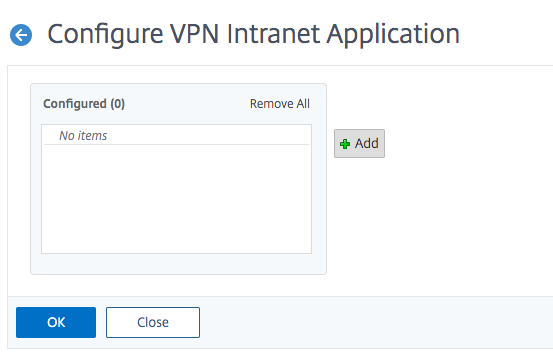
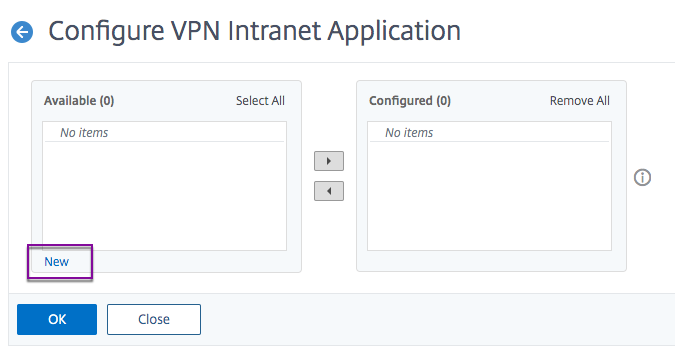
In the Configure VPN Intranet Application page, click Add, and then click New.
-
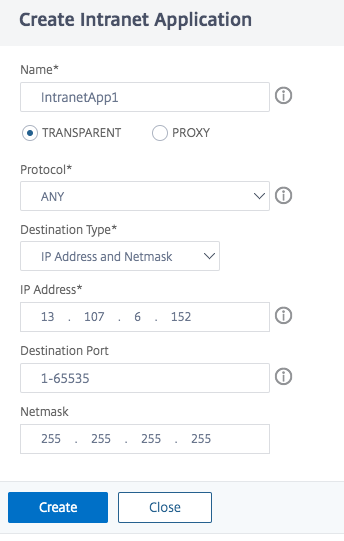
In Name, type a name for the profile.
-
In Protocol, select the protocol that applies to the network resource.
-
In Destination Type, select IP Address and Netmask.
-
In IP Address, enter the IP address that must be routed directly to the internet for O365 traffic. For the list of IP address, see List of IP addresses.
-
In Netmask, enter the netmask IP address.
-
Click Create and then click Close.
Note: Repeat this procedure for all the IP addresses.
Configuration by using the CLI
-
To set split tunnel to reverse, at the command prompt, type;
set vpn parameter -splitTunnel REVERSE
-
To add VPN intranet application, at the command prompt, type;
add vpn intranetApplication intranetapp1 ANY 13.107.6.152 -netmask 255.255.255.254 -destPort 1-65535 -interception TRANSPARENT
Note: Repeat this procedure for all the IP addresses.
-
To bind the intranet application, at the command prompt type;
bind vpn global -intranetApplication intranetapp1
List of IP addresses of Office 365 services (EXO, SPO, and Microsoft Teams)
Reference: IP addresses.
Note from Microsoft:
As part of Microsoft's response to the COVID-19 situation, Microsoft has declared a temporary moratorium on some planned URL and IP address changes. This moratorium is intended to provide customer IT teams with confidence and simplicity in implementing recommended network optimizations for work-from-home Office 365 scenarios. From March 24, 2020 through June 30, 2020 this moratorium will halt changes for key Office 365 services (Exchange Online, SharePoint Online, and Microsoft Teams) to IP ranges and URLs included in the Optimize category.
IPv4 address range
-
104.146.128.0/17
-
13.107.128.0/22
-
13.107.136.0/22
-
13.107.18.10/31
-
13.107.6.152/31
-
13.107.64.0/18
-
131.253.33.215/32
-
132.245.0.0/16
-
150.171.32.0/22
-
150.171.40.0/22
-
191.234.140.0/22
-
204.79.197.215/32
-
23.103.160.0/20
-
40.104.0.0/15
-
40.108.128.0/17
-
40.96.0.0/13
-
52.104.0.0/14
-
52.112.0.0/14
-
52.96.0.0/14
-
52.120.0.0/14
IPv6 address range
-
2603:1006::/40
-
2603:1016::/36
-
2603:1026::/36
-
2603:1036::/36
-
2603:1046::/36
-
2603:1056::/36
-
2603:1096::/38
-
2603:1096:400::/40
-
2603:1096:600::/40
-
2603:1096:a00::/39
-
2603:1096:c00::/40
-
2603:10a6:200::/40
-
2603:10a6:400::/40
-
2603:10a6:600::/40
-
2603:10a6:800::/40
-
2603:10d6:200::/40
-
2620:1ec:4::152/128
-
2620:1ec:4::153/128
-
2620:1ec:c::10/128
-
2620:1ec:c::11/128
-
2620:1ec:d::10/128
-
2620:1ec:d::11/128
-
2620:1ec:8f0::/46
-
2620:1ec:900::/46
-
2620:1ec:a92::152/128
-
2620:1ec:a92::153/128
-
2a01:111:f400::/48
-
2620:1ec:8f8::/46
-
2620:1ec:908::/46
-
2a01:111:f402::/48