
EPA scan classification types on Windows client
Important:
Endpoint Analysis is intended to analyze the user device against pre-determined compliance criteria and does not enforce or validate the security of end-user devices. It is recommended to use endpoint security systems to protect devices from local admin attacks.
The following new classification types are added to the EPA scan for missing patches. The EPA scan fails if the client has any of the following missing patches.
-
Application
-
Connectors
-
CriticalUpdates
-
DefinitionUpdates
-
DeveloperKits
-
FeaturePacks
-
Guidance
-
SecurityUpdates
-
ServicePacks
-
Tools
-
UpdateRollups
-
Updates
Notes:
-
Earlier, the EPA scans for missing patches were done on the severity levels; Critical, Important, Moderate, and Low on the Windows client.
-
If you are using Citrix Secure Access for Windows 23.8.1.1 and above, the scan
CLIENT.SYSTEM('WIN-UPDATE_SCAN-TIME')is limited to client machines that have the automatic updates enabled. If the automatic updates are disabled, this scan returns a different outcome.
Configure the EPA scan classification types by using the GUI
-
Navigate to NetScaler Gateway > Policies > Preauthentication.
-
Create a preauthentication policy or edit an existing policy.
-
Click the OPSWAT EPA Editor link.
-
In Expression Editor, select Windows > Windows Update.
-
In Shouldn’t have missing patch of following windows update classification type, select the classification type for the missing patches.
-
Click OK.
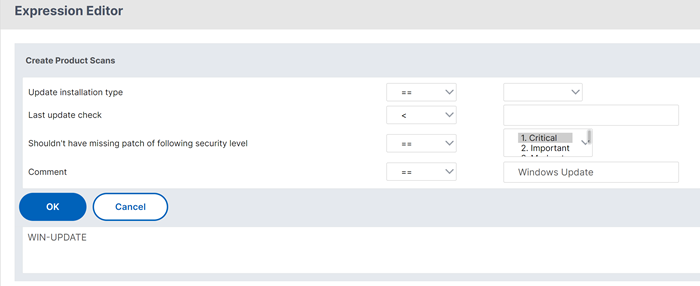
Customers can upgrade to the OPSWAT version 4.3.2744.0s to use these options.
Telemetry data scan by EPA client for Windows
Starting from the EPA client for Windows release 24.8.1.19, the EPA client sends application events and metrics to the TAP server.
Points to note:
-
Telemetry sent by the EPA client is sent only to TAP, and not to any third-party vendor. Also, the EPA client does not share any personal information of the user to TAP.
-
To disable telemetry, administrators must contact Citrix Support.
-
The EPA client collects product configuration and usage data to enhance client experience.
Data collection
TAP collects the following metadata and telemetry logs whenever the EPA scans are executed:
-
Number of unique end devices per customer split based on geo location (country and continent)
-
Platform of the end devices (Windows)
-
EPA client version
-
Client installation type (local or admin)
-
Authentication type (pre-authentication or post-authentication EPA)
-
Scan status (successful or failed scans and errors while scanning)
-
Number of customers using different types of scans (device cert scans, OPSWAT scans, OS version check scans)
-
Number of customers using EPA client with on-premises NetScaler Gateway
References
-
For details about the Windows server update services classification GUIDs, see Windows server updates.
-
For the description of the Microsoft software updates terminology, see Microsoft software updates.