
Enable DTLS 1.2 protocol on NetScaler Gateway
NetScaler Gateway now supports the DTLS 1.2 protocol, the latest security standard, to improve security and protection for back-end connections. Starting from release 14.1 build 47.46, you can configure NetScaler Gateway to use DTLS 1.2 to secure the connection between NetScaler Gateway and VDA.
Configure DTLS 1.2 by using the GUI
-
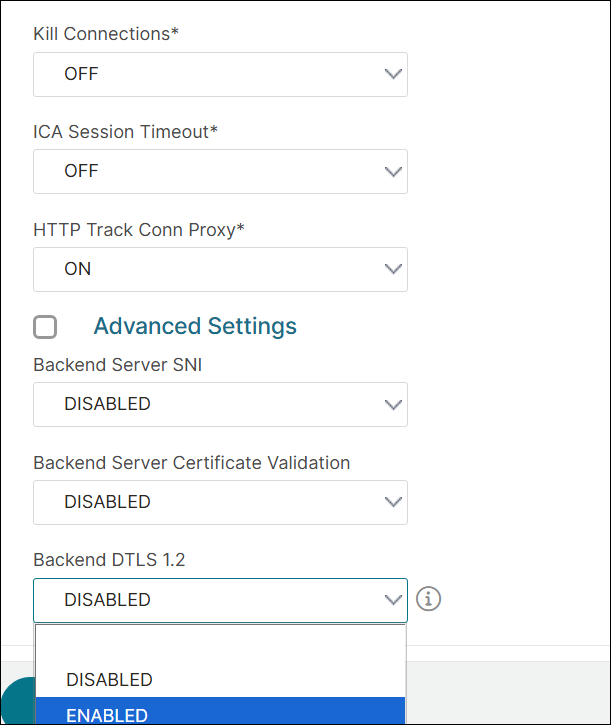
Navigate to NetScaler Gateway -> Global Settings -> Change Global Settings.
-
On the Global NetScaler Gateway Settings page, select ENABLED in the Backend DTLS 1.2 menu and click OK.
Configure DTLS 1.2 by using the CLI
To enable the DTLS 1.2 for the back-end connections, at the command prompt, type:
set vpn parameter -backenddtls12 ENABLED
To disable the DTLS 1.2 for the back-end connections, at the command prompt, type:
set vpn parameter -backenddtls12 DISABLED
 unset vpn parameter -backendDtls12
Verify DTLS 1.2 encryption status
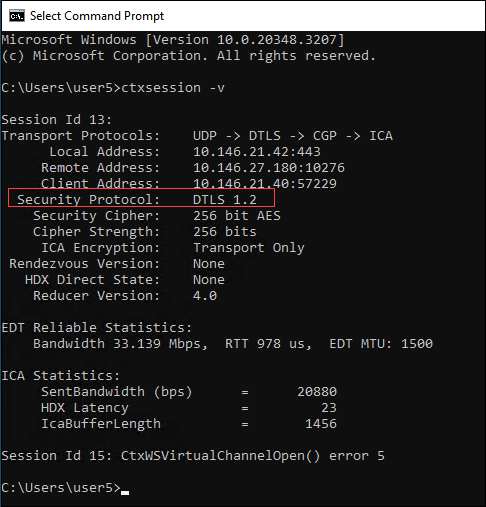
Check the status of DTLS 1.2 encryption using the following command:
sh vpn parameter - Backend DTLS 1.2: DISABLED
Compatibility matrix
The following table provides a compatibility matrix for VDA platforms that support DTLS 1.2 and DTLS 1.2 with HDX Insight, ensuring secure end-to-end connections between NetScaler Gateway and VDA.
| Supported platforms | DTLS 1.2 | DTLS 1.2 with HDX Insight |
|---|---|---|
| Windows | 2407 and later | 2503 and later |
| Linux | 2411 and later | 2411 and later |
| macOS | 2507 and later | 2507 and later |
Starting from NetScaler Gateway release 14.1 build 56.x, VDA for macOS supports DTLS 1.2 and DTLS 1.2 with HDX Insight provided Secure HDX is configured on Delivery Controller or Citrix Studio. For details about configuring Secure HDX, see Secure HDX™.
Limitations
DTLS 1.2 is not supported in a double-hop topology.