Restrict access to NetScaler Gateway for members of one Active Directory group
NetScaler Gateway supports two methods of restricting logon access.
-
LDAP search filter: Restricts logon access to NetScaler Gateway only to the user names that match the LDAP search filter (for example, Active Directory group membership).
-
NetScaler Gateway session policy: Restricts logon access to NetScaler Gateway only to users from groups included in session policy or profile. This method supports multiple Active Directory groups.
LDAP search filter method
Overview
When a user enters the credentials on the logon page of the NetScaler Gateway virtual server and presses ENTER, the appliance first searches the Active Directory (LDAP) for the user name. If an LDAP Search Filter is not defined in the LDAP policy or the server, then the appliance searches all Active Directory user names for a match. Once a match is found, the appliance then pulls the user’s full Distinguished Name (DN) and uses the user’s DN and password to authenticate to the Active Directory.
If an LDAP Search Filter is defined, then only user names that match the LDAP Search Filter are searched for a user name match. For example, if the LDAP Search Filter is constructed to only search members of an Active Directory group, then the user name entered by the user must match the members of the group.
Prerequisites
The NetScaler Gateway virtual server must be configured for LDAP authentication.
Steps to configure an LDAP Search Filter for members of one Active Directory group
-
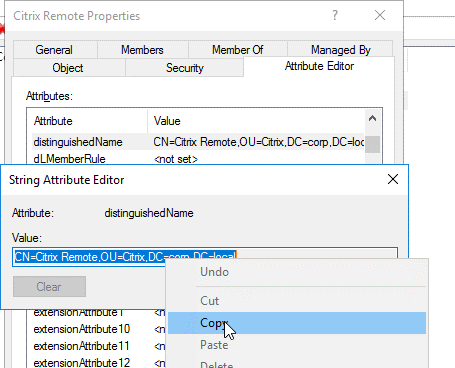
Determine the Active Directory Group that has access permission, and get its full Distinguished Name.An easy way to get the full Distinguished Name of the group is through Active Directory Users and Computers.
-
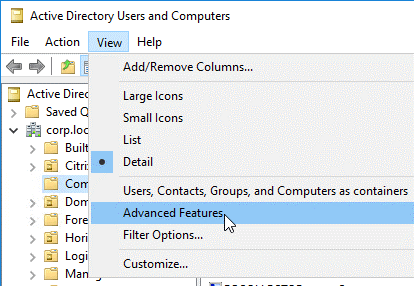
In Active Directory Users and Computers, from the View menu, enable Advanced Features.
-
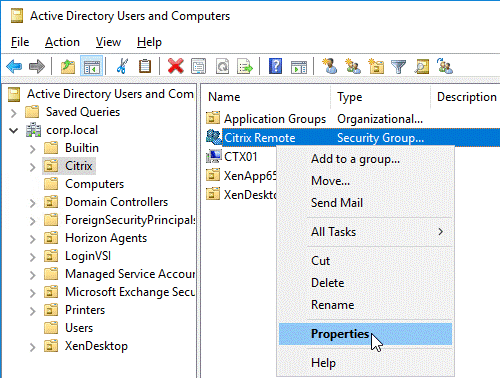
Browse the tree to the group object, right-click, and then and click Properties. Note: You cannot use Find. Instead, you must navigate through the tree to find the object.
-
On the right, switch to the Attribute Editor tab.
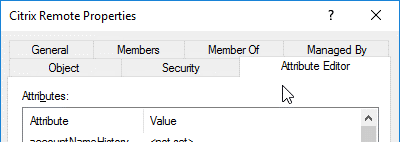 This tab is only visible if Advanced Features is enabled, and if you have not used the Find feature.
 -
Scroll down to distinguishedName, double-click it, and then copy it to the clipboard.
-
In the NetScaler Gateway GUI, navigate to NetScaler Gateway > Virtual Servers.
-
Select an existing NetScaler Gateway virtual server and click Edit.
-
In the Basic Authentication section, click LDAP Policies.
-
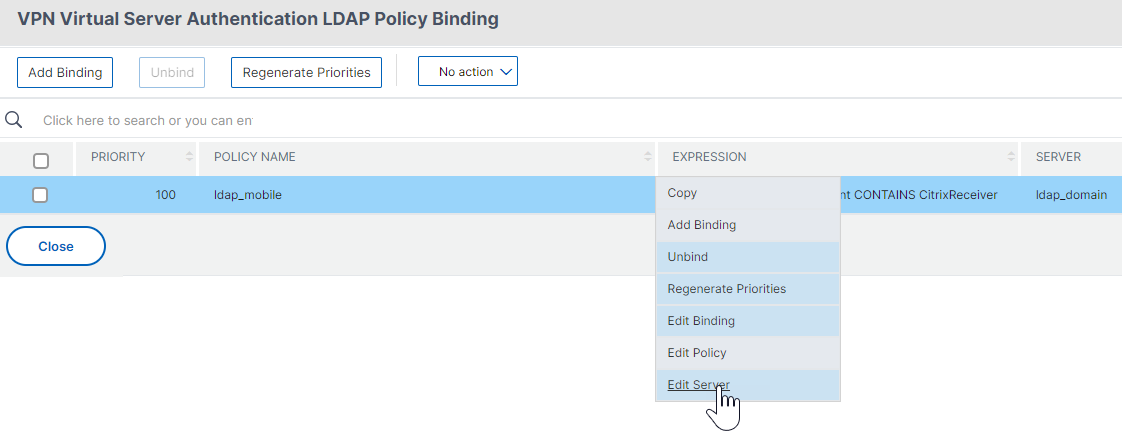
Right-click an existing LDAP policy, and click Edit Server.
-
In the Other Settings section, in the Search Filter field, type in memberOf= and then paste the Distinguished Name of the Active Directory group after the equals sign (=).
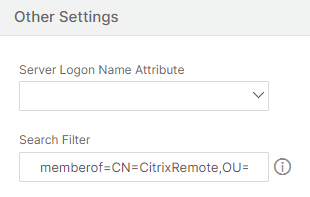 An example Search Filter is the following: memberOf=CN=Citrix® Remote,OU=Citrix,DC=corp,DC=local Note: By default, NetScaler® only searches for user names that are direct members of the Active Directory group. If you want to search nested groups, then add the Microsoft OID:: to the LDAP Search Filter. The OID is inserted between memberOf and =.Example: memberOf:1.2.840.113556.1.4.1941:=CN=Citrix Remote,OU=Citrix,DC=corp,DC=local
 -
Click OK.
NetScaler Gateway session policy method
NetScaler Gateway allows administrators to specify the users from which Active Directory groups are permitted to log on through a session policy or profile. For information about creating and adding users to the Active Directory group, see To create groups on NetScaler Gateway.
Using CLI:
Run the following command to restrict access to NetScaler Gateway for users from a particular group:
set vpn sessionAction sessionActionName -allowedLoginGroups groupName
Using GUI:
-
Navigate to NetScaler Gateway > Policies > Session.
-
In the details pane, click Add.
-
In Name, type a name for the policy.
-
Next to Profile, click Add.
-
In Name, type a name for the profile.
-
Click the Security tab and select Advanced Settings.
-
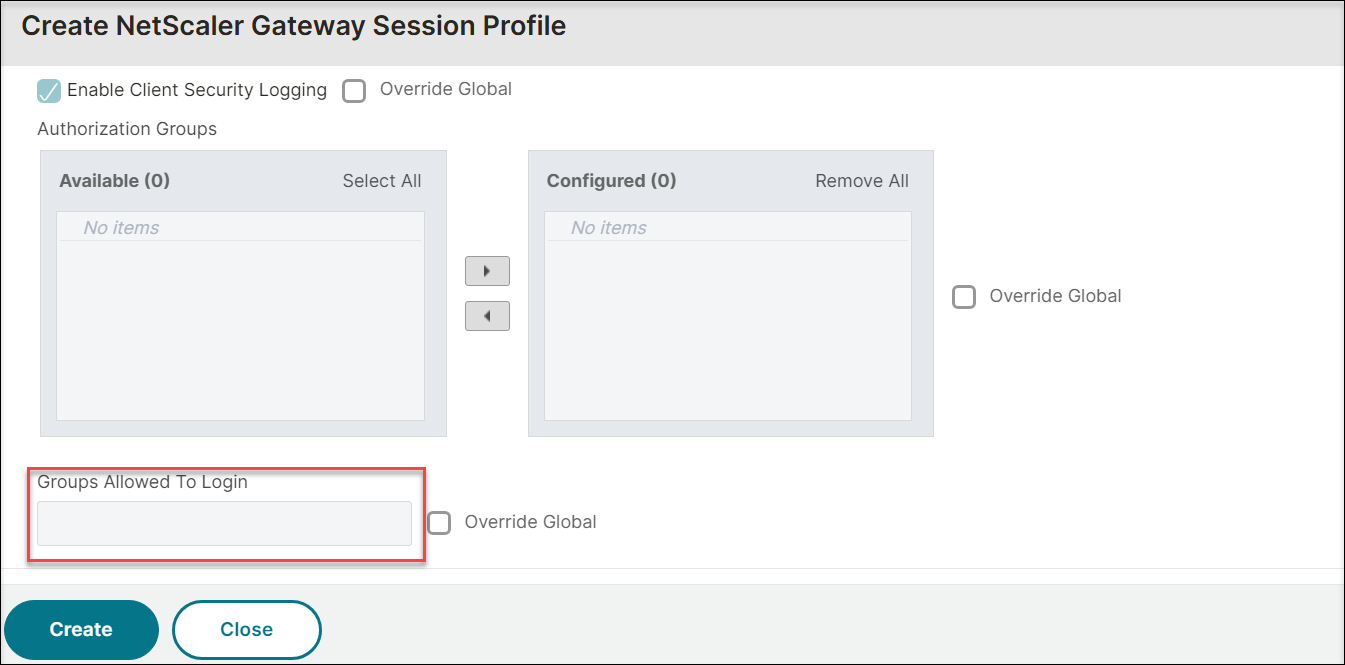
Next to Groups Allowed To Login, select Override Global, and then enter the Active Directory groups to be allowed to log in to NetScaler Gateway.
-
Click Create.
After you create and close the session profile, create the expression for the session policy in the Create NetScaler Gateway Session Policy dialog box.