
Configure client interception
You configure interception rules for user connections on NetScaler Gateway by using Intranet Applications. By default, when you configure the system IP address, a mapped IP address, or a subnet IP address on the appliance, subnet routes are created based on these IP addresses. Intranet applications are created automatically based on these routes and can be bound to a virtual server. If you enable split tunneling, you must define intranet applications for client interception to occur.
You can configure intranet applications by using the GUI. You can bind intranet applications to users, groups, or virtual servers.
If you enable split tunneling and users connect by using WorxWeb or WorxMail, when you configure client interception, you must add the IP addresses for Citrix Endpoint Management™ and your Exchange server. If you do not enable split tunneling, you do not need to configure the Endpoint Management and Exchange IP addresses in Intranet Applications.
For information about split tunneling configuration, see Configure split tunneling.
Configure intranet applications for the Citrix Secure Access™ client
You create intranet applications for user access to resources by defining the following:
-
One IP address
-
A range of IP addresses
-
A host name
When you define an intranet application on NetScaler Gateway, the Citrix Secure Access client for Windows intercepts user traffic that is destined to the resource and sends the traffic through NetScaler Gateway.
When configuring intranet applications, consider the following:
-
When Split Tunnel is ON,
-
Configure the intranet applications.
-
Assign intranet applications to every authentication, authorization, and auditing group.
-
-
When Split Tunnel is OFF,
-
All traffic intercepts through the VPN tunnel.
-
Intranet applications need not be configured.
-
-
When Split Tunnel is REVERSE,
-
Configure the intranet applications. The traffic that is not specified by the intranet applications pass through the VPN tunnel.
-
Assign the intranet applications to be excluded from the VPN to every authentication, authorization, and auditing group.
Important:Interception must be set to TRANSPARENT irrespective of the split tunnel configuration. -
Note:
-
When configuring an intranet application, you must select an interception mode that corresponds to the type of plug-in software used to make connections.
-
You cannot configure an intranet application for both proxy and transparent interception.
To create an intranet application for one IP address
-
On the Configuration tab, in the navigation pane, expand NetScaler Gateway Resources and then click Intranet Applications.
-
In the details pane, click Add.
-
In Name, type a name for the profile.
-
In the Create Intranet Application dialog box, select TRANSPARENT.
-
In Destination Type, select IP Address and Netmask.
-
In Protocol, select the protocol that applies to the network resource.
-
In IP Address, type the IP address.
-
In Netmask, type subnet mask, click Create and then click Close.
To configure an IP address range
If you have multiple servers in your network, such as web, email, and file shares, you can configure a network resource that includes the IP range for network resources. This setting allows users access to the network resources contained in the IP address range.
-
On the Configuration tab, in the navigation pane, expand NetScaler Gateway Resources and then click Intranet Applications.
-
In the details pane, click Add.
-
In Name, type a name for the profile.
-
In Protocol, select the protocol that applies to the network resource.
-
In the Create Intranet Application dialog box, select TRANSPARENT.
-
In Destination Type, select IP Address Range.
-
In IP Start, type the starting IP address and in IP End, type the ending IP address, click Create and then click Close.
To create an intranet application for a host name
-
On the Configuration tab, in the navigation pane, expand NetScaler Gateway Resources and then click Intranet Applications.
-
In the details pane, click Add.
-
In Name, type a name for the profile.
-
In the Create Intranet Application dialog box, select TRANSPARENT.
-
In Destination Type, select hostname.
-
In Protocol, select ANY, click Create, and then click Close.
Important:
-
From release 13.0 build 36.27 and later, the Windows VPN plug-in supports host name (FQDN) based rules for split tunneling. You must upgrade both the NetScaler appliance and the Windows VPN plug-in to release 13.0 build 36.27 or later.
-
Wildcard host names are also supported. For example, if an intranet application with the host name “*.example.com” is configured,
a1.example.com,b2.example.com, and so on gets tunneled. -
Host name-based intranet application works only when you have split tunneling set to ON or REVERSE.
Exclude specific domain traffic from client interception
Citrix Secure Access client intercepts and tunnels hostname-based applications. For example, if client interception is configured for a hostname-based application
*.example.com, then Citrix Secure Access client intercepts all hostname-based application access that ends with example.com.
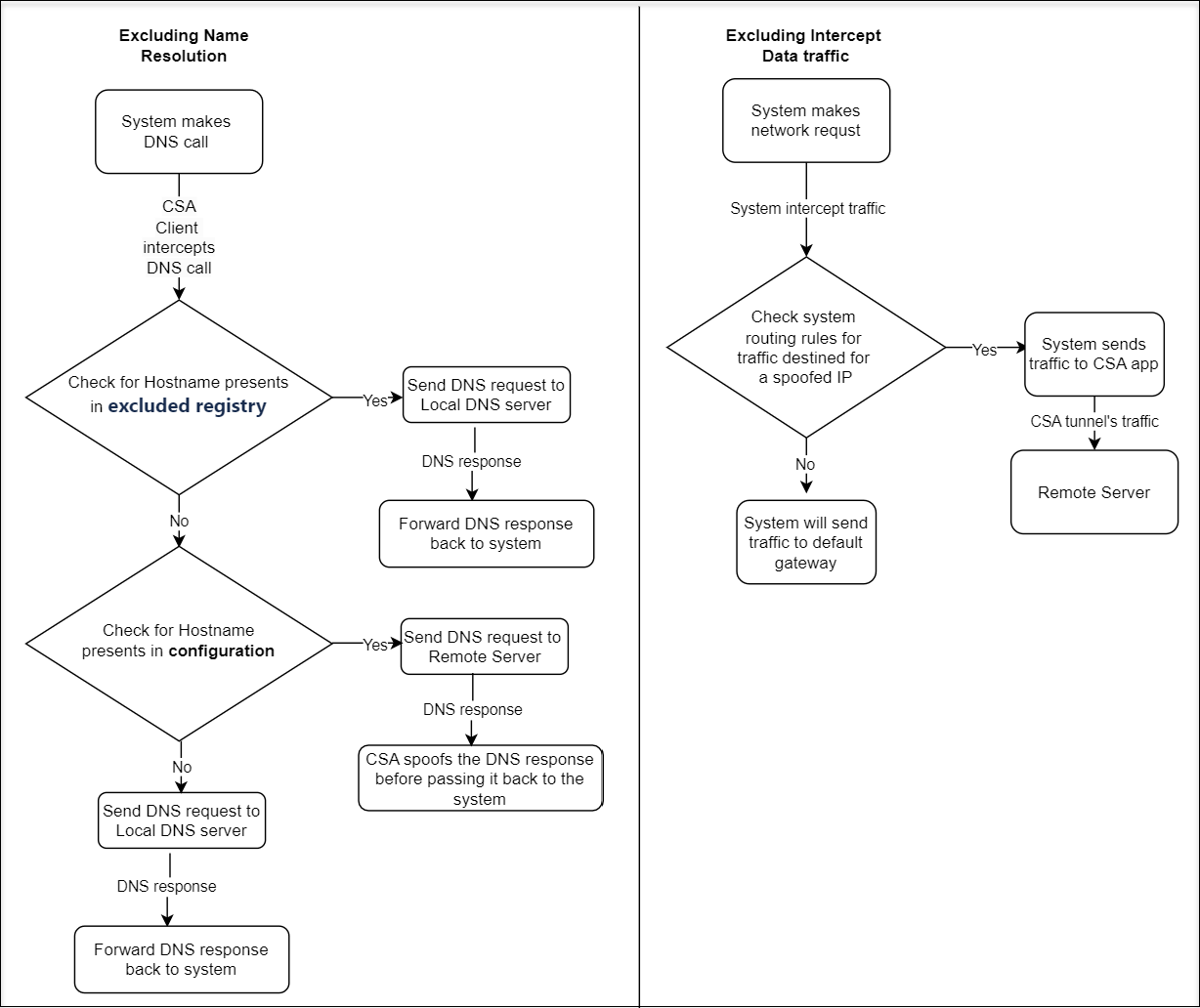
Starting from Citrix Secure Access client for Windows release 24.8.1.15 and macOS/iOS release 24.10.1, you can exclude certain child domains from client interception and tunneling. For example, to exclude
rdp.example.com and ftp.example.com, define these domains in the excluded parameter. Citrix Secure Access client bypasses the DNS call for these domains and sends it to the local DNS server instead of the remote DNS server. It does not intercept or tunnel traffic for these child domains.
The following chart illustrates the process of excluding DNS resolution and client interception by the Citrix Secure Access client.
Important:
-
For the Citrix Secure Access client for Windows, you can configure the exclusion of client interception only using registries in NetScaler® Gateway and using both registries and UI in Secure Private Access.
-
For the Citrix Secure Access client for macOS/iOS, you can configure the exclusion of client interception only using the Secure Private Access UI.
To configure exclusion of client interception using registries
-
Configure the
ExcludeDomainsFromRemoteDnsregistry on the end-user device to exclude DNS resolution from being performed by Citrix Secure Access client through a remote DNS server. For more information, see NetScaler Gateway Windows VPN client registry keys. -
Configure the
ExcludeDomainsFromTunnelregistry on the end-user device to exclude traffic from being tunneled by Citrix Secure Access client. For more information, see NetScaler Gateway Windows VPN client registry keys.
To configure exclusion of client interception in the Secure Private Access admin console
For details on configuring a TCP/UDP app in the Secure Private Access service console, see Support for TCP/UDP apps.
Note:
For client interception exclusion, the routing type must be External.