
Always On VPN before Windows Logon (formally Always On service)
The AlwaysOn VPN before Windows Logon (formally Always On service) feature enables a user to establish a machine level VPN tunnel even before a user logs in to a Windows system. The tunnel remains active until the machine shuts down. After the user logs on, the machine-level VPN tunnel is taken over by a user-level VPN tunnel. After the user logs off, the user-level tunnel is torn and a machine-level tunnel is established. Always On VPN before Windows Logon can be configured by using advanced authentication policies only. For details see, Configure Always On VPN before Windows Logon.
Always On VPN before Windows Logon capabilities
-
Administrator can provide a one-time password to the first time users working remotely using which users can connect to the domain controller to change their password.
-
Administrator can remotely manages/enforces AD policies to the device even before the user logs in.
-
Administrator can provide a granular level of control to users based on the user group after the user logs on. For example, using a user-level tunnel, you can restrict or provide access for a resource to a particular user group.
-
The user tunnel can be configured for MFA as per user requirements.
-
Multiple users can use the same machine. Access to selective resources are provided based on the user profile. For example multiple users can use a machine in a kiosk without hassle.
-
Users working remotely connect to the domain controller to change their password.
-
Windows machine can verify the user's login credential using the corporate active directory (AD) and Windows credentials on the machine are not cached. Also, new corporate AD users are enabled to seamlessly log on to the machine.
-
Windows machine becomes a part of the corporate intranet even before users log in, allowing IT administrators to access the client machine from the corporate network for debugging purposes.
-
VPN tunnel for a Windows machine remains connected even when different users log in or log out to the machine.
Understanding Always On VPN before Windows Logon
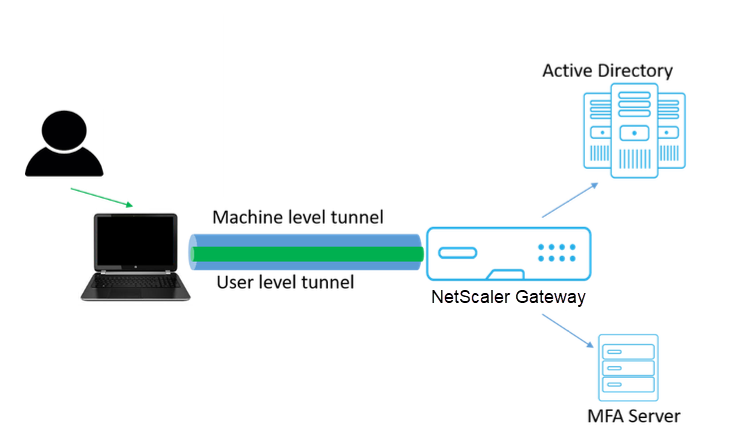
The following is the flow of events for the Always On VPN before Windows Logon functionality.
-
User turns on the laptop. The machine-level tunnel is established towards NetScaler Gateway using the device certificate as identity.
-
User logs in to the laptop with AD credentials.
-
Post login, user is challenged with MFA.
-
Upon a successful authentication, the machine-level tunnel is replaced with the user-level tunnel.
-
Once the user logs out, the user-level tunnel is replaced with the machine-level tunnel.
Points to note:
-
NetScaler Gateway and VPN plug-in must be version 13.0.41.20 and later.
-
If a client machine does not have internet connectivity, Always On VPN before the Windows Logon waits for the internet connectivity to become available before establishing the VPN tunnel.
-
If a client machine is connected to a captive portal network, Always On VPN before the Windows Logon waits for the user to authenticate to the captive portal. After the user logs in and internet access is enabled, Always On VPN before the Windows Logon establishes the VPN tunnel.
-
Always On VPN before Windows Logon feature supports captive portals for NetScaler.
-
If the cached logon credentials option is not enabled for Windows, then users cannot log on in the following scenarios:
-
Machine has no internet connectivity
-
Machine is connected to a captive portal network
-
-
Admins must check the device certificate revocation status before presenting the logon page to the end users.
Windows credential manager screen after Always On VPN before Windows Logon configuration
After the Always On VPN before Windows Logon feature is configured, the Windows credentials manager screen is modified as follows.
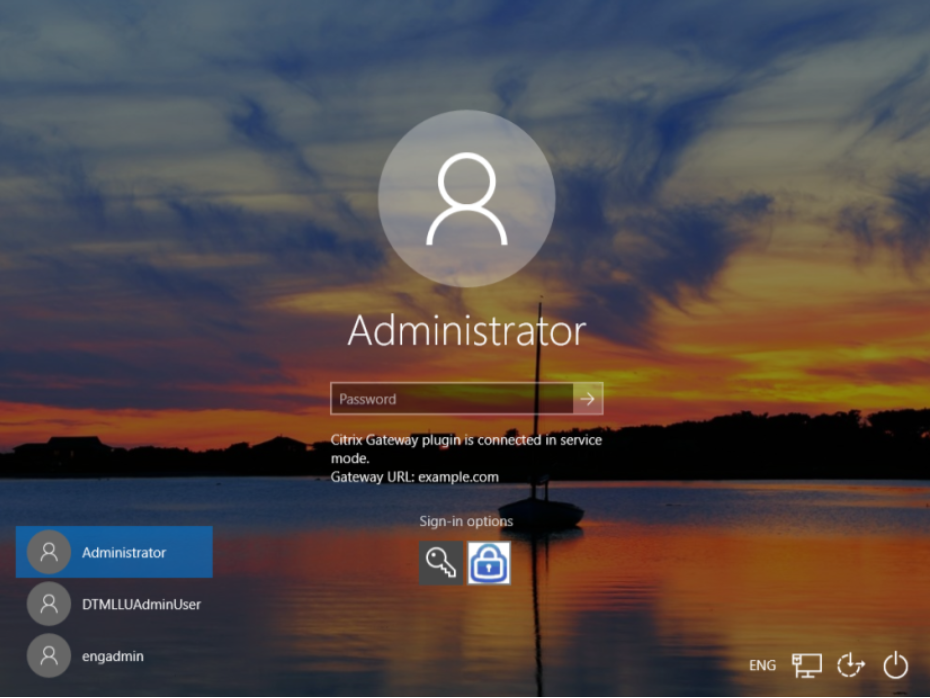
When you click Sign-in options on the logon screen, the following information is displayed:
-
NetScaler Gateway icon suggests whether the machine is connected to NetScaler Gateway or not.
-
Depending on the user configuration mode, one of the following statements is displayed on the logon screen.
-
NetScaler Gateway is connected in service mode
-
NetScaler Gateway is connected in user mode
-