
Configuring route monitors
You can use route monitors to make the high availability state dependent on the internal routing table, whether the table contains any dynamically learned or static routes. In a high availability configuration, a route monitor on each node checks the internal routing table to make sure that a route entry for reaching a particular network is always present. If the route entry is not present, the state of the route monitor changes to DOWN.
When a NetScaler Gateway appliance has only static routes for reaching a network, and you want to create a route monitor for the network, you must enable monitored static routes for the static routes. The monitored static route removes unreachable static routes from the internal routing table. If you disable monitored static routes on static routes, an unreachable static route can remain in the internal routing table, defeating the purpose of having the route monitor.
Route monitors are supported on either enabled or disabled Independent Network Configuration settings. The following table shows what occurs with route monitors in a high availability setup and with Independent Network Configuration enabled or disabled.
| Route Monitors in high availability in disabled Independent Network Configuration mode | Route Monitors in high availability in enabled Independent Network Configuration mode |
|---|---|
| Route monitors are propagated by nodes and exchanged during synchronization. | Route monitors are neither propagated by nodes nor exchanged during synchronization. |
| Route monitors are active only in the current primary node. | Route monitors are active on both the primary and the secondary node. |
| The NetScaler Gateway appliance always displays the state of a route monitor as UP irrespective whether the route entry is present or not in the internal routing table. | The NetScaler Gateway appliance displays the state of the route monitor as DOWN if the corresponding route entry is not present in the internal routing table. |
A route monitor starts monitoring its route in the following cases, to allow NetScaler Gateway to learn the dynamic routes, which might take up to 180 seconds: reboot, failover, set route6 command for v6 routes, set route msr enable/disable command for v4 routes, adding a new route monitor |
Not applicable. |
Route monitors are useful when you disable Independent Network Configuration mode and you want a gateway from a primary node as unreachable as one of the conditions for high availability failover.
For example, you disable Independent Network Configuration in a high availability setup in a two-arm topology that has NetScaler Gateway appliances NS1 and NS2 in the same subnet, with router R1 and switches SW1, SW2, and SW3, as shown in the following figure. Because R1 is the only router in this setup, you want the high availability setup to fail over whenever R1 is not reachable from the current primary node. You can configure a route monitor (say, RM1 and RM2, respectively) on each of the nodes to monitor the reachability of R1 from that node.
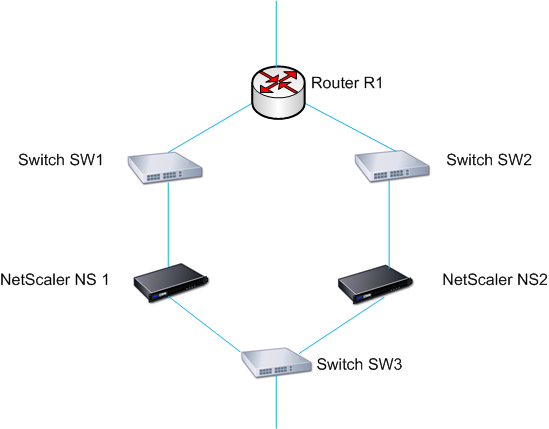
With NS1 as the current primary node, the network flow is as follows:
-
Route monitor RM1 on NS1 monitors NS1's internal routing table for the presence of a route entry for router R1. NS1 and NS2 exchange heartbeat messages through switch SW1 or SW3 at regular intervals.
-
If switch SW1 fails, the routing protocol on NS1 detects that R1 is not reachable and therefore removes the route entry for R1 from the internal routing table. NS1 and NS2 exchanges heartbeat messages through switch SW3 at regular intervals.
-
Detecting that the route entry for R1 is not present in the internal routing table, RM1 initiates a failover. If the route to R1 is down from both NS1 and NS2, failover happens every 180 seconds until one of the appliances is able to reach R1 and restore the connection.