
Configuring Smart Card Authentication
You can configure NetScaler Gateway to use a cryptographic smart card to authenticate users.
To configure a smart card with NetScaler Gateway, you need to do the following:
-
Create a certificate authentication policy. For more information, see Configuring Client Certificate Authentication.
-
Bind the authentication policy to a virtual server.
-
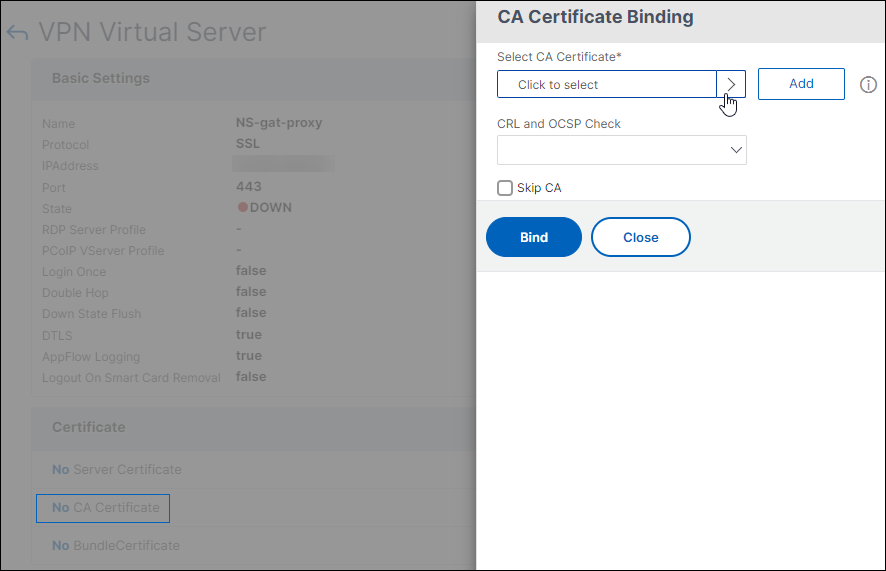
Add the root certificate of the Certificate Authority (CA) issuing the client certificates to NetScaler Gateway. For more information, see To install a root certificate on NetScaler Gateway.Important:When you add the root certificate to the virtual server for smart card authentication, you must select the certificate from the Select CA Certificate list.
After you create the client certificate, you can write the certificate, known as flash, onto the smart card. When you complete that step, you can test the smart card.
If you configure StoreFrontâ„¢ for smart card passthrough authentication, if either of the following conditions exist, single sign-on to StoreFront fails:
-
If you set the domain on the Published Applications tab as
mydomain.com insteadmydomain. -
If you do not set the domain name on the Published Applications tab and if you run the command
wi-sso-split-upnsetting the value to 1. In this instance, the UserPrincipalName contains the domain name "mydomain.com."
You can use smart card authentication to streamline the logon process for your users while also enhancing the security of user access to your infrastructure. Access to the internal corporate network is protected by certificate-based two-factor authentication using the public key infrastructure. Private keys are protected by hardware controls and never leave the smart card. Your users get the convenience of accessing their desktops and applications from a range of corporate devices using their smart cards and PINs.
You can use smart cards for user authentication through StoreFront to desktops and applications provided by Citrix Virtual Apps and Desktops. Smart card users logging on to StoreFront can also access applications provided by NetScaler Endpoint Management. However, users must authenticate again to access Endpoint Management web applications that use client certificate authentication.
For more information, see Configure smart card authentication in the StoreFront documentation.
Configuring Smart Card Authentication with Secure ICA® Connections
Users who log on and establish a secure ICA connection by using a smart card with single sign-on configured on NetScaler Gateway might receive prompts for their personal identification number (PIN) twice.
-
When logging on and when trying to start a published resource. This situation occurs if the web browser and the Citrix Workspace app are using the same virtual server that is configured to use client certificates.
-
Citrix Workspace app does not share a process or a Secure Sockets Layer (SSL) connection with the web browser. Therefore, when the ICA connection completes the SSL handshake with NetScaler Gateway, the client certificate is required a second time.
To prevent users from receiving the second PIN prompt, you have to change two settings:
-
Client authentication on the VPN Virtual Server must be disabled.
-
SSL renegotiation must be enabled.
After you configure the virtual server, bind one or more STA servers to the virtual server, as described in Configure NetScaler Gateway to handle the STA and ICA traffic.
You might also want to test smart-card authentication.
To disable client authentication:
-
In the configuration utility, on the Configuration tab, in the navigation pane, expand NetScaler Gateway and then click Virtual Servers.
-
Select the relevant virtual server in the main details pane, and then click Edit.
-
In the Advanced options pane, click SSL Parameters.
-
Clear the Client Authentication check box.
-
Click Done.
To enable SSL renegotiation:
-
Using the configuration utility, from the Configuration tab, navigate to Traffic Management, and then clickSSL.
-
In the main panel, click Change advanced SSL settings.
-
From the Deny SSL Renegotiation menu, select NO.
To test smart card authentication:
-
Connect the smart card to the user device.
-
Open your web browser and log on to NetScaler Gateway.