
NetScaler SDX 14000
The NetScaler SDX 14020/14030/14040/14060/14080/14100 are 2U appliances. Each model has two 6-core processors and 64 GB of memory and sixteen 10G SFP+ ports (16x10G SFP+).
Note
For information about NetScaler SDX hardware and component compatibility matrix, see NetScaler SDX Hardware-Software Compatibility Matrix.
The following figure shows the front panel of the SDX 14020/14030/14040/14060/14080/ 14100 (16x10G SFP+) appliance.
Figure 1. NetScaler SDX 14020/14030/14040/14060/14080/14100 (16x10G SFP+), front panel
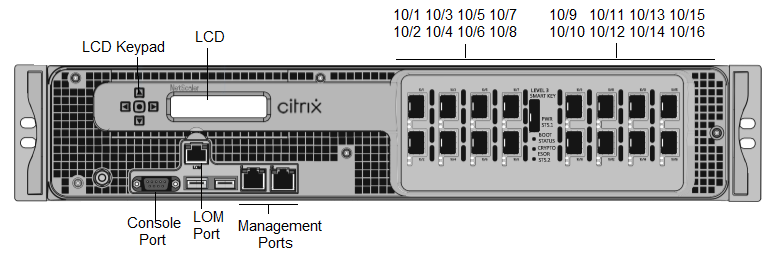
The NetScaler SDX 14020/14030/14040/14060/14080/14100 appliances have the following ports:
-
RS232 serial Console Port.
-
10/100Base-T copper Ethernet Port (RJ45), also called the LOM port. You can use this port to remotely monitor and manage the appliance independently of the NetScaler software.
-
Two 10/100/1000Base-T copper Ethernet management ports (RJ45), numbered 0/1 and 0/2 from left to right. These ports are used to connect directly to the appliance for system administration functions.
-
Network ports, sixteen 10G SFP+ ports (16x10G SFP+).
-
USB ports (reserved for a future release).
Note
The 10G SFP+ ports on these appliances support copper 1G SFP transceivers.
The following figure shows the back panel of the SDX 14020/14030/14040/14060/14080/ 14100 appliance.
Figure 2. NetScaler SDX 14020/14030/14040/14060/14080/14100, back panel
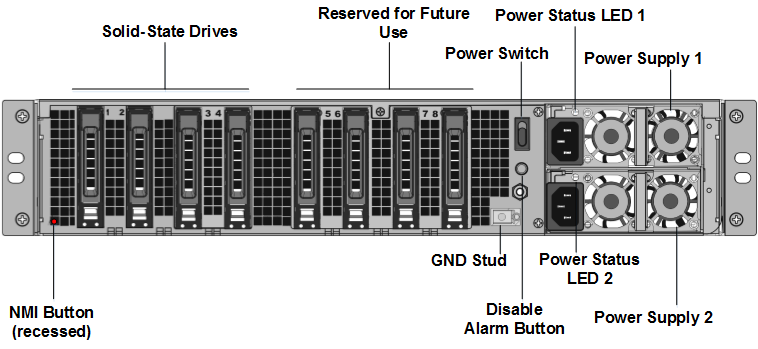
The following components are visible on the back panel of the SDX 14020/14030/14040/14060/14080/14100 appliance:
-
Two 240 GB or larger removable solid-state drives in a redundant array of independent disks (RAID) configuration.Note: These drives store the NetScaler® software, and cannot be increased by users.
-
Two to six 300 GB or larger solid-state drives.Note: These drives are used to provision VPX instances. Contact NetScaler sales Support to purchase extra drives.Note: Drive densities might increase as components become EOL but its size is never smaller than the original.For more information about managing RAID allocation, see Managing RAID disk allocation on SDX 22XXX.
-
Power switch which turns power to the appliance on or off. Press the switch for less than two seconds to shut off the power.
-
Two power supplies. each rated at 1000 watts, 100–240 volts. Each power supply has an LED that indicates the status of the power supply, as described in Common hardware components.
-
Disable alarm button. which is functional only when the appliance has two power supplies. Press this button to stop the power alarm from sounding when either of the following conditions is true:
-
You have plugged the appliance into only one power outlet
-
One power supply is malfunctioning and you want to continue operating the appliance until it is repaired.
-
-
Non-maskable interrupt (NMI) Button. used at the request of Technical Support to initiate a core dump. To press this red button, which is recessed to prevent unintentional activation, use a pen, pencil, or other pointed object. The NMI Button is also available remotely over the network in the LOM GUI, in the Remote Control menu. For more information about the lights out management port of the appliance, see Lights out management port of the NetScaler SDX appliance.
Note: If you buy an instance license pack for SDX 14000 that includes extra SSDs, read CTX215581. Complete the steps for adding a logical drive before trying to use the additional instance licenses.