
Common hardware components
Note:
This section does not apply to the SDX 9200 platform. For information specific to the SDX 9200, see NetScaler SDX 9200 platform.
Each platform has front panel and back panel hardware components. The front panel has an LCD display and an RS232 serial console port. The number, type, and location of ports—copper Ethernet, copper and fiber 1G SFP, 10GSFP+, and 40G QSFP+. The back panel provides access to the fan and the field-replaceable units (power supplies, CompactFlash cards, and solid-state and hard-disk drives).
LCD display and LED status indicators
On some NetScaler SDX appliances, the LCD on the front panel displays the appliance's model number, but the number shown might not be the licensed model number. To view the licensed model number of any SDX appliance, log on to the Management Service and check the licensed model number in the top left corner of the screen. For example, if you have purchased an SDX 11515 license, the LCD screen displays CITRIX NSSDX-11500, and the Management Service screen displays NetScaler SDX (11515).
The LCD backlight on the NetScaler appliance is always on.
On the appliance’s back panel, system status LEDs indicate the overall status of the appliance. The following table describes the indicators of the system status LED.
On the appliance’s back panel, power status LEDs indicate the status of each power supply.
Note
System status LEDs are available on only some NetScaler SDX appliances.
| LED Color | LED Indicates |
|---|---|
| OFF | No power |
| Green | Appliance is receiving power |
| Red | Appliance has detected an error |
The port LEDs show whether a link is established and traffic is flowing through the port. The following table describes the LED indicators for each port. There are two LED indicators for each port type.
Note
This section applies to all the appliances.
LED port-status indicators
| Port type | LED color | LED indicates |
|---|---|---|
| 50 Gbps | Off | A link has not been established |
| Blinking amber | Indicates a problem with the link | |
| Solid green | Indicates a valid link with no active traffic | |
| Blinking green | Indicates a valid link with active traffic |
| Port type | LED | LED | LED color | LED indicates |
|---|---|---|---|---|
| 10 Gbps | Top | Speed | Off | No connection. |
| Solid blue | Traffic rate of 10 gigabits per second | |||
| Bottom | Link/Activity | Off | No link | |
| Solid green | A link is established but no traffic is passing through the port | |||
| Blinking green | Traffic is passing through the port | |||
| 1G SFP (1 Gbps) | Left | Link/Activity | Off | No link |
| Solid green | A link is established but no traffic is passing through the port | |||
| Blinking green | Traffic is passing through the port | |||
| Right | Speed | Off | No connection | |
| Yellow | Traffic rate of 1 gigabit per second | |||
| Management (RJ45) | Left | Speed | Off | No connection, or a traffic rate of 10 megabits per second (Mbps) |
| Green | Traffic rate of 100 Mbps | |||
| Amber | Traffic rate of 1 gigabit per second | |||
| Right | Link/Activity | Off | No link | |
| Solid yellow | A link is established but no traffic is passing through the port |
On each power supply, a bicolor LED indicator shows the condition of the power supply.
LED power supply indicators
| Power supply type | LED color | LED indicates |
|---|---|---|
| AC | OFF | No power to any power supply |
| Flashing RED | No power to this power supply | |
| Flashing GREEN | The power supply is in standby mode | |
| GREEN | The power supply is functional | |
| RED | Power supply failure |
Ports
Ports are used to connect the appliance to external devices. NetScaler appliances support RS232 serial ports, 10/100/1000Base-T copper Ethernet ports, 1-gigabit copper and fiber 1G SFP ports, 10-gigabit fiber SFP+, 25 GB, 40 GB QSFP+, 50 GB, and 100 GB ports. All NetScaler appliances have a combination of some or all of these ports. For details on the type and number of ports available on your appliance, see the section describing that platform.
Note
NetScaler appliances leverage the Receive Side Scaling (RSS) feature to optimally distribute and process traffic. The RSS implementation is based on Toeplitz hashing which distributes the packet among its queues based on the 5-tuple: TCP/IP protocol, source IP address, destination IP address, source port, and destination port.
RS232 serial port
The RS232 serial console port provides a connection between the appliance and a computer, allowing direct access to the appliance for initial configuration or troubleshooting.
All hardware platforms ship with an appropriate serial cable used to connect your computer to the appliance. For instructions on connecting your computer to the appliance, see Installing the Hardware.
Copper Ethernet ports
The copper Ethernet ports installed on many models of the appliance are standard RJ45 ports.
There are two types of copper Ethernet ports that are installed on your appliance:
-
10/100BASE-T portThe 10/100BASE-T port has a maximum transmission speed of 100 megabits per second (Mbps). Most platforms have at least one 10/100BASE-T port.
-
10/100/1000BASE-T portThe 10/100/1000BASE-T port has a maximum transmission speed of 1 gigabit per second, 10 times faster than the other type of copper Ethernet port. Most platforms have at least one 10/100/1000Base-T port.
To connect any of these ports to your network, you plug one end of a standard Ethernet cable into the port and plug the other end into the appropriate network connector.
Management ports
Management ports are standard copper Ethernet ports (RJ45), which are used for direct access to the appliance for system administration functions.
1G SFP, 10G SFP+, and 40G QSFP+ ports
A 1G SFP port can operate at a speed of 1 Gbps. It accepts either a copper 1G SFP transceiver for operation as a copper Ethernet port, or a fiber 1G SFP transceiver for operation as a fiber optic port.
The 10G SFP+ and Base-T 10G, 40G QSFP+ are high-speed ports that can operate at speeds of up to 40 Gbps. You need a fiber optic cable to connect to a port. If the other end of the fiber optic cable is attached to a 1G SFP port, the 10G SFP+ port negotiates to match the speed of the 1G SFP port.
Ports compatibility
On some appliances, the 10G slot supports copper 1G transceivers, which can operate at up to 1 Gbps in a 10 Gbps slot.
Note
-
Certain platforms have 10G slots that do not support copper transceivers. Check with your account representative for support details.
-
You cannot insert a fiber 1G transceiver into a 10G slot.
-
You cannot insert a 10G transceiver into a 1G slot.
The 10G SFP+ modules are dual-speed capable and support both 1 Gbps and 10 Gbps, depending on the peer switch that the model connects to.
25G, 40G, 50G, and 100G ports
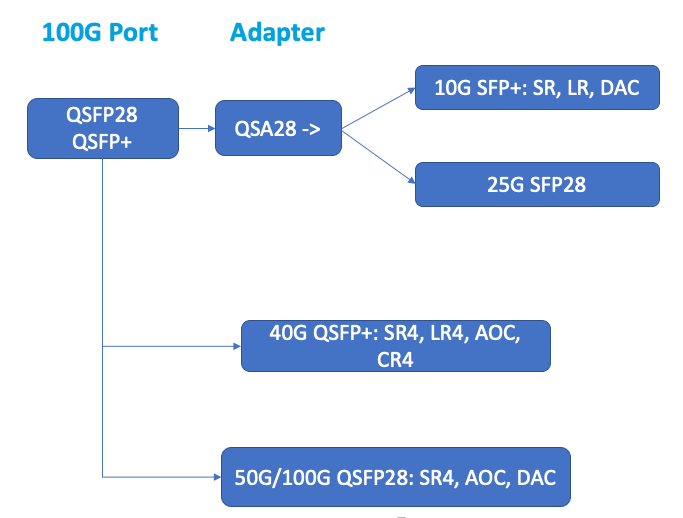
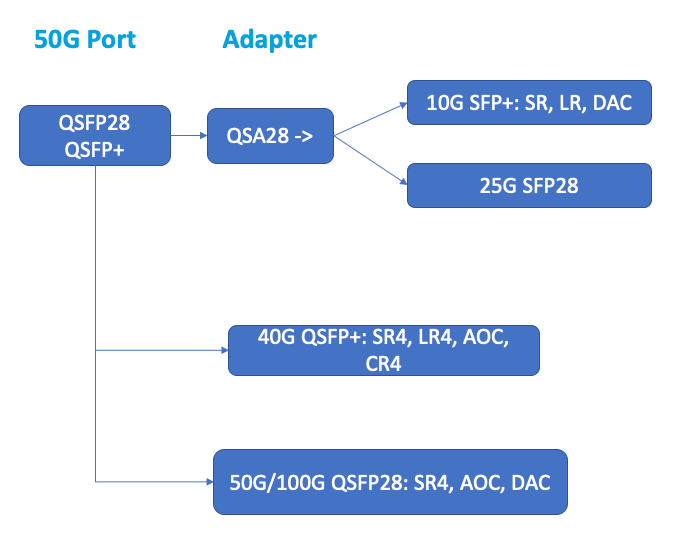
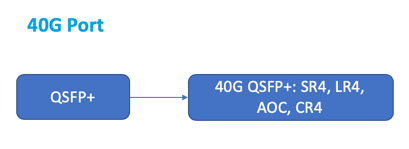
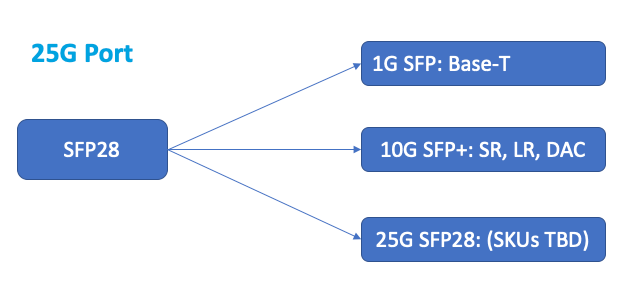
A 100G port can support five speeds: 10G, 25G, 40G, 50G, and 100G. 1G speed is not supported on the 100G port. 50G and 100G ports use the same transceiver. 40G QSFP+ are high-speed ports that can operate at speeds of up to 40 Gbps. The appliance determines the speed, and not the port.
Only 50G/100G (QSFP28) transceivers can be directly used on a QSFP28 interface. Use a QSA28 adapter on a QSFP28 interface to use 10G (SFP+) and 25G (SFP28) transceivers. Use a 40G QSFP+ transceiver in the 50G/100G port if the peer is 40G.
The following diagram shows the transceiver compatibility.
Notes:
-
Fortville firmware 8.70 does not support 1G connectivity. Dual speed 10G/1G SFP+ (both SR LC and LR LC) don't operate at 1G, if Fortville firmware 8.70 is used.
-
Use
i40e_firmware_view.shto check the FW version. -
Ensure that the FW is at version 7.0. To downgrade the firmware version to 7.0, type:
[root@netscaler-sdx ~]# echo "version 7.00" > /opt/xensource/packages/files/sdx-firmware/i40efirmware-target
 [root@netscaler-sdx ~]# echo "version 7.00" > /opt/xensource/packages/files/sdx-firmware/i40efirmware-direction
 [root@netscaler-sdx ~]#reboot
Most tables have the following columns:
-
Description: The price list description of the part.
-
Transmit Wavelength: The nominal transmit wavelength.
-
Cable/Fiber Type: Fiber characteristics affect the maximum transmit distance achievable, especially with 10G on multi-mode fiber (MMF), where various dispersion components become dominant. For more information, see
<http://www.thefoa.org/tech/ref/basic/fiber.html>. -
Typical Reach: Maximum transmit distance.
-
Products: Some chassis are available with different media options. Use the appropriate data sheet to confirm that your particular chassis type supports the media.
1G pluggable media
The following table lists the maximum distance specifications for 1G transceivers.
Copper 1G SFP distance specifications
Description: NetScaler 1G SFP Ethernet copper (100 m) - 4 pack
Transmitter wavelength (nm): Not applicable
Cable type: Category 5 (Cat-5) copper cable
Typical reach (m): 100 m
Applicable platforms:
-
SDX 14000
-
SDX 16000
-
SDX 22040/22060/22080/22100/22120
-
SDX 24100/24150
Short reach fiber 1G SFP distance specifications
Description: NetScaler 1G SFP Ethernet SX (300 m) - 4 pack
Transmitter wavelength (nm): 850 nm (nominal)
Fiber type: 50/125um MMF, 2000MHz-km (OM3) Typical Reach (m): 550 m
Fiber type: 50/125um MMF, 500MHz-km (OM2) Typical Reach (m): 550 m
Fiber type: 50/125um MMF, 400MHz-km Typical Reach (m): 550 m
Fiber type: 62.5/125um MMF, 200MHz-km (OM1) Typical Reach (m): 300 m
Fiber type: 62.5/125um MMF, 160MHz-km Typical Reach (m): 300 m
Applicable platforms: SDX 22040/22060/22080/22100/22120 SDX 24100/24150
Short reach fiber 1G SFP distance specifications
Description: NetScaler 1G SFP Ethernet short range (300 m) - Single
Transmitter wavelength (nm): 850 nm (nominal)
Fiber type: 50/125um MMF, 2000MHz-km (OM3) Typical Reach (m): 550 m
Fiber type: 50/125um MMF, 500MHz-km (OM2) Typical Reach (m): 550 m
Fiber type: 50/125um MMF, 400MHz-km Typical Reach (m): 550 m
Fiber type: 62.5/125um MMF, 200MHz-km (OM1) Typical Reach (m): 275 m
Fiber type: 62.5/125um MMF, 160MHz-km Typical Reach (m): 220 m
Applicable platforms:
-
SDX 22040/22060/22080/22100/22120
-
SDX 24100/24150
Long reach fiber 1G SFP distance specifications
Description: NetScaler 1G SFP Ethernet LX - Single
Transmitter wavelength (nm): 1310 nm (nominal)
Fiber type: 9/125um SMF
Typical reach (m): 10 km
Applicable platforms:
-
SDX 22040/22060/22080/22100/22120
-
SDX 24100/24150
Long reach fiber 1G SFP distance specifications
Description: NetScaler 1G SFP Ethernet long range (10 km) - Single
Transmitter wavelength (nm): 1310 nm (nominal)
Fiber type: 9/125um SMF
Typical reach (m): 10 km
Applicable platforms:
-
SDX 22040/22060/22080/22100/22120
-
SDX 24100/24150
10 GE pluggable media
The following table lists the maximum distance specifications for 10G transceivers.
Short reach fiber 10G SFP+ distance specifications
Description: NetScaler 10G SFP+, Ethernet Short Range (300 m) - Single
Transmitter wavelength (nm): 850 nm (nominal)
Fiber types 50/125um MMF, 2000MHz- km (OM3), typical reach (m): 300 m 50/125um MMF, 500MHz-km (OM2), typical reach (m): 82 m 50/125um MMF, 400MHz-km, typical reach 66 m 62.5/125um MMF, 200MHz-km (OM1), typical reach: 33 m 62.5/125um MMF, 160MHz-km, typical reach: 26 m
Applicable platforms:
-
SDX 9100
-
SDX 14000
-
SDX 14000-40G
-
SDX 14000-40S
-
SDX 14000 FIPS
-
SDX 15000
-
SDX 15000-50G (adapter required to connect 50G ports to 10G transceiver)
-
SDX 16000 (adapter required to connect 100G ports to 10G transceiver)
-
SDX 22040/22060/22080/22100/22120
-
SDX 24100/24150
-
SDX 25000-40G
-
SDX 26000 (adapter required to connect 50G ports to 10G transceiver)
-
SDX 26000-50S (adapter required to connect 50G ports to 10G transceiver)
-
SDX 26000-100G (adapter required to connect 100G ports to 10G transceiver)
Long reach fiber 10G SFP+ distance specifications
Description: NetScaler 10G SFP+ Ethernet long range (10 km) - Single
Transmitter wavelength (nm): 1310 nm (nominal)
Fiber type: 9/125um SMF
Typical reach (m): 10 km
Applicable platforms:
-
SDX 9100
-
SDX 14000
-
SDX 14000-40G
-
SDX 14000-40S
-
SDX 14000 FIPS
-
SDX 15000
-
SDX 15000-50G (adapter required to connect 50G ports to 10G transceiver)
-
SDX 16000 (adapter required to connect 100G ports to 10G transceiver)
-
SDX 22040/22060/22080/22100/22120
-
SDX 24100/24150
-
SDX 25000-40G
-
SDX 26000 (adapter required to connect 50G ports to 10G transceiver)
-
SDX 26000-50S (adapter required to connect 50G ports to 10G transceiver)
-
SDX 26000-100G (adapter required to connect 100G ports to 10G transceiver)