
Open the appropriate ports on the firewalls
You must ensure that the appropriate ports are open on the firewalls to support the different connections that occur among the various components involved in a double-hop DMZ deployment. For more information about the connection and communication process, see Communication flow in a double-hop DMZ deployment.
The following figure shows common ports that can be used in a double-hop DMZ deployment.
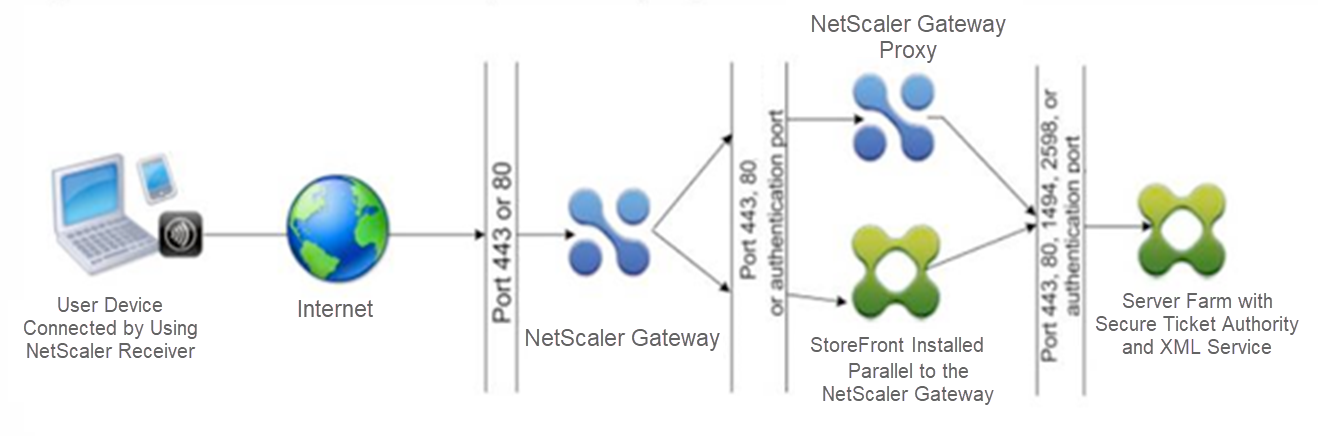
The following table shows the connections that occur through the first firewall and the ports that must be open to support the connections.
| Connections through the first firewall | Ports used |
|---|---|
| The web browser from the Internet connects to NetScaler Gateway in the first DMZ. Note: NetScaler Gateway includes an option to redirect connections that are made on port 80 to a secure port. If you enable this option on NetScaler Gateway, you can open port 80 through the first firewall. When a user makes an unencrypted connection to NetScaler Gateway on port 80, NetScaler Gateway automatically redirects the connection to a secure port. | Open TCP port 443 through the first firewall. |
| Citrix Workspace app from the Internet connects to NetScaler Gateway in the first DMZ. | Open TCP port 443 through the first firewall. |
The following table shows the connections that occur through the second firewall and the ports that must be open to support the connections.
| Connections through the second firewall | Ports used |
|---|---|
| NetScaler Gateway in the first DMZ connects to StoreFront in the second DMZ. | Open either TCP port 80 for an unsecure connection or TCP port 443 for a secure connection through the second firewall. |
| NetScaler Gateway in the first DMZ connects to NetScaler Gateway in the second DMZ. | Open TCP port 443 for a secure SOCKS connection through the second firewall. |
| If you enabled authentication on NetScaler Gateway in the first DMZ, this appliance might need to connect to an authentication server in the internal network. | Open the TCP port on which the authentication server listens for connections. Examples include port 1812 for RADIUS and port 389 for LDAP. |
The following table shows the connections that occur through the third firewall and the ports that must be open to support the connections.
| Connections through the third firewall | Ports used |
|---|---|
| StoreFront in the second DMZ connects to the XML Service hosted on a server in the internal network. | Open either port 80 for an unsecure connection or port 443 for a secure connection through the third firewall. |
| StoreFront in the second DMZ connects to the Secure Ticket Authority (STA) hosted on a server in the internal network. | Open either port 80 for an unsecure connection or port 443 for a secure connection through the third firewall. |
| NetScaler Gateway in the second DMZ connects to the STA residing in the secure network. | Open either port 80 for an unsecure connection or port 443 for a secure connection through the third firewall. |
| NetScaler Gateway in the second DMZ makes an ICA connection to a published application or virtual desktop on a server in the internal network. | Open TCP port 1494 to support ICA connections through the third firewall. If you enabled session reliability on Citrix Virtual Apps, open TCP port 2598 instead of 1494. |
| If you enabled authentication on NetScaler Gateway in the first DMZ, this appliance might need to connect to an authentication server in the internal network. | Open the TCP port on which the authentication server listens for connections. Examples include port 1812 for RADIUS and port 389 for LDAP. |