
Upgrade the LOM firmware on a NetScaler MPX appliance
Citrix has automated the upgrade of LOM firmware within NetScaler MPX software. It is no longer necessary to know your hardware platform or download any LOM firmware.
Note
This procedure requires two reboots to complete and therefore a disruption in production traffic is expected. Citrix recommends that you perform the upgrade during a maintenance window. In a high availability setup, perform the upgrade on the secondary node to minimize disruption to production traffic. Run the
upgrade_bmc.sh script on the following supported platforms. The script is available in the /netscaler folder.
-
MPX 5900
-
MPX 8900
-
MPX 14000
-
MPX 15000
-
MPX 22000
-
MPX 25000
-
MPX 26000
For information about upgrading the NetScaler appliance, see Upgrade and downgrade a NetScaler appliance
Note
If you cannot log into the LOM GUI on the MPX 5900, MPX 8900, MPX 15000, or MPX 26000, reset the LOM password. To reset the password type
shell in the command prompt and then ipmitool user set password 2 <your preferred password> after upgrade to 5.56 or 4.61.
Troubleshooting
-
Console redirection fails after upgrading the LOM to 4.61 on the MPX 5900 and MPX 8900 platforms or 5.56 on the MPX 15000 and MPX 26000 platforms.
 Perform a unit reset from the Maintenance tab, which resets the BMC.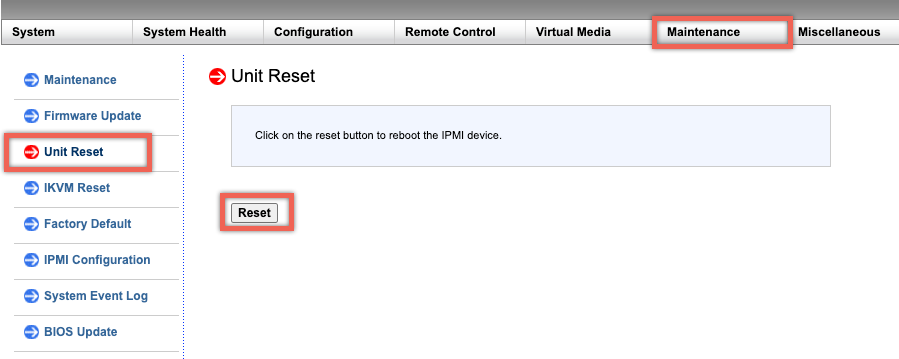
Upgrading LOM version to 3.11.0
LOM version 3.11.0 is now available for the following platforms. This version addresses multiple functional issues.
-
MPX 9100
-
MPX 9100 FIPS
-
MPX 16000
Notes:
-
The upgrade process requires two reboots, so a disruption in production traffic is expected. It is highly recommended to perform this upgrade during a maintenance window.
-
In a high availability setup, upgrade the secondary node first to minimize impact on production.
Upgrade procedure
-
At the command prompt, run the
upgrade_bmc.shscript on supported platforms. -
During execution, you are prompted to choose Yes or No.
-
If you select Yes, make sure to record all previous configuration settings before proceeding with the upgrade.
-
If you select No, the upgrade will not continue.
-
-
Alternatively, you can use the command
upgrade_bmc.sh -yto bypass interactive prompts. This script is available in the/netscalerfolder.
Configuration compatibility
The LOM configuration format is not compatible between the 2.12.12 and 2.13.12 LOM versions and the new 3.11.00 LOM version.
You might lose some LOM configurations during the upgrade process from the 2.12.12 or 2.13.12 version to the new LOM 3.11.00 version. Once the upgrade is complete, you cannot use any manually created LOM 2.12.12 or 2.13.12 version configuration backups to restore the configuration.
Note
Citrix® advises noting all the current LOM configuration before the upgrade. This allows you to manually reapply any missing settings afterwards.
The upgrade process does not retain all LOM configuration settings; manual re-application may be necessary in the following areas:
-
Manually created local LOM user accounts (specifically, all accounts except the default nsroot).
-
RADIUS server shared secret.
-
LDAP Binds Password.
-
SMTP password under Notifications > SMTP section.
-
All SNMP settings can be found in the Notifications > SNMP section.
-
Find the authentication key and encryption key for SNMPv3 alerts in the Notifications > Alerts section.
-
The SNMPv1 alert Trap Community string is located under the Notifications > Alerts section.