
Enable RADIUS authentication in the LOM GUI
RADIUS (Remote Authentication Dial-In User Service) is a network protocol that allows you to manage remote user authentication, authorization, and auditing.
Configure RADIUS authentication in the LOM GUI
-
Log on to the LOM GUI.
-
Navigate to Configuration > Radius.
-
Select Enable RADIUS.
-
Specify the port and IP address of the RADIUS server.
-
Specify the secret (password) for the user to access the RADIUS server.
-
Click Save.
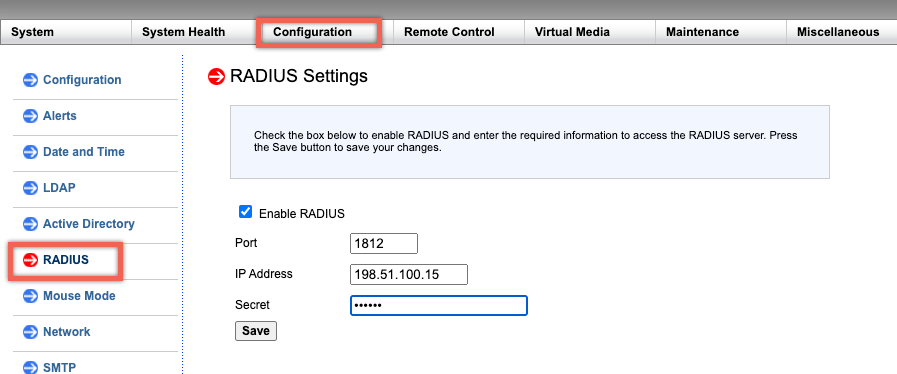
Parameters:
RADIUS username and password:
The maximum LOM password length varies depending on whether the LOM account uses RADIUS for user authentication.
For LOM 2.13.12, the maximum password length is 16 characters if you are using a RADIUS user account to log on to the LOM GUI. An "Invalid Username or Password" message appears for passwords longer than 16 characters.
For LOM 3.11.0, the maximum password length is 45 characters if you are using a RADIUS user account to log on to the LOM GUI. If the password length is longer than 45 characters, the LOM GUI might block the login page and the following message appears "Your session has timed out. You will need to open a new session."
RADIUS secret:
BMC valid characters are
0–9, a-z, A-Z,! @, +, -, /,: and _.
The 'secret password' shared between the RADIUS server and the LOM device cannot exceed 31 characters for both LOM 2.13.12 and 3.11.0. That is, if the RADIUS server sets the "secret password" length above 31 characters, LOM's RADIUS setting for secret password under LOM GUI is truncated to 31 characters.
Configure an external computer running Windows or Ubuntu OS to access the LOM using RADIUS’ network protocol
RADIUS is an application that runs on an external computer to access the Citrix® LOM. Before you run RADIUS, you need to configure the user account and client information.
Perform the following actions:
-
Configure a user account in Ubuntu.
-
Configure client information in Ubuntu.
-
Start the RADIUS server in Ubuntu.
-
Add roles in Windows server.
-
Add an object – Group.
-
Add an object – User.
-
Add a network policy.
-
Add a vendor specific attribute.
-
Configure a RADIUS client.
For more information, see the documentation for Ubuntu.