
Deploy {{page.netscaler-cpx-short}} in a Single Host Network
In a single host network, the {{page.netscaler-cpx-short}} instance acts as a proxy between application containers on the same host. In this capacity, the {{page.netscaler-cpx-short}} instance provides scalability and security to the container-based applications. Additionally, it optimizes performance and also provides an insight into telemetry data.
In a single host network, the client, the servers, and the {{page.netscaler-cpx-short}} instance are deployed as containers on the same Docker host. All the containers are connected through docker0 bridge.
In this environment, the {{page.netscaler-cpx-short}} instance acts as a proxy for the applications provisioned as containers on the same Docker host.
The following figure illustrates the single host topology.
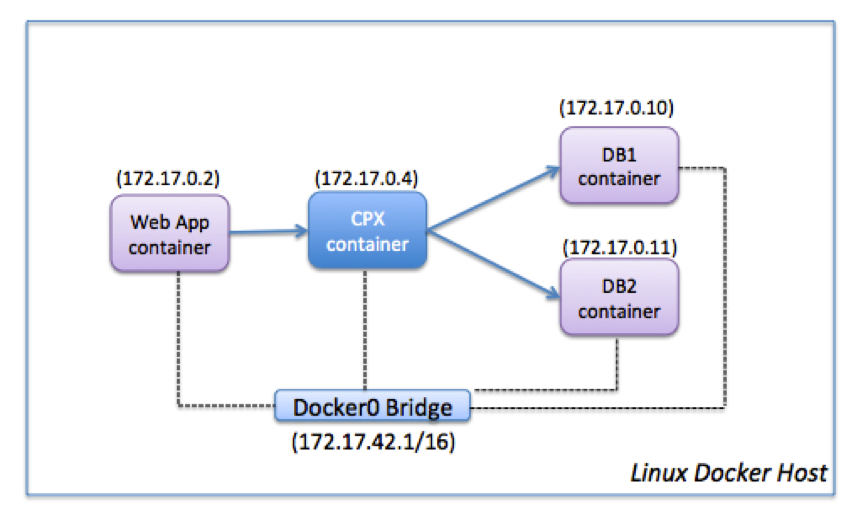
In this example, a web app container (172.17.0.2) is the client and the two database containers, DB1 (172.17.0.10) and DB2 (172.17.0.11), are the servers. The {{page.netscaler-cpx-short}} container (172.17.0.4) sits between the client and the servers acting as a proxy.
To enable the web application to communicate with the database containers through {{page.netscaler-cpx-short}}, you have to first configure two services on the {{page.netscaler-cpx-short}} container to represent the two servers. Then, configure a virtual server by using the {{page.netscaler-cpx-short}} IP address and a non-standard HTTP port (such as 81) because the {{page.netscaler-cpx-short}} reserves the standard HTTP port 80 for NITRO communication.
In this topology, you do not have to configure any NAT rules because the client and the server are on the same network.
To configure this scenario, run the following commands either by using the Jobs feature in NetScaler® MAS or by using NITRO APIs:
add service db1 HTTP 172.17.0.10 80
 add service db2 HTTP 172.17.0.11 80
 add lb vserver cpx-vip HTTP 172.17.0.4 81
 bind lb vserver cpx-vip db1
 bind lb vserver cpx-vip db2