
Deploy NetScaler BLX™ with GSLB on AWS
NetScaler® BLX is a software form factor of NetScaler and provides the same functionality as other form factors. It runs as a user space application on a Linux host.
Setting up GSLB for BLX on AWS consists of configuring NetScaler to load balance traffic to servers located outside the VPC that NetScaler belongs to, such as within another VPC in a different availability region or an on-premises data center.
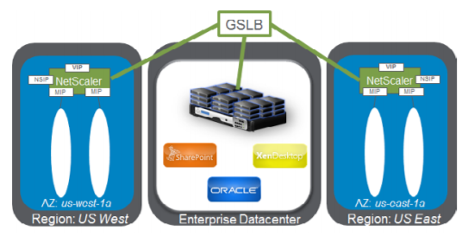
Domain-based services overview
NetScaler GSLB supports Domain Based Services (DBS) for Cloud load balancers, enabling automatic discovery of dynamic cloud services. This configuration enables NetScaler to implement Global Server Load Balancing in an active-active environment. DBS allows the scaling of back-end resources in AWS environments through DNS discovery.
DBS with ELB
GSLB DBS uses the FQDN of the user Elastic Load Balancer (ELB) to dynamically update the GSLB service groups to include the back-end servers that are being created and deleted within AWS. The back-end servers or instances in AWS can be configured to scale based on network demand or CPU utilization. To configure this feature, point NetScaler to the ELB to dynamically route to different servers in AWS without having to manually update NetScaler every time an instance is created and deleted within AWS. NetScaler DBS feature for GSLB service groups uses DNS aware service discovery to determine the member service resources of the DBS namespace identified in the Autoscale™ group.
Prerequisites
-
Deploy two standalone BLX instances on different AWS VPCs. For information about deployment, see Deploy a standalone NetScaler BLX instance on AWS.Note:Ensure that you have specified the following commands in the cli-cmds section of the
blx.conffile.-
add ns ip <VIP address> <netmask> -type VIP -
add ns ip <SNIP address> <netmask> -type SNIP -mgmtAccess ENABLED
-
-
You need a NetScaler license that supports the GSLB feature. For more information, see Licensing.
-
Ensure that you have two Linux instances available on AWS.Note:We recommend creating an instance type of m5.xlarge or higher for better performance.
-
You need three IP addresses to configure as NSIP, VIP, and SNIP.Note:The IP addresses configured as VIP and SNIP must have a public IP address associated with them.
-
You must open the following ports on the Security group:
-
53/UDP
-
22/TCP
-
3008/TCP
-
3009/TCP
-
Sample blx.conf file
blx-system-config
 {
   core-dumps: yes
   syslog: yes
   ipaddress: 10.0.12.245/20
   interfaces: eth1
 }
 static-routes
 {
   default 10.0.0.1
 }
 cli-cmds
 {
   add ns ip 11.0.12.245/20 -type VIP`
   add ns ip 12.0.12.245/20 -type SNIP -mgmtAccess ENABLED`
 }
Configure GSLB
NetScaler configured with GSLB provides disaster recovery and ensures continuous availability of applications by protecting against points of failure in a WAN. GSLB balances the load across data centers by directing client requests to the closest or best-performing data center, or surviving data centers if there is an outage.
For more information about GSLB deployment types and configurations, see the GSLB documentation.